
StreamYard Review
StreamYard is a live streaming studio that runs in your browser. You host a show with remote guests, and StreamYard sends it to one or more platforms. It also runs webinars and records your shows.
Best for hosts of live shows with guests. This review checks what it costs and whether it can run a 24/7 channel.
If you need a stream that runs while you are away, start with where StreamYard falls short.
- Best for
- Live shows with guests
Interviews, talk shows and webinars from a browser.
- Website
- streamyard.com
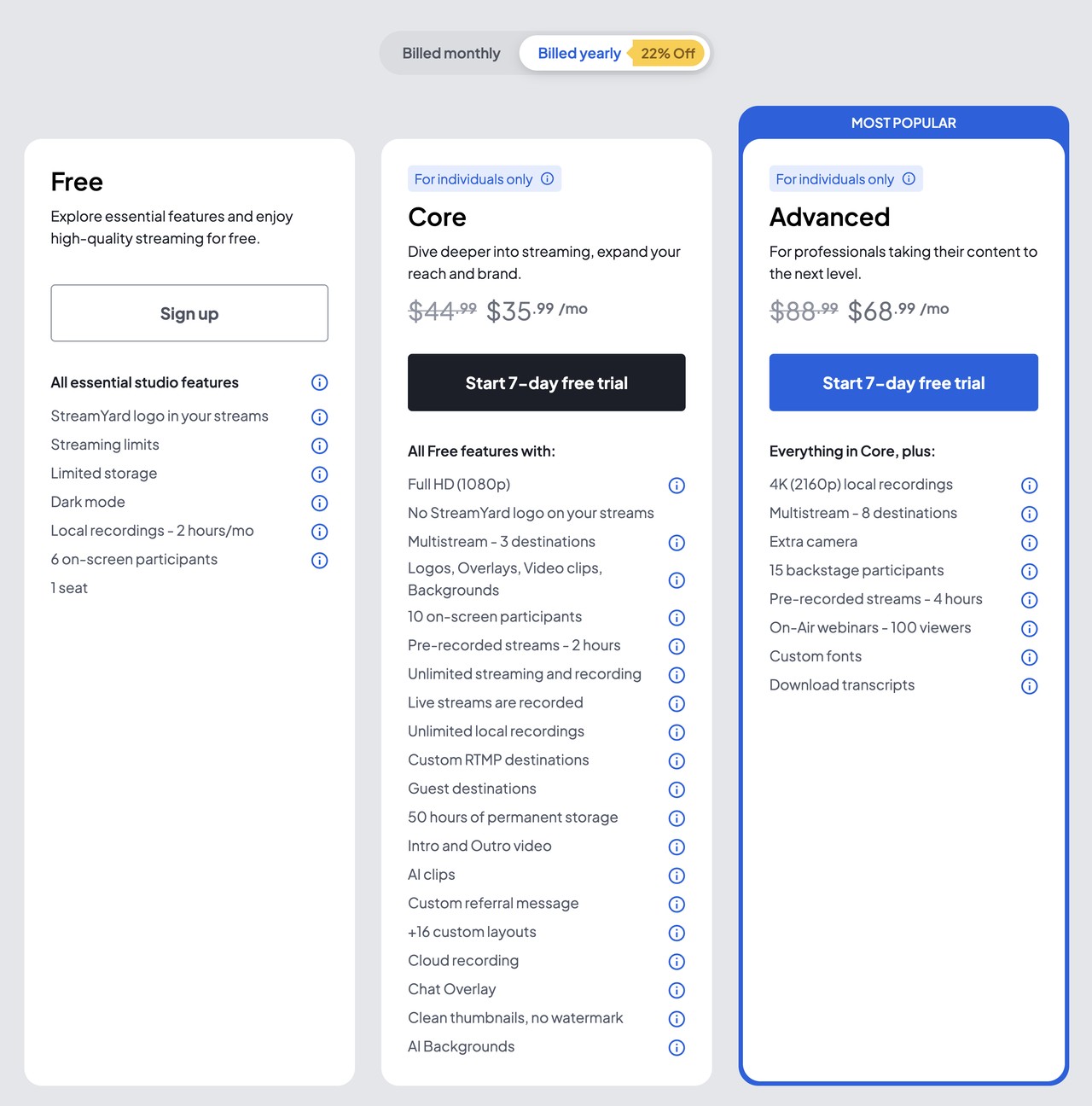
The StreamYard pricing page for individuals, with yearly billing selected. Prices are in US dollars.
How much does StreamYard cost?
StreamYard Core costs $44.99 a month, or $35.99 a month billed yearly. Advanced costs $88.99, or $68.99 billed yearly, and Business costs $299, or $249. Free costs $0. These prices are from StreamYard's pricing page, which says that they can change with promotions.
| Plan | Billed monthly | Billed yearly, per month | Yearly total | Best for |
|---|---|---|---|---|
| Free | $0 | $0 | $0 | An interview show to one platform, with the StreamYard logo |
| Core | $44.99 | $35.99 | $431.88 | Multistreaming and pre-recorded streams, with no StreamYard logo |
| Advanced | $88.99 | $68.99 | $827.88 | Webinars, an extra camera, a backstage and 4K local recordings |
| Business | $299 | $249 | $2,988 | Company use, with 2 seats included and up to 1,000 seats |
| Enterprise | Contact sales | Contact sales | Not listed | Large organizations, from 5 seats |
The pricing page shows monthly and yearly billing and a price per month only. The yearly total is that price × 12. Billed yearly, Core saves $108 a year, Advanced $240 and Business $600.
The Business and Enterprise rows are on the Business tab of the pricing page.
Core and Advanced are for individual use. StreamYard's Plan Usage Policy says that if you sign up with a company email domain, you need the Business plan.
More cloud storage on Core and Advanced costs from $4.99 a month for 100 hours.
For a loop that runs without you, see where StreamYard falls short.
Is StreamYard free, and what does each plan limit?
Yes, StreamYard has a Free plan. It has a monthly cap on streaming hours, and StreamYard shows the number only in your account. The cap resets each month, and a live stream is not cut when you reach it. Free recordings older than 12 months are removed. Paid plans start with a 7-day free trial. New users can also multistream free for 7 days. After that, Free sends to 1 platform, with no custom RTMP destinations, no custom overlays and no recording downloads.
| Limit | Free | Core | Advanced | Business |
|---|---|---|---|---|
| Live output resolution | Not stated | 1080p | 1080p | 1080p |
| Multistreaming: destinations at once | 1 | 3 | 8 | 10 |
| StreamYard logo on the stream | Yes | No | No | No |
| Guests on screen | 6 | 10 | 10 | 10 |
| Guests backstage | Not listed | Not listed | 15 | 15 |
| Streaming hours | Monthly cap | Unlimited | Unlimited | Unlimited |
| Recording for each stream | Not recorded | 10 hours | 10 hours | 24 hours |
| Cloud storage | 5 hours | 50 hours | 50 hours | 700+ hours |
| Local recordings | 2 hours a month | Unlimited | Unlimited, up to 4K | Unlimited, up to 4K |
| Pre-recorded video length | Not available | 2 hours | 4 hours | 8 hours |
| Pre-recorded streams scheduled at once | Not available | 5 | 10 | Unlimited |
| Webinar viewers | None | None | 100 | 1,000+ |
| Extra camera | No | No | Yes | Yes |
Vertical and horizontal streams to YouTube at the same time count as two destinations. The Business pre-recorded rows and the Free storage come from the help center, because the pricing page does not list them. The pricing page names Full HD only from Core. Source: StreamYard pricing page and help center.
Where does StreamYard fall short for a 24/7 channel?
StreamYard is strong at live shows, but a 24/7 channel meets five limits. Its pre-recorded streams play once, and their length is capped by plan. Replays need new broadcasts. Encoders join as a camera, and there is no 4K live output.
Pre-recorded streams play once
StreamYard
A pre-recorded stream will "end once the video is finished." A clip shorter than 10 minutes can loop, but only inside a live studio session, with your computer on. Source: StreamYard Help Center.
On Streamloop
A Streamloop playlist loops from the cloud until you stop it or the schedule ends.
Length is capped by plan
StreamYard
Each pre-recorded video has a maximum length that depends on the plan. Free has no pre-recorded streams. See the limits table. Source: StreamYard Help Center.
On Streamloop
A Streamloop playlist holds up to 1,000 items, each up to 15 GiB, and it plays again and again.
Replays need new broadcasts
StreamYard
Each pre-recorded stream has one date and time, and the help center lists no repeat option. A weekly replay is a new broadcast each week. Source: StreamYard Help Center.
On Streamloop
A Streamloop loop repeats Daily or Weekly in one time window.
Encoders join as a camera
StreamYard
OBS enters the browser studio through OBS Virtual Camera, as a webcam source. StreamYard's pages list no RTMP input. Source: StreamYard Help Center.
On Streamloop
Live Scenes takes the OBS feed as a live input over RTMP, and the scene sends the show to your platforms. See how OBS connects.
No 4K live output
StreamYard
StreamYard "does not support live streaming in 4k." 4K is for local recordings only. See the limits table. Source: StreamYard Help Center.
On Streamloop
See the output quality of Streamloop in the comparison.
Is it right for your channel?
Five common jobs, and the tool that fits each job better.
A loop that plays around the clock
A playlist that streams all day and all night, with nobody at a computer. See why StreamYard stops, or see what Streamloop does instead.
Better fit: Streamloop
The same replay every week
The same replay at the same time each week. See the scheduling limit.
Better fit: Streamloop
An interview with remote guests
A live interview with remote guests on screen. See what you give up.
Better fit: StreamYard
A webinar with sign-ups
A live webinar that viewers register for. See the webinar row.
Better fit: StreamYard
A feed from an encoder to several platforms
An OBS or hardware encoder feed, sent to several platforms. See how encoders join.
Better fit: A cloud relay, such as Streamloop Live Scenes
What does StreamYard do well?
- Vertical and horizontal at once
One studio can stream a vertical and a horizontal version of the same show. This works on every plan, Free included. Both formats to YouTube need a paid plan. Streamloop video loops are 16:9 only.
- A studio in your browser
You produce the show in a browser tab, with no download. Your device sends one stream, and StreamYard sends it on to every destination.
- A free start
StreamYard says that its core features are free to use. You can run your first shows before you pay, and upgrade when you need more.
What do you give up if you switch to Streamloop?
- Remote guests on screen
Streamloop has no guest cameras. StreamYard brings guests into the studio from their browsers, with a backstage area on Advanced. For an interview show, stay on StreamYard.
- Webinars and cloud recordings
Streamloop runs no webinars and does not record your streams. StreamYard webinars on Advanced and Business have sign-up forms and can run on your own site. Download your StreamYard recordings before you leave: see how to switch.
- More than 5 platforms
A Streamloop stream goes to up to 5 destinations. StreamYard Advanced and Business send to more. StreamYard also shows comments from every platform in one view. For 6 or more platforms at once, stay on StreamYard.
What does Streamloop do instead?
Streamloop streams your playlist 24/7 from the cloud, to up to 5 platforms. See worked costs for four kinds of stream.
Try a 24/7 loop for $1.
Streaming is billed by the minute, only while live: one 24/7 stream at 1080p is about $10 per 30 days. Start with a $1 trial week, which becomes a monthly plan unless you cancel, or top up and pay as you go. See all prices
For a live feed, Live Scenes takes OBS or an encoder, adds graphics and sends the show to up to 5 platforms. Live Scenes is billed by the minute, only while live: one 1080p channel at 30 fps, live 24/7, is about $20 per 30 days. Each extra platform adds $6 per 30 days at 1080p. A nonstop Live Scenes feed to 3 platforms costs $47 per 30 days at 1080p60, and $32 at 1080p30. StreamYard Core costs $35.99 a month billed yearly. Choose Scene when you create a stream and describe your use case. Access is granted within 24 hours.
See how OBS connects and how the AI assistant builds the look.
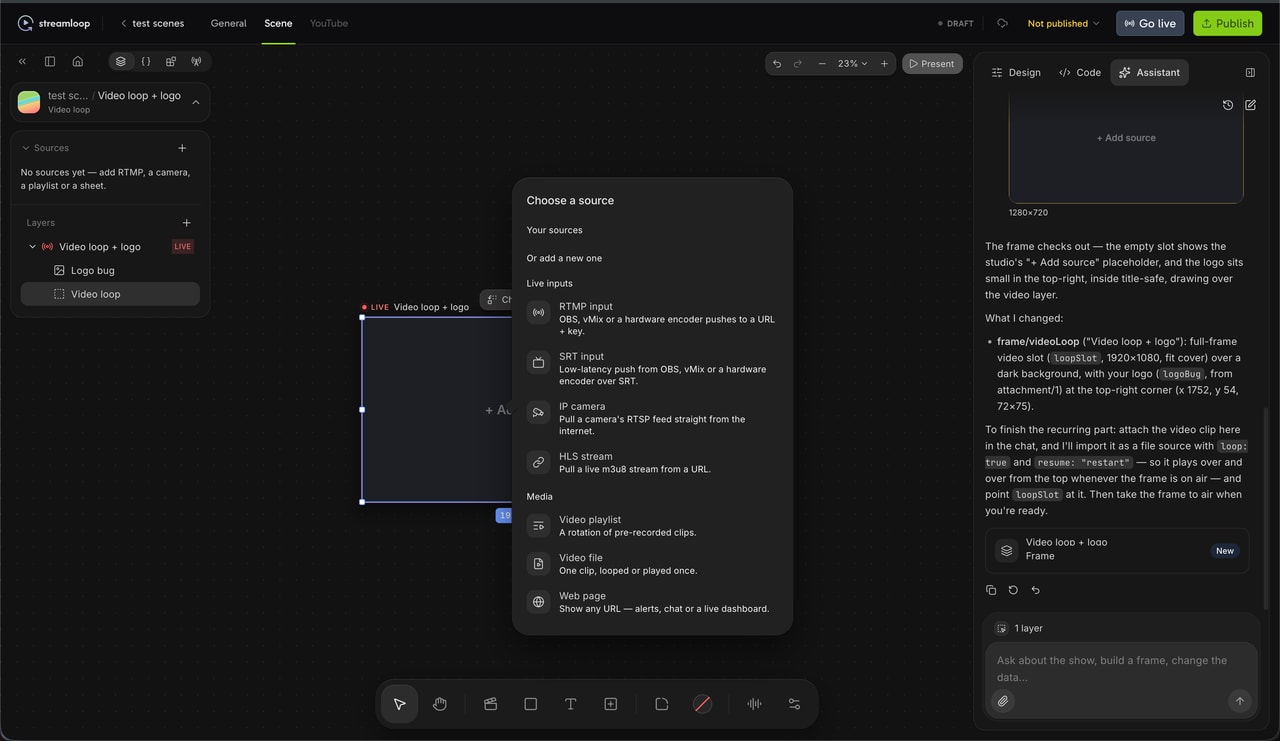
A scene in the Live Scenes studio. You can add a live input, a playlist, a camera or a web page.
Other costs: each extra destination costs $3.50 to $12.50 per 30 days, by resolution. Encoding costs $0.005 per minute of encode time, and playlists over 30 GiB per stream add $0.35 per GiB-month. The minimum top-up is $5. A card top-up can add a fee of up to 5%, at least $0.50, depending on the payment method. The top-up window shows the fee before you pay.
Frequently asked questions
Can StreamYard stream pre-recorded video?
Yes, on paid plans. You upload a video or choose a past broadcast, then set one start time. The stream starts at that time and ends when the video ends. The length limit depends on the plan. See the limits table and where StreamYard falls short.
Is StreamYard good for a 24/7 channel?
Not for a pre-recorded 24/7 channel, because its pre-recorded streams play once. A looping clip needs a live studio session on your computer. StreamYard is good for live shows with guests, webinars and recordings. See Is it right for your channel?
What does StreamYard cost?
Free costs $0, Core $44.99 a month or $35.99 billed yearly, Advanced $88.99 or $68.99, and Business $299 or $249. Company accounts go on Business. See the price table.
Is StreamYard free?
Yes: the Free plan costs $0 and sends to 1 platform, with the StreamYard logo, a monthly hour cap and no pre-recorded streams. See the limits table.
How many platforms can StreamYard multistream to?
Free sends to 1 platform, Core to 3, Advanced to 8 and Business to 10 at once. A vertical and a horizontal stream to YouTube count as two. See the multistreaming row in the limits table.
Can a company or church use StreamYard Core?
Usually not. StreamYard's Plan Usage Policy says that Core and Advanced are for individual use. If you sign up with a company email domain, StreamYard moves you to Business. A church with its own email domain may need Business too. See the notes under the price table.
Sources
Checked on October 15, 2026 against StreamYard's pricing page and help center, and the Streamloop dashboard. We did not test a paid StreamYard account.
StreamYard pricing page (streamyard.com/pricing), both tabs, billed monthly and yearly
StreamYard multistreaming page
StreamYard Help Center: Pre-recorded Streaming; Feature Limits on the Free Plan; Plan Usage Policy; How to Use OBS Virtual Camera with StreamYard
Questions or a correction? Contact us
Changes
October 15, 2026. Rebuilt the review with current prices, limits by plan and the pre-recorded rules.
September 1, 2026. First published.
Read next