
How to Live Stream Church Services
To live stream a church service, you need four things: a camera, a sound desk feed, an encoder, and a YouTube channel or Facebook Page.
This church live stream setup guide is for the volunteer or pastor who runs the stream.
It also shows how a church with no Sunday volunteer can replay a recorded service at service time.
On this page
Should you stream the service live or replay a recording?
Live from the room
Cameras and the sound desk feed an encoder during the service.
Recorded service at service time
Film the service once, and play the file at the service time each week. A replay cannot react to what happens on the day.
Streamloop streams pre-recorded video as a live stream from the cloud, so the church computer can be off and no one runs OBS. It is for churches that replay a recorded service. A second product, Live Scenes, sends one live OBS or encoder feed to several platforms.
A scheduled live stream lets members set a reminder, so people gather at the service time. A YouTube Premiere also takes reminders, but it shows one upload on YouTube only. A church that streams live to one platform does not need Streamloop.
What equipment do you need to live stream a church service?
A basic church live stream setup needs a camera, an audio feed from the sound desk, an encoder, and a wired internet connection. The encoder is OBS Studio, which is free, on a computer, or a hardware encoder.
| Setup | Camera | Audio | Encoder | Fits |
|---|---|---|---|---|
| Start | A phone or tablet on a tripod | The desk feed into the phone through an adapter | The YouTube or Facebook app | One fixed shot |
| Standard | One camera with clean HDMI output on a fixed mount | A stream mix through a USB audio interface | A computer with OBS Studio and a capture card | One camera operator or none |
| Multi-camera | Two or three cameras, or PTZ (pan, tilt, zoom) cameras | A separate stream mix from an aux or matrix output | A video switcher, a hardware encoder, or OBS or vMix with several inputs | Larger churches with a team |
Phone only: see the phone steps for YouTube and Facebook. With no volunteer on Sunday, a recorded replay can fit better.
Hardware encoder: follow the same steps, with your encoder in place of OBS. See custom RTMP streaming for the server URL and stream key fields.
How do you get the sound desk audio into the live stream?
Common practice is to take a separate stream mix from an aux or matrix output on the sound desk, not the room mix. Send that mix to the encoder.
- Pick a free aux or matrix output, and set it post-fader so the mix follows the service.
- Connect the output to a USB audio interface on the computer, or to your hardware encoder.
- In OBS, add the interface as an audio input.
- At rehearsal, check the levels in headphones.

What upload speed does a church live stream need?
YouTube recommends 8 Mbps for 720p at 30 fps and 14 Mbps for 1080p at 30 fps with H.264. Its minimums are 3 Mbps and 5 Mbps.
For 1080p at 60 fps, Facebook gives 15 Mbps as its maximum recommended bitrate. Run a speed test at service time, on the wired connection, as YouTube recommends.
How do you live stream a church service on YouTube?
Turn on live streaming at least one day before the first service, because YouTube says the first enable may take up to 24 hours.
- Verify the YouTube channel. You must be at least 16 years old.
- In YouTube Studio, click Create, then Go live, to open the Live Control Room.
- On the Manage tab, click Schedule stream, so members can set reminders.
- Copy the stream key into OBS or your hardware encoder. See Find your YouTube stream key for the screen.
- Start OBS or your hardware encoder a few minutes early. When the preview shows, click Go live.
- For captions, turn on live automatic captions. They are English only and need normal latency.
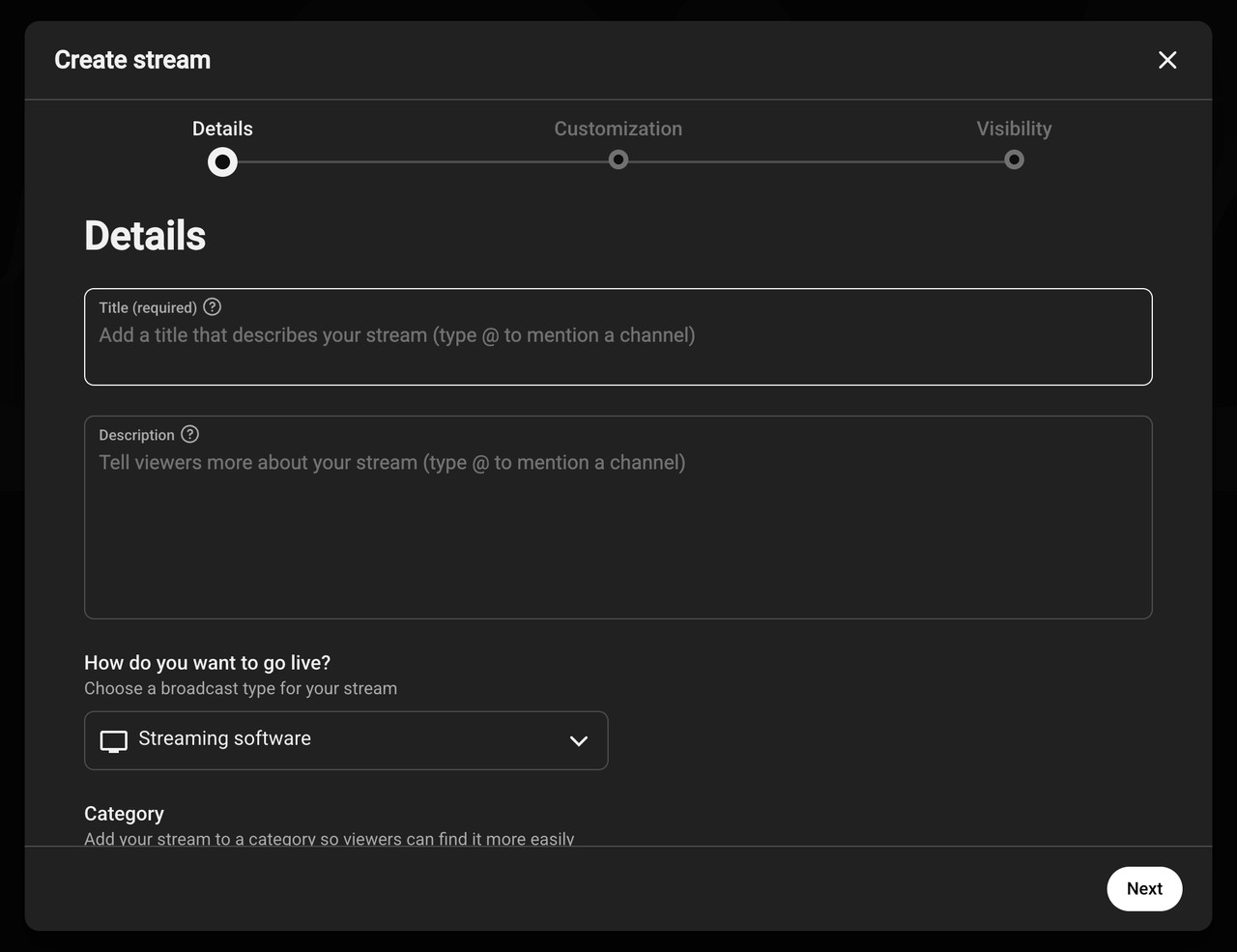
From a phone: the YouTube app needs at least 50 subscribers. Below 1,000, YouTube may limit the viewers and make the archive private by default.
In the YouTube app, tap Create, then Live. Tap Edit to enter the details or schedule the stream. Then tap Go live.
How do you go live on Facebook from the church Page?
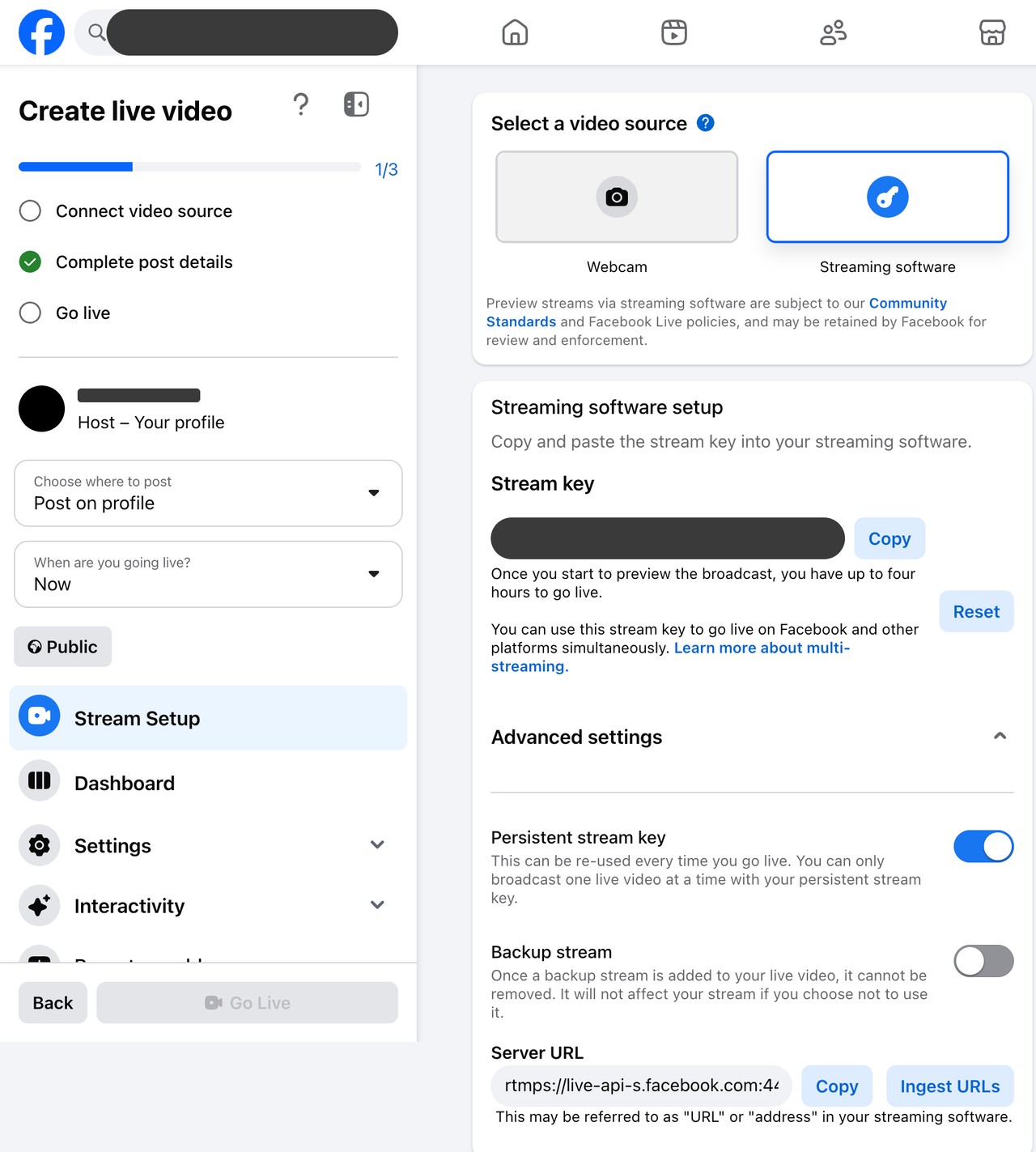
Open Live Producer on a computer, post to the church Page, and choose Streaming software as the video source.
Your account must be at least 60 days old. The Page needs at least 100 followers, and you need Facebook access or task access to create content on it.
In Advanced settings, turn on the persistent stream key, so OBS or your hardware encoder keeps the same key every week. Turning it on changes the current key. Live Producer can also schedule a broadcast up to 24 hours ahead.
Copy the server URL and stream key into OBS or your hardware encoder. See Find your Facebook stream key for each screen. Stream from the Page, not from a personal profile.
From a phone: the same rules apply. Meta gives these iPhone app steps: tap the post box at the top of your Feed, then Live video, then Go live. Tap Finish to end.
How do you show a countdown before the service starts?
Start the stream a few minutes early, and play a countdown video in OBS or on the hardware encoder. Early viewers then see when the service begins.
Streamloop Live Scenes, which adds graphics to a live feed, also has a Starting soon layout with a countdown.
Can you stream the service to YouTube and Facebook at the same time?
Yes, in two ways. Send two streams from the church computer, which needs twice the upload. Or send one stream to a cloud service that copies it to both platforms.
In OBS, the free Multiple output plugin can send the second stream, with no service fee. Multistream relay services take one stream and copy it to each platform, and so does Streamloop.
- A Scene stream (Live Scenes) takes RTMP, RTMPS or SRT from OBS, vMix or a hardware encoder. It can also pull an IP camera over RTSP.
- One Scene stream goes to up to 5 destinations.
- It streams up to 1080p at 60 fps, and it has no guest cameras.
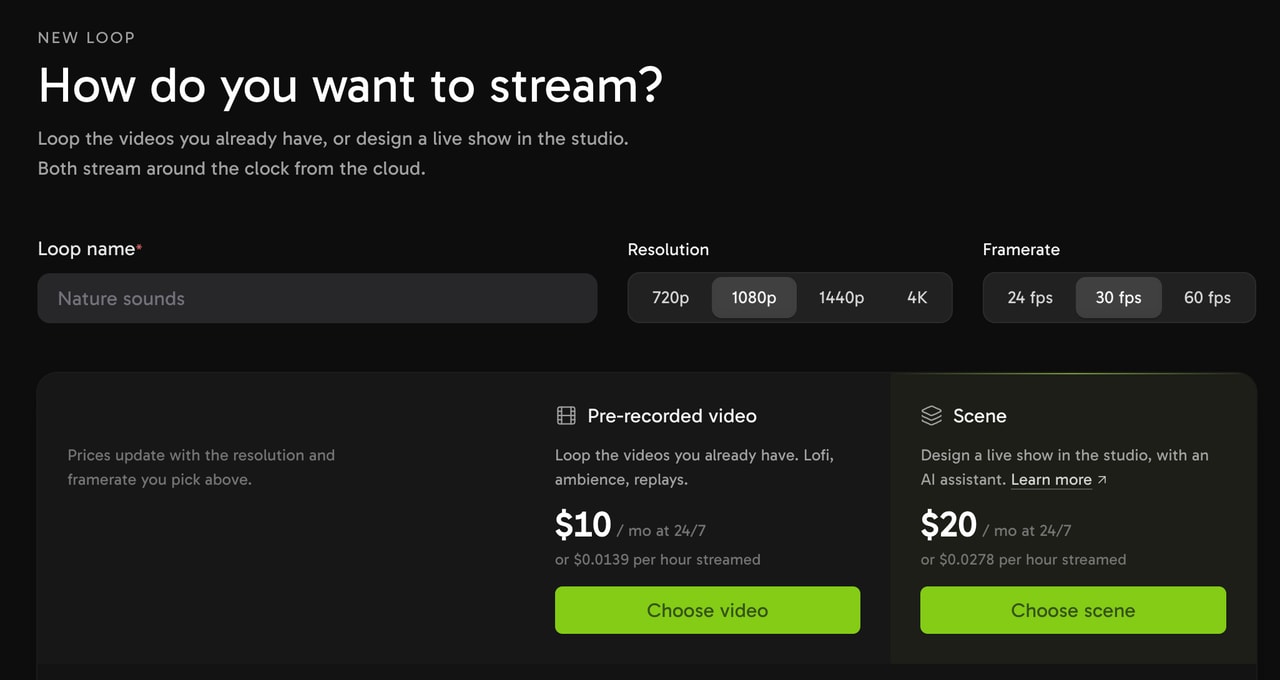
Choose Scene for a live feed from your encoder.
Live Scenes is billed per minute while live, with no encoding fee for live inputs. A 2-hour service at 1080p and 30 fps to YouTube and Facebook costs about $0.07.
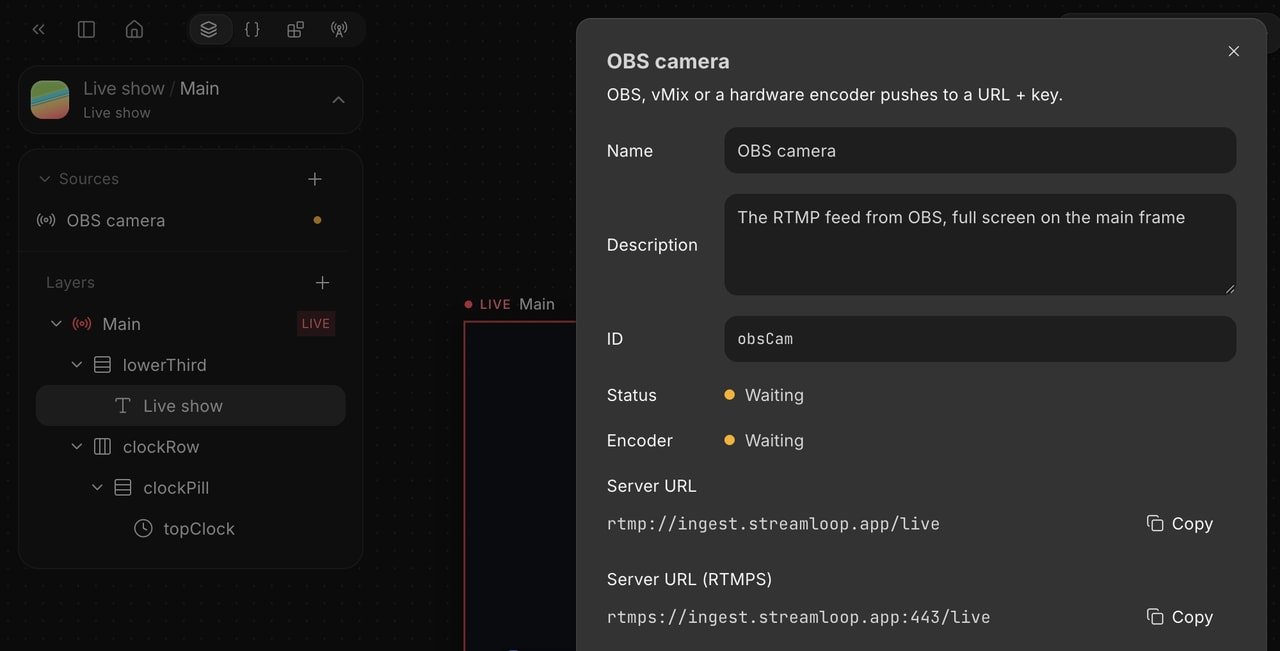
Stream the service to both platforms
Choose Scene when you create a stream, and describe your use case. Access is granted within 24 hours. The minimum top-up is $5.
Do you need a CCLI streaming license to stream worship music?
Yes, for copyrighted worship songs. CCLI says its Streaming License extends the Church Copyright License, so that you can live-stream or upload your services.
It covers songs that your church musicians perform live.
- The CCLI Streaming Plus License adds master recordings: artist tracks, backing tracks and multitracks.
- In the US, prices start at $84 a year for churches already licensed with CCLI. Elsewhere, check CCLI for your country.
- The license covers the church website and social media channels, on any day of the week.
- CCLI recommends both license numbers in the description of each post.
- A license does not stop YouTube checks. YouTube scans every live stream and can interrupt it, unless the song owner adds your channel to an allowlist.
- Public domain songs need no license if the arrangement and the recording are also out of copyright.
How do you replay a recorded service every Sunday?
First, turn on YouTube live streaming. A Facebook destination needs a church Page. For songs, see the CCLI section, and check with CCLI that a scheduled replay is covered.
For one showing on YouTube only, a YouTube Premiere works, and it has its own countdown. For free, OBS on a church computer can play the file, with the computer on.
For a weekly replay with no computer on, upload the service once and set a weekly schedule.
- In Streamloop, create a stream and choose Pre-recorded video.
- Upload the service video. Each file can be up to 15 GB.
- Add YouTube and Facebook as destinations. A stream takes up to 5.
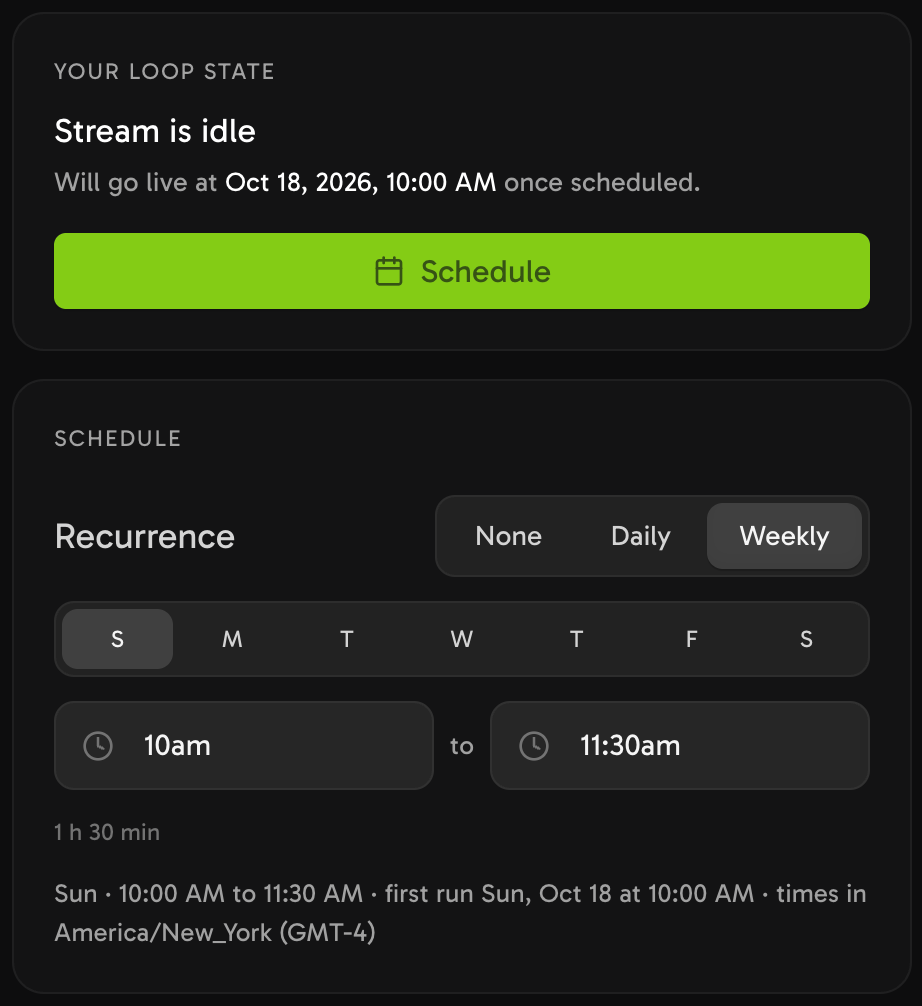
- In Schedule, set Recurrence to Weekly, pick Sunday, and set From and To less than 24 hours apart.
- Select Schedule the stream.
The stream then starts and stops itself each week. Streamloop keeps the schedule in UTC, so after a daylight-saving change the local start moves by one hour. Set it again.
Streaming a 2-hour run at 1080p and 30 fps to two destinations costs about $0.044 each week. A file that needs re-encoding also has a one-time encoding fee of $0.005 per minute of encode time.
The encode time can differ from the video length. A file that already matches the output needs no encode.
Say in the title or the description that it is a recorded service.
Set up a weekly replay
Pay as you go from a $5 top-up. Streaming is billed per minute while live, and encoding is billed separately.
What should you check before every Sunday stream?
Live service
- The stream is scheduled on YouTube and Facebook.
- An unlisted test stream ran at rehearsal, and the stream mix sounds right.
- The internet is wired, and the speed test passed.
- The license numbers are in the description, and captions are on if you need them.
Recorded replay
- The To time is at the end of the service video. In a longer window, the video plays again from the start until the To time.
- A YouTube destination connected by sign-in has an answer to "Made for kids?". If not, Streamloop does not start the stream.
- The repeat does not show "Repeat is paused until this is fixed" after a failed run.
Frequently asked questions
How much does a CCLI streaming license cost?
In the US, CCLI lists prices from $84 a year for churches already licensed with CCLI. The CCLI section says what each license covers.
Does the CCLI streaming license cover Facebook Live and YouTube?
Yes, on channels in the name of the church. CCLI says that the license does not necessarily prevent takedowns, so read the CCLI section.
What is the best camera for a church live stream?
For one angle, use a camera with clean HDMI output on a fixed mount. For several angles, use PTZ cameras and a switcher. See the equipment table.
Do you need subscribers to live stream a church service on YouTube?
The YouTube app needs at least 50 subscribers to go live. The YouTube encoder pages list no subscriber minimum, so a small channel can use OBS on a computer.
Can we keep the service recording online after the live stream?
Yes, while your CCLI Streaming License is active. If it expires, CCLI says that all videos must be removed. YouTube archives live streams under 12 hours automatically.
Where does this information come from?
Sources
YouTube Help: Get started with live streaming, Create a YouTube live stream with an encoder, and Create a live stream on mobile.
YouTube Help: Choose live encoder settings, Copyright issues with live streams, Premiere a new video, and Use automatic captioning.
Meta Business Help Center: Facebook Live requirements, About Facebook Live Producer, the persistent stream key, and Facebook Live video specs.
Facebook Help Center: Go live on Facebook. OBS Studio: obsproject.com.
CCLI: CCLI Streaming and Streaming Plus Licenses (US), and the CCLI US support articles on streaming.
Checked on October 14, 2026 against YouTube Help, Meta Business Help Center, CCLI and the Streamloop dashboard. A correction? Contact us
Changes
October 14, 2026: first version.