


Streamloop vs OneStream Live
For creators who must pick one tool for a 24/7 prerecorded channel, or for a live OBS show on several platforms.
Streamloop turns pre-recorded videos into a 24/7 live stream from the cloud, with no OBS and your computer off. It suits lofi and music channels, sermon replays, podcasts and study streams. A live stream stays live, so new viewers can find it at any hour. For a live OBS or camera feed, Streamloop Live Scenes adds graphics.
OneStream Live is a multistreaming platform with a browser studio for guests. This page compares the two on cost, 24/7 rules and live production.
The short version
Choose OneStream Live for live shows with guests on many platforms. Choose Streamloop for a 24/7 channel on any platform, or a live OBS show with AI-built graphics on up to 5 platforms. Streamloop bills by the minute while live. OneStream Live charges a plan each month or year, whether you stream or not.
Streaming is billed by the minute, only while live: one 24/7 stream at 1080p is about $10 per 30 days. Start with a $1 trial week, which becomes a monthly plan unless you cancel, or top up and pay as you go. See all prices
Published by Streamloop, a competitor.
How are Streamloop and OneStream Live different?
How do you build a live show with graphics in each tool?
OneStream's Studio page describes guests, cameras, branding and fonts, not an assistant that builds the layout. In Streamloop Live Scenes, you describe the show and the assistant builds it. It asks before anything goes live.
OneStream has browser guests and up to 4 cameras. Streamloop has no guest cameras, and Live Scenes go up to 1080p60. Live Scenes is billed by the minute, only while live: one 1080p channel at 30 fps, live 24/7, is about $20 per 30 days. Each extra platform adds $6 per 30 days at 1080p. Choose Scene when you create a stream.
Each tab shows the OneStream page above the Streamloop screen.
OneStream Live


OneStream: you design the show in a browser studio with guests. Source: OneStream Live Studio page, read October 16, 2026.
Streamloop

Streamloop: describe the show and attach a logo. The assistant builds the scenes, layers and data, then asks before anything goes live.
OneStream Live

OneStream: OBS and other encoders connect over RTMP, RTMPS, SRT or WHIP. Source: OneStream Live, read October 16, 2026.
Streamloop

Streamloop: add an RTMP or SRT input for OBS, an IP camera or an HLS feed to the scene.
OneStream Live

OneStream: the plan sets how many platforms you reach. Source: OneStream Live pricing page, read October 16, 2026.
Streamloop

Streamloop: one Scene stream goes to up to 5 platforms.
How does a 24/7 prerecorded loop work in each tool?
In Streamloop
Upload your videos, or import them from Google Drive, YouTube or a link. The playlist loops until you stop it, on up to 5 platforms at once.
Set the order in plain words with Smart order: "play the cartoons in the morning and the films at night". The new order starts when the video on screen ends. You can also edit the playlist while it is live, with no restart.
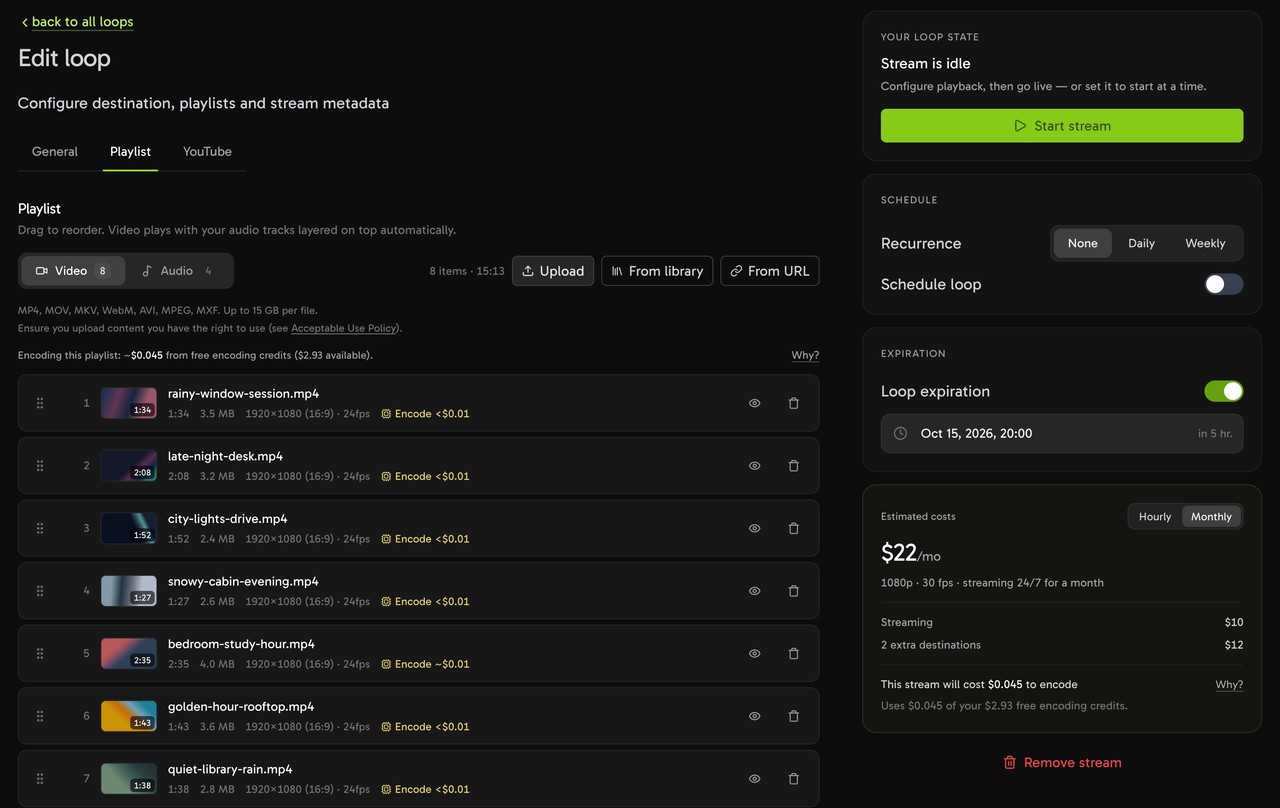
A Streamloop playlist of videos and audio tracks that plays in a loop.
Two limits: a stream has one start and stop window, and there is no TV-style schedule page for viewers.
In OneStream Live
A prerecorded stream plays a video once, or loops it up to 60 times. Each stream stops at the plan's time cap, from 15 minutes on Free to 20 hours on Enterprise. Playlists start on Professional.
For a nonstop channel, OneStream sells 24/7 streaming for YouTube only, for up to 30 days per run. OneStream's pricing page and its help center disagree on who may buy 24/7 streaming. The pricing page sells it as an add-on, and the help center says it requires Enterprise.
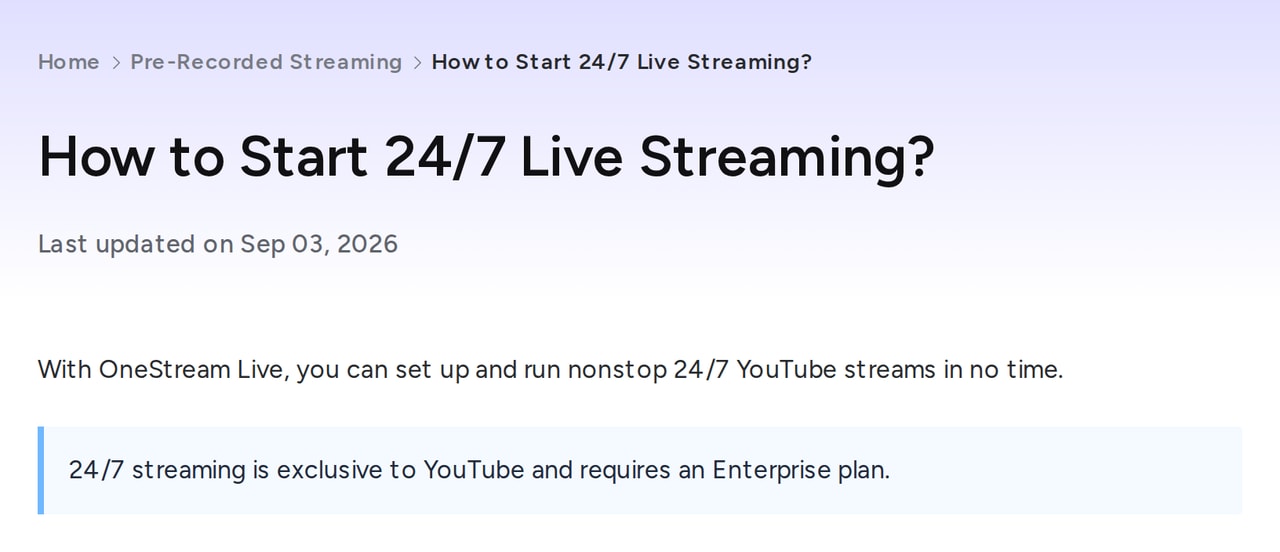
The help center says 24/7 needs Enterprise. Source: OneStream Live help center, read October 16, 2026.
What does the same setup cost on each tool?
For a prerecorded channel, Streamloop costs less in every case below. For a live show with guests, OneStream is the tool for the job.
Streamloop cost = live hours a month x the 30-day price / 720. OneStream prices are from its pricing page, in US dollars.
One YouTube channel, 24/7
Streamloop
$10 /30 days
At 720p30, the same loop costs $5.
OneStream Standard + 24/7 add-on
$69 /mo
$62 a month billed yearly, if the add-on is not discounted. OneStream does not state the quality of its 24-hour stream. If the help center rule applies, Enterprise costs $99, or $83 billed yearly. At 720p, Basic plus the add-on costs $45, or $42 billed yearly.
The same loop on YouTube, Twitch and Kick
Streamloop · $10 + 2 x $6
$22 /30 days
One stream goes to all three platforms.
OneStream Live
Not offered
Its 24/7 option sends to YouTube only. Other prerecorded streams stop after 3 hours on Standard and 20 hours on Enterprise.
Two hours a day on three platforms
Streamloop · 60 h x $22 per 720 h
$1.83 /mo
A Daily schedule starts and stops the stream. The minimum top-up is $5, and credit does not expire.
OneStream Standard
$39 /mo
$32 a month billed yearly. Each prerecorded stream runs up to 3 hours. A playlist needs Professional, at $49 or $39 billed yearly.
A weekly 4-hour live OBS show with graphics
Streamloop Live Scenes · 17.3 h x $32 per 720 h
$0.77 /mo
$20 for Live Scenes plus 2 x $6 for two extra platforms. No guest cameras.
OneStream Standard
$39 /mo
$32 a month billed yearly. A live session runs up to 6 hours, and up to 10 guests can join in the browser.
Billed yearly, OneStream saves 16% to 20% by plan, but it still costs more than Streamloop in all four cases. It is the better buy when the show needs guests, more than 5 platforms or a studio in the browser.
Other Streamloop costs: encoding costs $0.005 per minute of encode time, only for files that need it. Playlists above 30 GiB of storage add $0.35 per GiB-month while live. The minimum top-up is $5. A card top-up can add a fee of up to 5%, at least $0.50, depending on the payment method. The top-up window shows the fee before you pay.
Which features does each tool include?
| Feature | OneStream Live | Streamloop |
|---|---|---|
| Prerecorded and 24/7 | ||
| Free plan | Yes: 2 platforms, 720p, 15-minute prerecorded streams | No; a $1 trial week |
| 24/7 streaming | YouTube only, up to 30 days per run | Any RTMP platform, no time limit |
| Prerecorded length | 15 minutes to 20 hours per stream, by plan | No length limit |
| Playlists | Professional and Enterprise | Every stream, up to 1,000 items |
| Play order by time of day | Scheduled streams up to 60 days ahead | Smart order: describe it in plain words |
| Upload formats | MP4, MOV, M4V | MP4, MOV, MKV, WebM, AVI, MPEG, MXF and more |
| Add video from | Google Drive, Dropbox, OneDrive, Box, pCloud, Zoom and more | An upload, Google Drive, YouTube or a link |
| Storage | 1 GB to 150 GB by plan, kept 30 to 180 days | 15 GiB per file; large playlists add a storage fee |
| Live | ||
| Live inputs | RTMP, RTMPS, SRT, WHIP | Live Scenes: RTMP, RTMPS, SRT; RTSP and HLS pull |
| When a live input drops | Backup stream key on Enterprise | Each Live Scenes input has a fallback. After a set delay it hides the layer, shows a slate or switches to another source |
| Guests in a browser studio | Yes, 4 to 16 by plan | No guest cameras |
| Graphics | Studio branding, colors and fonts | Scenes built by an AI assistant: layers, tickers, clocks, Google Sheets data |
| Platforms per stream | 2 to 50 by plan | Up to 5 |
| Highest quality | 720p on Free and Basic; 1080p from Standard | Loops up to 4K60; Live Scenes up to 1080p60 |
OneStream facts come from its pricing page and help center. The OneStream Live review has more on its plans.
Which one should you pick?
Use OneStream Live when you need:
- Live shows with up to 16 guests in the browser
- More than 5 platforms at once
- Imports from Dropbox, OneDrive, Box or Zoom
- Scheduled events with a live studio
- Three 24/7 YouTube streams, included on Enterprise
- One chat for Facebook, LinkedIn, YouTube, Twitch and Kick
Use Streamloop when you need:
- A 24/7 channel on YouTube, Twitch, Kick or any RTMP server
- To pay only for the hours you are live
- A live OBS show with graphics that an AI assistant builds
- Loops in 1440p or 4K on YouTube
- A play order by time of day, set in plain words
How do you move a channel from OneStream Live to Streamloop?
Five steps move a channel. Keep OneStream if you still host shows with guests.
Keep your video files
Download your videos from OneStream, or find the original files. OneStream keeps uploads for 30 to 180 days, by plan.
Create a loop or a Scene
Create a loop for prerecorded video, or a Scene for a live show. Upload the files, or import them from Google Drive, YouTube or a link.
Add your platforms
Connect YouTube with Google sign-in. Add Twitch, Kick, Facebook or any RTMP server, up to 5 per stream.
Set the order and the schedule
Ask Smart order to play the cartoons in the morning and the films at night. For a part-time stream, set a Daily or Weekly window.
Go live, then cancel the add-on
Start the stream and check it on each platform. Then cancel the OneStream 24/7 add-on, so you do not pay twice.
Frequently asked questions
What is the difference between Streamloop and OneStream Live?
OneStream Live is a multistreaming platform with a browser studio for guests. It sends one live or prerecorded stream to 2 to 50 platforms, by plan. Streamloop streams prerecorded video 24/7 from the cloud to up to 5 platforms, and bills only while live. For live shows, Live Scenes adds graphics that an AI assistant builds. See how they differ.
Does OneStream Live include 24/7 streaming?
Yes, for YouTube only, and each run lasts up to 30 days. Its pricing page sells 24/7 as a $30 a month add-on on Basic, Standard and Professional, and includes it on Enterprise. Its help center says that 24/7 streaming requires Enterprise. Ask OneStream which rule applies before you buy.
Which one is cheaper for a 24/7 channel?
Streamloop. One YouTube channel at 1080p30, nonstop for 30 days, costs about $10. On OneStream, it costs $69 a month, Standard plus the $30 add-on, or $62 a month billed yearly. See the cost cases.
Which one is better for multistreaming?
OneStream Live, if you need many platforms. Its plans send one stream to 2 to 50 platforms, and 5 more cost $10 a month. Streamloop sends each stream to up to 5 platforms, and each one after the first adds $6 per 30 days at 1080p. For a 24/7 channel on Twitch or Kick, only Streamloop works.
Does either tool support 4K?
Streamloop does. Its video loops stream up to 4K60 to YouTube, and Live Scenes go up to 1080p60. OneStream Live streams at 720p on Free and Basic and at 1080p from Standard, and no plan offers 4K.
Sources
Checked on October 16, 2026 against OneStream Live's pricing page and help center, and the Streamloop dashboard.
OneStream Live: its pricing page, with monthly and yearly billing, and its help center articles on 24/7 streaming, add-ons and the free plan. We also read its Studio and external encoder pages.
Streamloop prices are per 30 days, or 720 hours, of streaming.
Questions or a correction? Contact us
Changes
October 16, 2026: rebuilt with current OneStream prices and 24/7 rules, Live Scenes and four cost cases.
August 4, 2026: first version.