
How to Set Up a 24/7 Facebook Live Stream From Pre-Recorded Video
Yes, you can stream pre-recorded video on Facebook Live, and you can keep a Page live around the clock. Facebook ends a live video at its time limit, typically 8 hours (12 for some approved partners). So a 24/7 stream is a chain of live videos.
This guide is for Pages and creators who want to show videos they already have as a Facebook live video, once or around the clock. Streamloop, the publisher of this guide, is a cloud service for churches, podcasters and other Pages with a video library.
One video and no budget? Go to the OBS steps. A 24/7 Page with your computer off? Go to the cloud steps. Not sure what Facebook allows? Start with the Facebook rules.
- Pre-recorded video
- Allowed, with a label
Facebook prefers live content. Mark pre-recorded video in the title, the description or on screen.
- Longest live video
- 8 hours
Then a new live video must start.
On this page
Can you stream a pre-recorded video on Facebook Live?
Yes. Facebook help names two video sources for Facebook Live Producer: your computer camera and streaming software. It does not name a saved video file. So you send the file with an encoder, such as OBS, or with a cloud service.
If the video does not need to be live, post it as a normal video on your Page.
Two rules in the Facebook Live Policies apply to every pre-recorded live video, and a third covers looping:
| Rule | What Facebook says | What to do |
|---|---|---|
| Label it | Pre-recorded content "must be clearly marked as pre-recorded" | Add "Pre-recorded" to the title or the description, or show a graphic on screen |
| Not "real time" | Live "must not be used to mislead users to think that specific footage is occurring in real time" | Do not present old footage as if it happens now |
Can you loop a video on Facebook Live?
Facebook's Live Policies say that Facebook Live "should not be used to broadcast looping videos, static images or poll-only videos". The example is "a 20-minute clip that is continuously looped". The policy gives no minimum length. A 24/7 playlist also repeats, so we advise a long, varied playlist with a clear pre-recorded label.
How long can you go live on Facebook?
One Facebook live video can last up to 8 hours. This limit applies to phones, computers and streaming software, as the Facebook time limit page says.
At the limit, Facebook ends the live video: "There is no grace period once the limit has been reached." Facebook advises you to "end and immediately restart the broadcast".
So a 24/7 stream needs a persistent stream key. A standard key works for one live video only. You can have only one live video at a time with a persistent key.
It also needs a tool that connects again. Meta says: "When a PSK is used, and the preview or broadcast has ended, the encoder stream does not automatically reconnect to Facebook Live. You must reconnect your encoder to the new preview or broadcast and keep the same PSK."
With streaming software, Facebook first shows a preview. The live video starts when you select Go live, as Facebook's setup help describes.
Which videos and music are allowed on a 24/7 Facebook stream?
Your own videos are the safest source. For licensed stock video, read the license terms before you stream it.
The Meta Music Guidelines say that you may not create "a music listening experience", and that this "includes live videos". Always show a visual part, not music alone.
Facebook can stop a live video that may contain content that belongs to another Page. Under the repeat infringement policy, Meta can disable accounts and remove Pages.
Which way should you run a 24/7 Facebook live stream?
Streamloop turns pre-recorded videos into a 24/7 live stream from the cloud. Your computer can be off, and you do not need OBS.
A live stream stays live, so new viewers can find it at any hour. Streamloop sends the loop to your Page with your stream key, and it restarts the connection before the 8-hour limit.
| Compare | Cloud loop (Streamloop) | OBS through Live Producer | FFmpeg on a server |
|---|---|---|---|
| Computer on? | No | Yes, every hour you are live | No, but a server that you rent stays on |
| Cost | About $10 per 30 days at 1080p30. See the cost section below | Free | Free software, but a server costs money |
| At the 8-hour limit | Restarts the connection about every 7 hours 45 minutes. See the restart section below | You stop, reconnect and select Go live before 8 hours | You script a stop and a restart |
| Setup | Upload files and select options | OBS scenes and sources | Command line |
| Best for | A 24/7 Page with no computer on | One showing, or a computer that is on anyway | Developers with a server |
For FFmpeg, see the FFmpeg loop guide. To compare more tools, see the best 24/7 streaming software.
One loop can also send to YouTube, Twitch and other platforms, up to 5 destinations in total. See how to multistream.
For a live camera or OBS feed, use Streamloop Live Scenes, at up to 1080p60 with no guest cameras. Choose Scene when you create a stream.
How do you stream a pre-recorded video to Facebook with OBS for free?
OBS Studio is free, and it is enough for one showing. Your computer must stay on while you are live.
Before you start: your account must be at least 60 days old. A Page or a professional-mode profile needs at least 100 followers, as Facebook Help explains. To go live as a Page, you need Facebook access or task access.
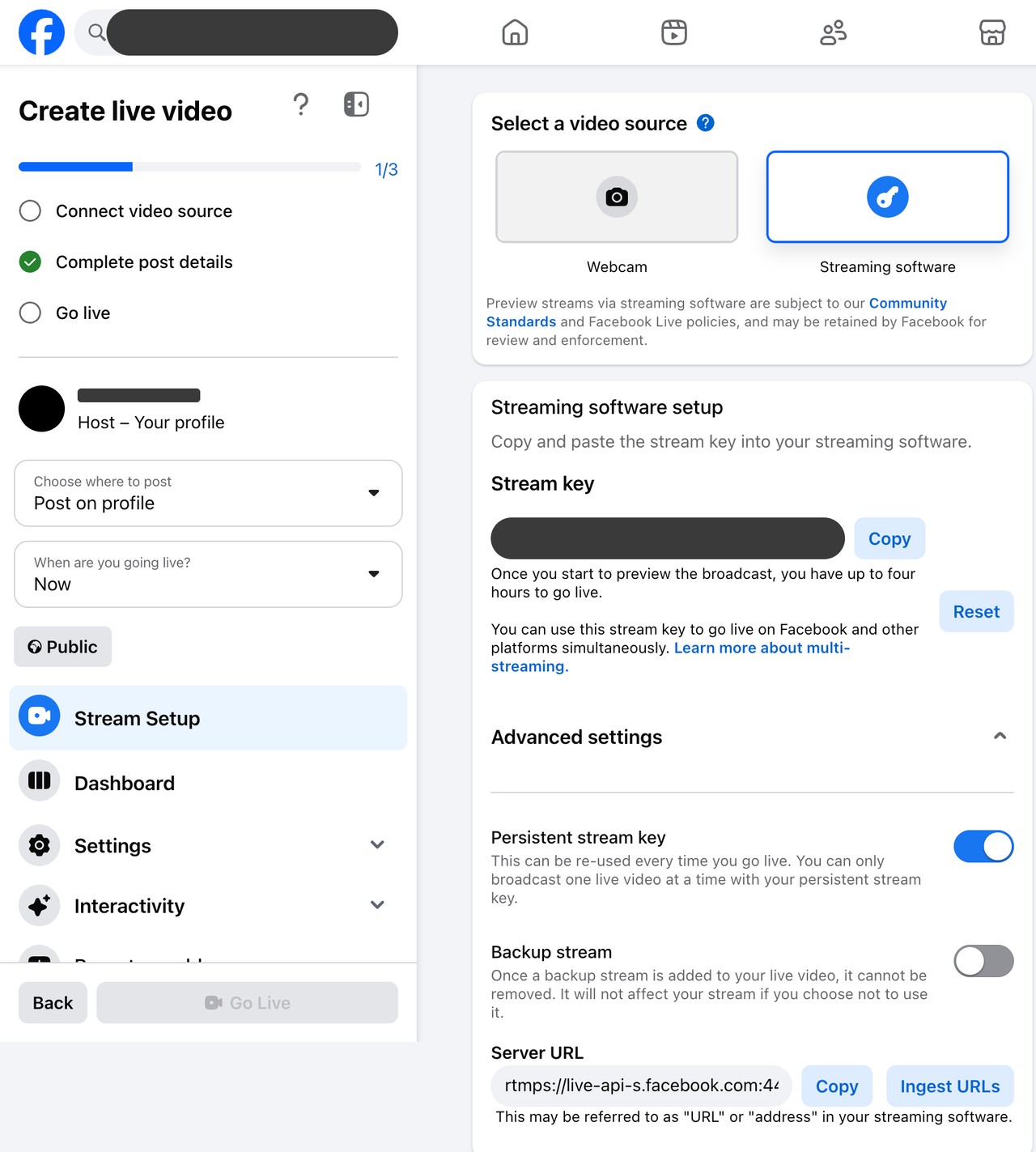
- In Live Producer, choose where to post, and select Streaming software. Copy the stream key and server URL.
- In OBS, add a Media Source for one file. For a folder of files, add a VLC Video Source, and select Loop Playlist.
- Open Settings, then Stream. Paste the server URL and the stream key.
- Select Start Streaming in OBS. When the preview shows in Live Producer, select Go live.
- Label the video as pre-recorded. End the live video when the file ends, or before 8 hours.
For a free 24/7 stream with OBS, someone must end each live video before 8 hours, reconnect OBS and select Go live again.
Live Producer can also schedule a live video up to 24 hours ahead, but OBS must send the video at that time.
Facebook's live video requirements and Live Video API documentation recommend these settings:
| Setting | Value |
|---|---|
| Video | 1080p at 30 fps, H.264, 3,000 to 6,000 Kbps, constant bitrate |
| Keyframe interval | 2 seconds |
| Audio | AAC, 44.1 kHz, stereo, 128 Kbps |
| Protocol | RTMPS |
How do you set up a 24/7 Facebook live stream with Streamloop?
1. Turn on a persistent stream key and copy it
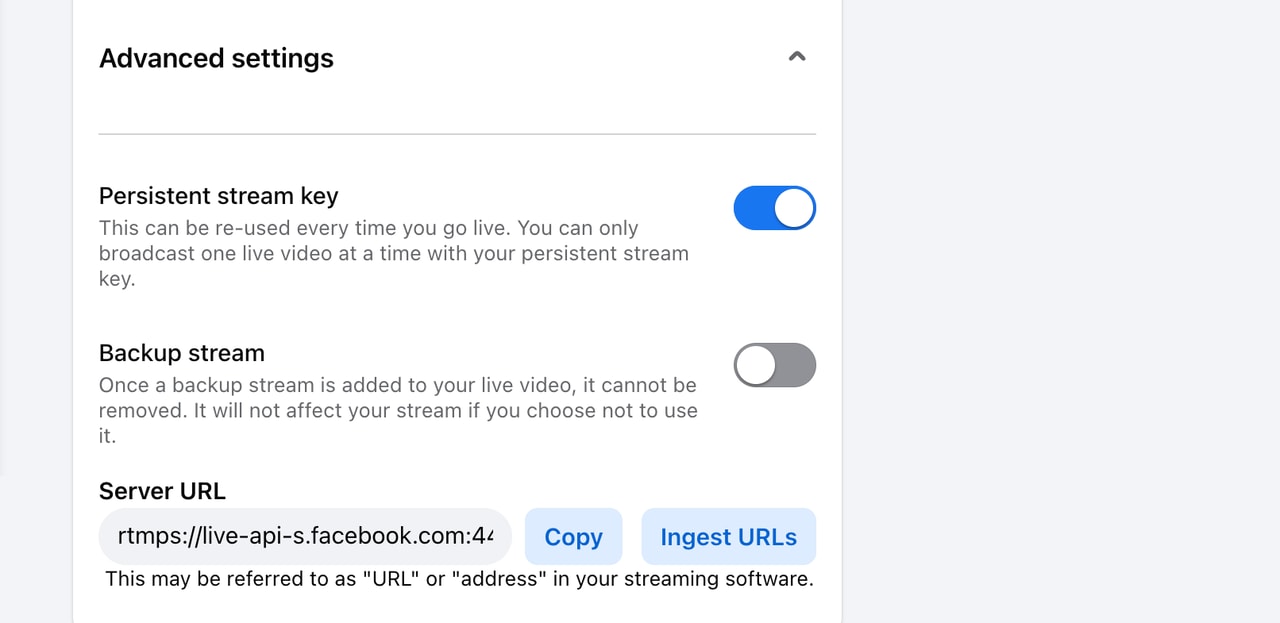
Your account must meet the same requirements as for OBS. In Facebook Live Producer, choose where to post, and select Streaming software. Under Advanced settings, turn on Persistent stream key.
Then copy the stream key, because turning on the option changes the key.
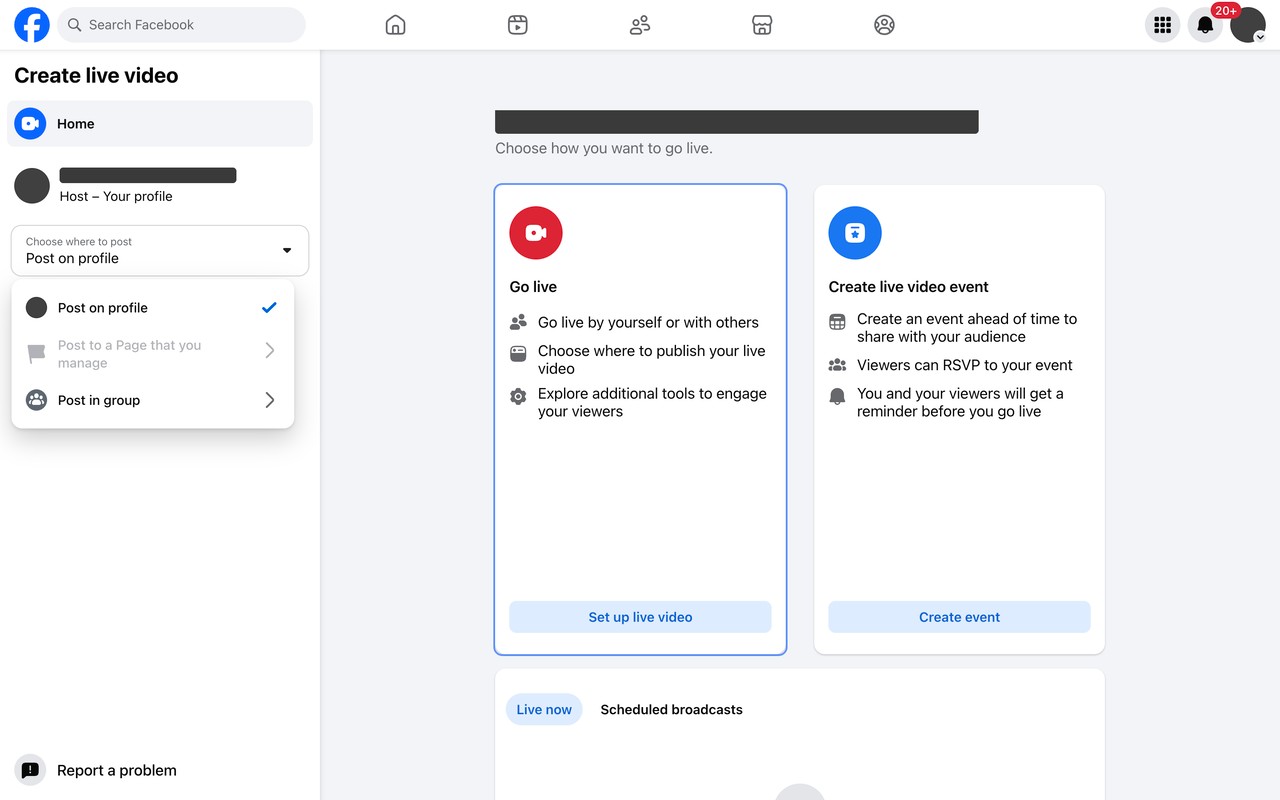
Choose where to post.
2. Create a loop in Streamloop
Sign in at streamloop.app, and select New loop. Choose Pre-recorded video.
3. Add your videos
In the Playlist tab, select Upload, From library or From URL. Streamloop accepts MP4, MOV, MKV, WebM, AVI, MPEG and MXF files, up to 15 GB each.

Under Loop behavior, choose In order, Shuffle or Smart order.
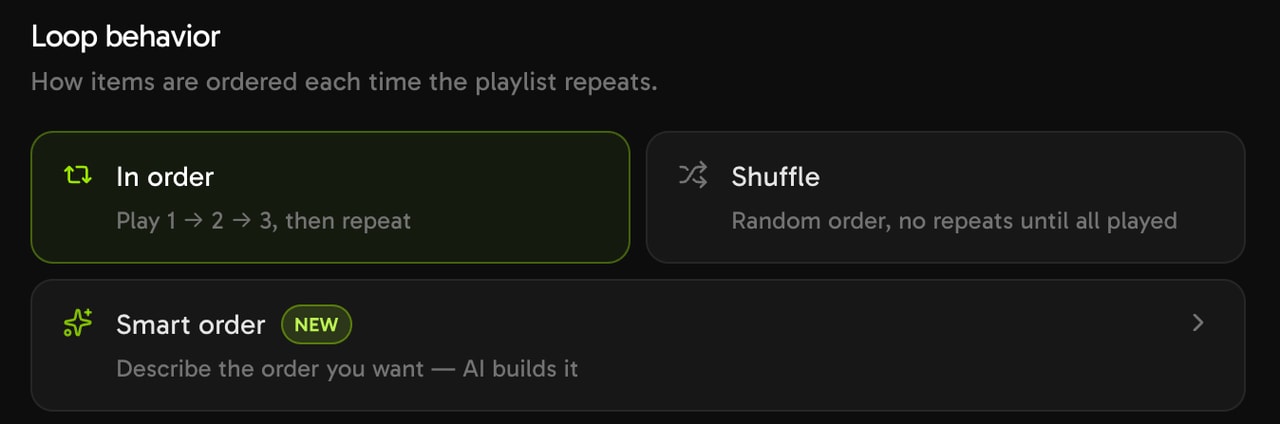
Choose how the playlist repeats.
4. Connect Facebook
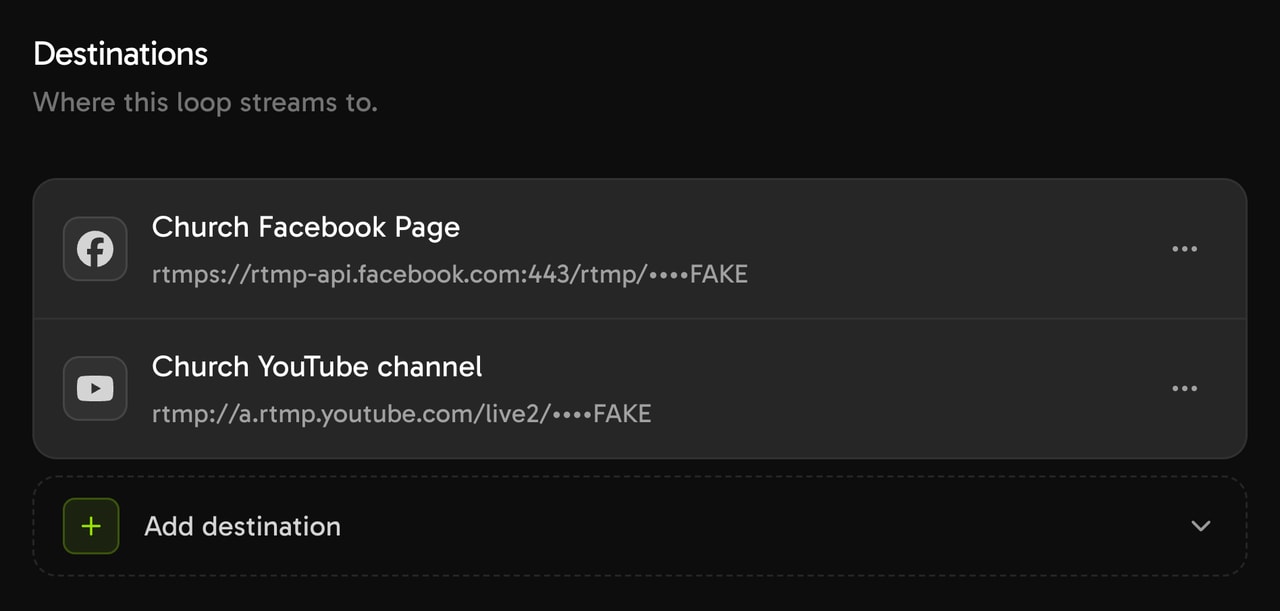
Open the General tab, and select Connect a destination. Then select Connect new destination, and choose Facebook.
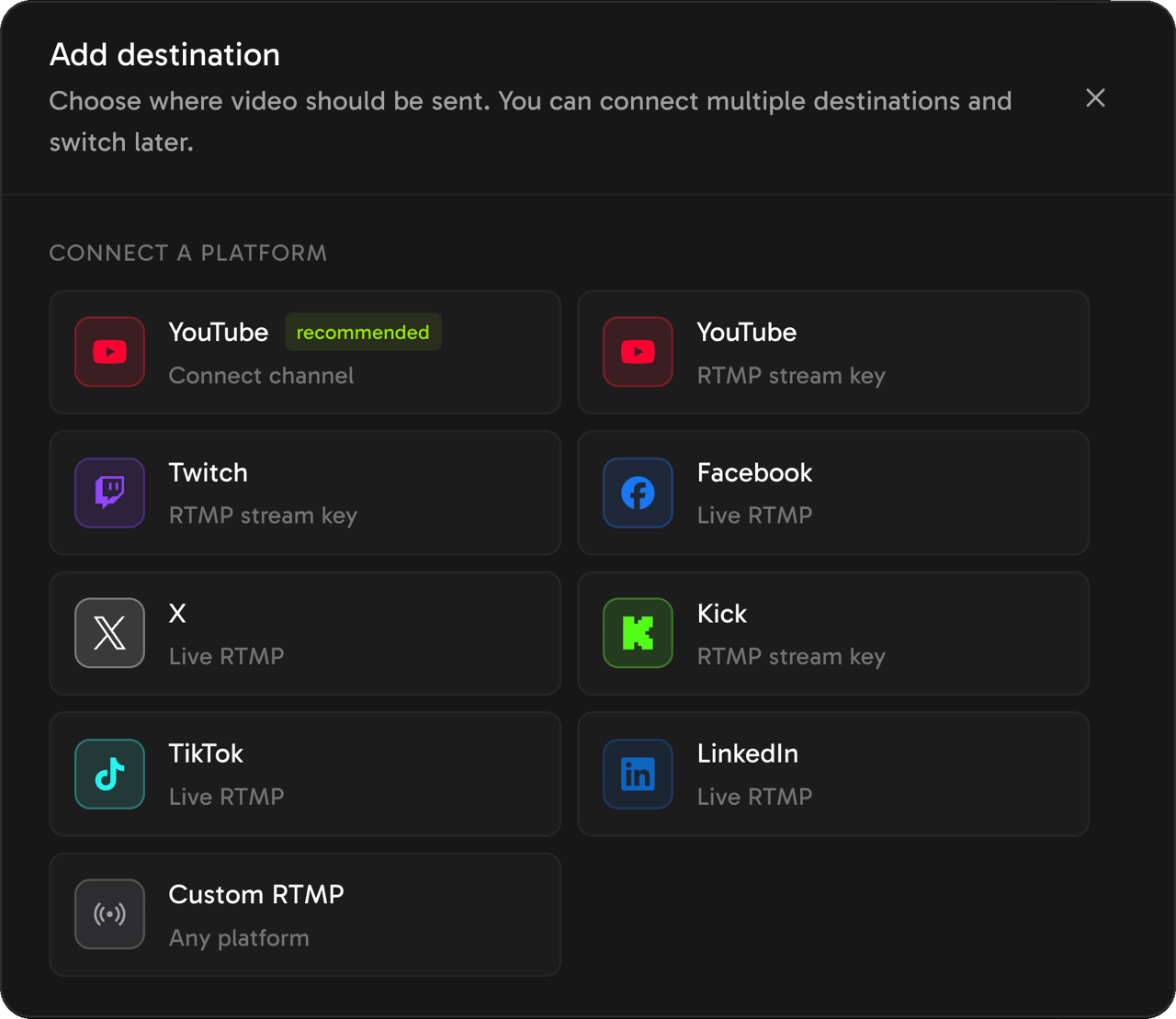
Paste your persistent stream key into Stream key, and select Save destination. Streamloop fills in the Facebook server URL.
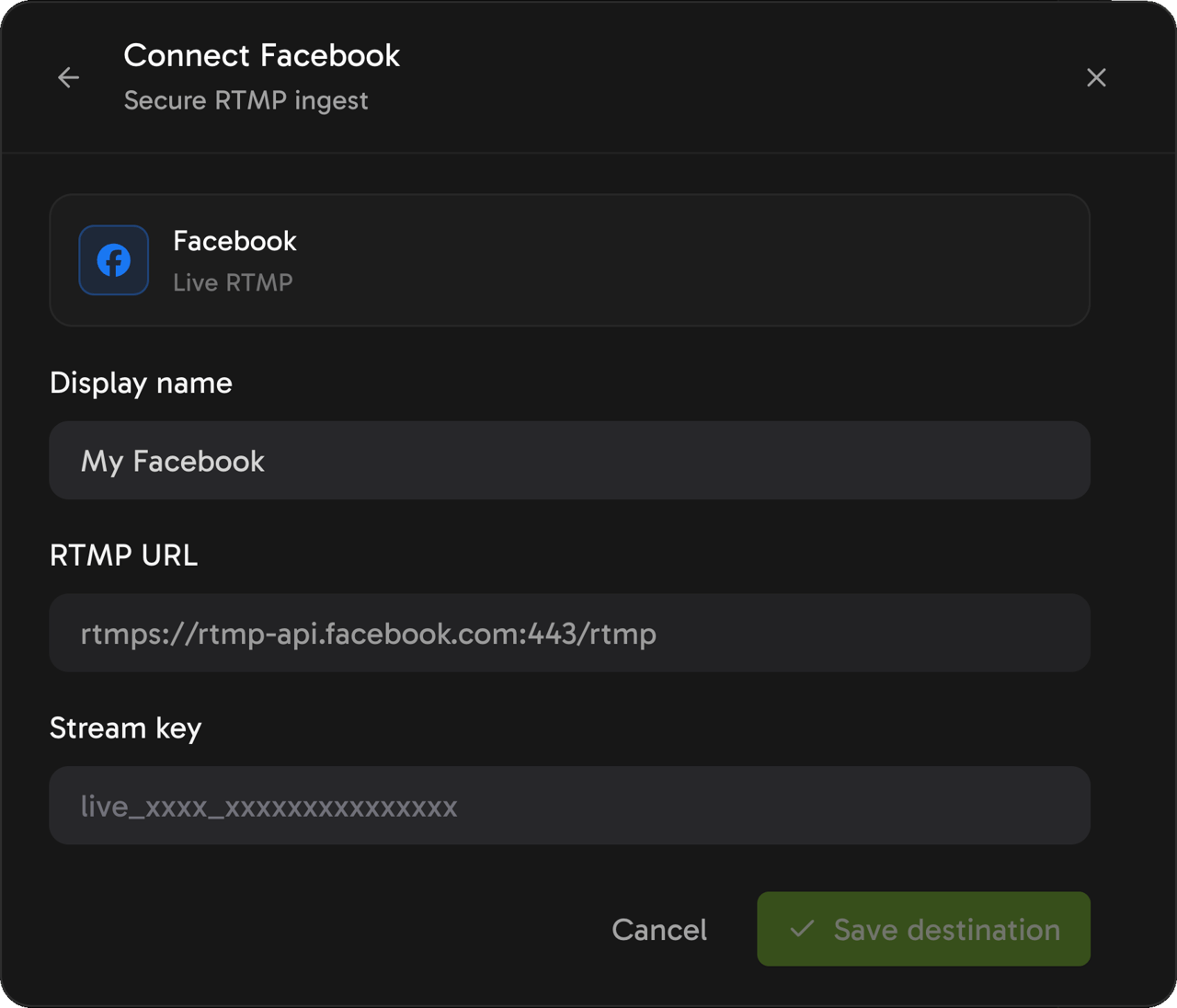
If you reset the key on Facebook, delete this destination and add Facebook again with the new key.
5. Choose 1080p at 30 fps
In Output quality, choose 1080p and 30 fps. Streamloop sends Facebook at most 1080p, and it refuses a 1440p or 4K loop when Facebook is a destination.
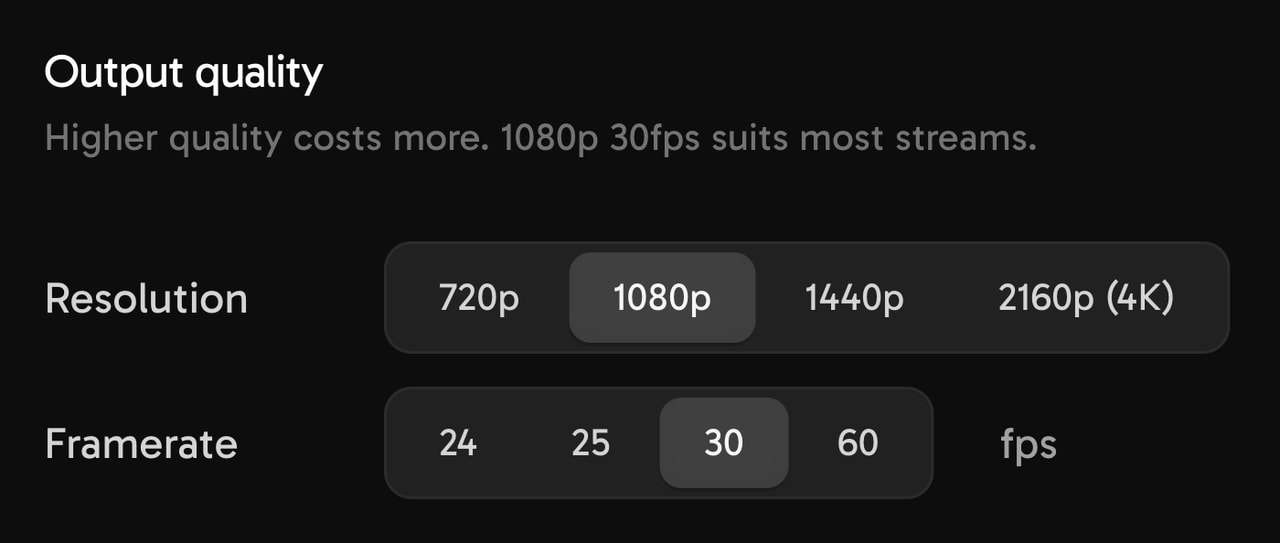
Choose 1080p for Facebook.
6. Add the pre-recorded label, then start the loop
Streamloop does not set the Facebook title or description. On Facebook, add "Pre-recorded" to one of them, as in the Facebook rules.
In Streamloop, select Start stream. To start later, or to run Daily or Weekly, use the Schedule settings.
A church can set a Weekly window, such as Sunday from 10:00 to 12:00. Each start is a new connection, so check the first service as you would a restart.
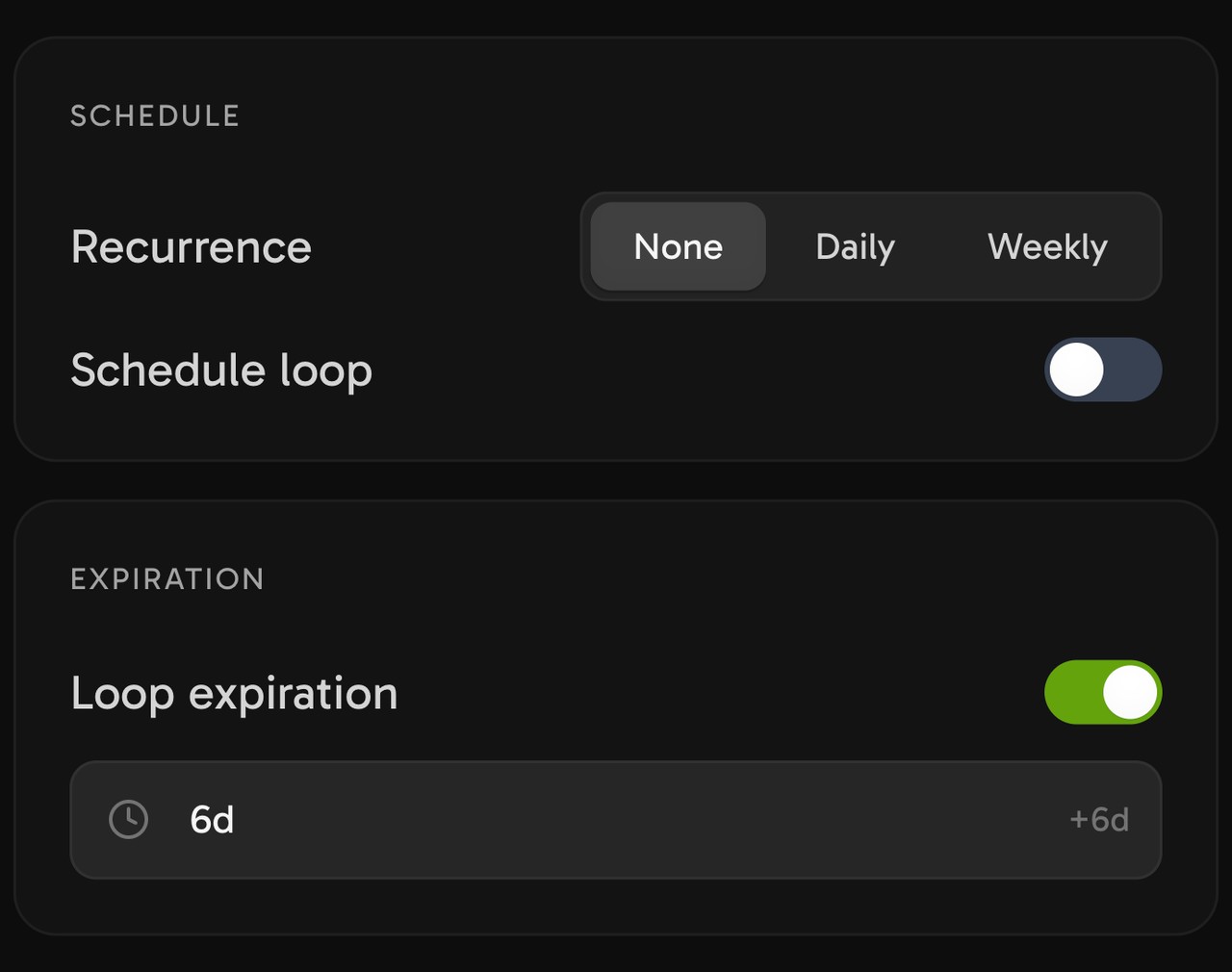
For a 24/7 loop, set Recurrence to None and turn off Loop expiration.
Can you change the videos while the loop is live?
Yes. Edit the playlist, then select Publish. The new playlist starts at the next video, and Facebook stays connected.
7. Start with the $1 trial, and watch the first restart
The first restart comes about 7 hours 45 minutes after the start. Check that the new live video is live. The trial week is a cheap way to watch that restart.
Start your 24/7 Facebook Live stream
Build a playlist from your own videos, paste your Facebook persistent stream key, and let it loop from the cloud while your computer stays off. Streaming is billed by the minute, only while live: one 24/7 stream at 1080p is about $10 per 30 days. Start with a $1 trial week, which becomes a monthly plan unless you cancel, or top up and pay as you go. See all prices
What happens at Facebook's 8-hour limit when Streamloop runs the stream?
Streamloop restarts the Facebook connection about every 7 hours 45 minutes, before Facebook's limit. The Facebook output stops for about 4 minutes, so Facebook can end the live video.
Streamloop then reconnects with the same key, as Meta requires, and the playlist continues from the same place. On a loop with more destinations, only the Facebook output pauses.
Plan for about three restarts a day. Facebook advises you to tell viewers about planned restarts in advance, for example in the description.
Check the first restart. Facebook help does not say whether the new live video starts on its own. After the first restart, open Live Producer, and check that the new live video is live, public and labeled. If it waits as a preview, your Page stays off until someone selects Go live.

The restart cycle, as a schematic.
Each live video becomes its own post. Facebook keeps it for replay for up to 30 days, then deletes it unless you download it or convert parts of it to reels. Meta changed live video storage in February 2025. With about three live videos a day, your Page holds about 90 replays at a time.
How much does a 24/7 Facebook live stream cost with Streamloop?
A loop at 1080p30 costs about $10 per 30 days of nonstop streaming, or $5 at 720p30. You pay by the minute, only while live. A monthly plan is optional: you can also top up and pay as you go.
The $1 trial is by card, one per person, and gives 7 days at the quality that you choose. On day 7, the monthly plan for that quality starts. To stop it, cancel the plan in Billing during the trial.
Each extra destination costs $6 per 30 days at 1080p. So Facebook plus YouTube at 1080p30 costs about $16 per 30 days.
A playlist over 15 GiB needs extra storage. The first 30 GiB of it is free for each loop, then $0.35 per GiB a month while live.
A card top-up can add a fee of up to 5%, at least $0.50, depending on the payment method. The top-up window shows the fee before you pay.
Frequently asked questions
Can you stream 24/7 on Facebook Live?
Not as one live video. Facebook ends each live video at 8 hours. A tool with a persistent stream key can stop before the limit and connect again.
After the first restart, check in Live Producer that the new live video is live.
How long can a Facebook Live stream last?
Eight hours, from a phone, a computer or streaming software. Some approved partners can get about 12 hours. An account manager arranges this, and it is not a setting.
Is it against Facebook's rules to loop a video on Live?
Facebook Live Policies say that Live "should not be used to broadcast looping videos". Facebook's example is a 20-minute clip that is continuously looped.
Facebook gives no minimum length. A long, varied playlist with a pre-recorded label is our advice, not a Facebook rule.
Can you make money from a 24/7 Facebook Live stream?
Do not plan on it. Meta's Content Monetization Policies have a list of prohibited formats. Read that list, and check the monetization tools for your Page, before you count on earnings.
How do I stream a pre-recorded video on Facebook Live?
Send the video file with streaming software. In Live Producer, select Streaming software and copy the stream key. Then paste it into OBS or a cloud service.
Label the video as pre-recorded. See the looping rule in the Facebook rules section.
What is the best Facebook Live streaming software for a 24/7 channel?
It depends on your computer. If the stream must run with your computer off, use a cloud loop. Streamloop costs about $10 per 30 days at 1080p30, with a $1 trial. See the prices and trial terms.
OBS is free if a computer is on anyway. FFmpeg suits developers with a server.
Do I need OBS to run an always-on Facebook stream?
No. A cloud service sends the stream and reconnects at each restart, with your computer off.
OBS is free, but your computer must stay on every hour that you are live.
Where do I find my Facebook Live stream key?
In Facebook Live Producer on a computer. Choose where to post, set up a live video, and select Streaming software. Copy the stream key there. Full steps: Find your Facebook stream key and server URL.
What is a persistent stream key and do I need one?
It is a Facebook stream key that you can use again for many live videos. A 24/7 stream needs one, because a standard key works for one live video only. Turn it on in Live Producer under Advanced settings, then copy the key again, because the key changes.
Can I re-stream a YouTube video to Facebook Live 24/7?
Not a video that belongs to someone else. For your own videos, upload the original file to your streaming tool, not a YouTube link. Read the YouTube Terms of Service before you use YouTube content in any other way.
What happens to the recording of a 24/7 Facebook stream?
Each live video becomes its own post. Facebook keeps it for replay for up to 30 days. Then Facebook deletes it, unless you download it or convert parts of it to reels.
What bitrate and resolution should I use for Facebook Live?
Facebook recommends 1080p at 30 fps, 3,000 to 6,000 Kbps and a keyframe every 2 seconds. Use H.264 video and AAC stereo audio at 128 Kbps. Streamloop sends Facebook at most 1080p.
Sources
Checked on October 15, 2026, against Facebook Help and the Streamloop dashboard.
Read our editorial policy.
Facebook sources
Time limit and guidelines for live-streaming on Facebook
Go live on Facebook using streaming software
About advanced Facebook live stream settings
Requirements for Facebook live videos
Live Video API support FAQ, on developers.facebook.com
Read next
How to run a 24/7 live stream from pre-recorded video: The cross-platform version
How to set up a 24/7 Twitch stream from pre-recorded video: The same setup on Twitch
Live streaming pre-recorded videos: 9 real advantages: Why run a pre-recorded channel
How to put a pre-recorded video on TikTok LIVE: The short-form equivalent