
How to Stream Prerecorded Church Services
To stream a prerecorded church service, upload the recording and schedule it to start at the service time.
For one new video on YouTube only, a free YouTube Premiere does this, and you need no other tool.
This guide is for the pastor or volunteer who wants a recorded service to go out live each week, with nobody at a computer.
On this page
What is the best way to stream prerecorded church services?
Use a weekly scheduling tool when the service goes to YouTube and Facebook, runs at two times, or is built from separate clips.
Streamloop sends prerecorded video as a live stream from the cloud, with no OBS and the church computer off. It is made for recordings such as sermon replays. Unlike a plain upload, the service shows in the YouTube Live tab while it plays. With Streamloop, one upload goes out live at service time every week, on YouTube and Facebook together.
| Your case | YouTube Premiere | Streamloop weekly schedule |
|---|---|---|
| One video, YouTube only | Yes | Yes |
| YouTube and Facebook | No, YouTube only | Yes, one stream to both |
| Two service times | One Premiere for each upload | Yes, one stream per time |
| Separate clips | Join them into one video first | Yes, in a playlist |
| Reminder page before the start | Yes | No |
| Cost | Free | Pay as you go from a $5 top-up |
How do you premiere a recorded service on YouTube?
A YouTube Premiere shows one uploaded video at a set time. A countdown plays first, and viewers can set a reminder.
- In YouTube Studio, select Create, then Upload videos, and choose the service file.
- At the Visibility step, make the video public and select Schedule.
- Enter the service date and time, and check Set as Premiere.
- To choose the countdown theme and length, select Set up Premiere.
Schedule it at least 24 hours ahead, so the thumbnail shows in subscription feeds. A service longer than 15 minutes needs a verified account.
Each week needs a new upload and a new Premiere schedule.
Can you still premiere a church service on Facebook?
No. Facebook no longer offers Premieres. The Church of England says that Facebook Premieres ended on August 22, 2022.
Two routes remain:
- A scheduled Page post, 20 minutes to 29 days ahead. It is a normal video post, not a live video, and needs no other tool.
- A live stream that is marked as prerecorded. See how to mark the service.
How do you put the welcome, announcements and sermon in one recorded service?
In Streamloop, a weekly recorded service takes four steps:
- Sign up for Streamloop.
- Create a Pre-recorded video stream, and upload the service videos.
- Add YouTube and the church Facebook Page as destinations.
- Set the weekly schedule.
For step 2, one file works. Use parts only if you swap the announcements or sermon each week. Export each part as its own video, and keep Loop behavior, the play order setting, on In order.
Drag the videos into your order of service:
- Welcome or countdown video
- Announcements
- Worship
- Sermon
- Closing
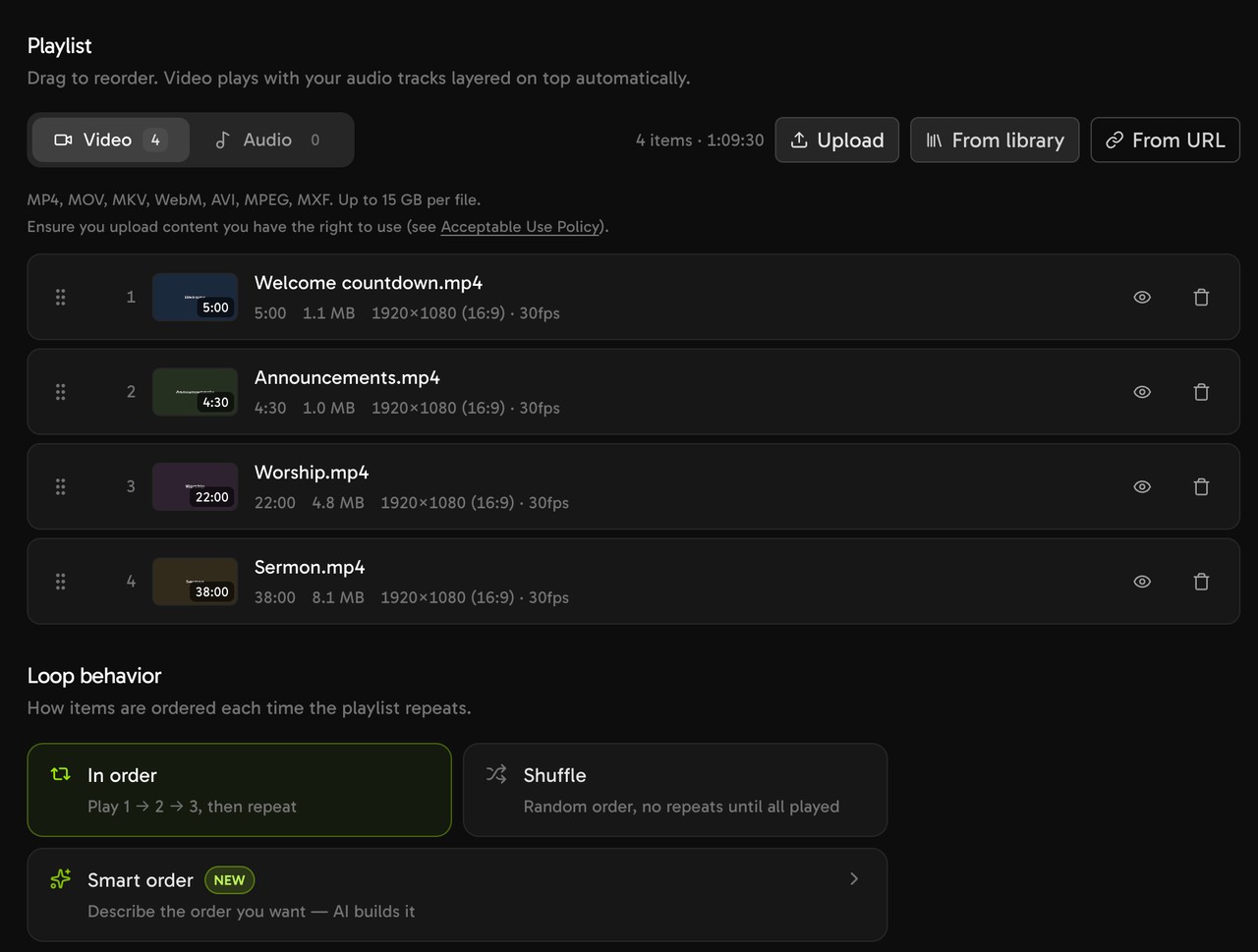
Start the first video with a title card that says "Recorded service". Facebook requires prerecorded video to be clearly marked, and the card reaches every platform.
Included storage covers playlists up to about 16 GB. For larger ones, see Build and schedule your playlist.
How do you send the service to YouTube and Facebook?
Add YouTube by signing in. Add the church Facebook Page with its stream key, the private code that lets a tool stream to the Page. One stream sends to both, and to up to 5 destinations.
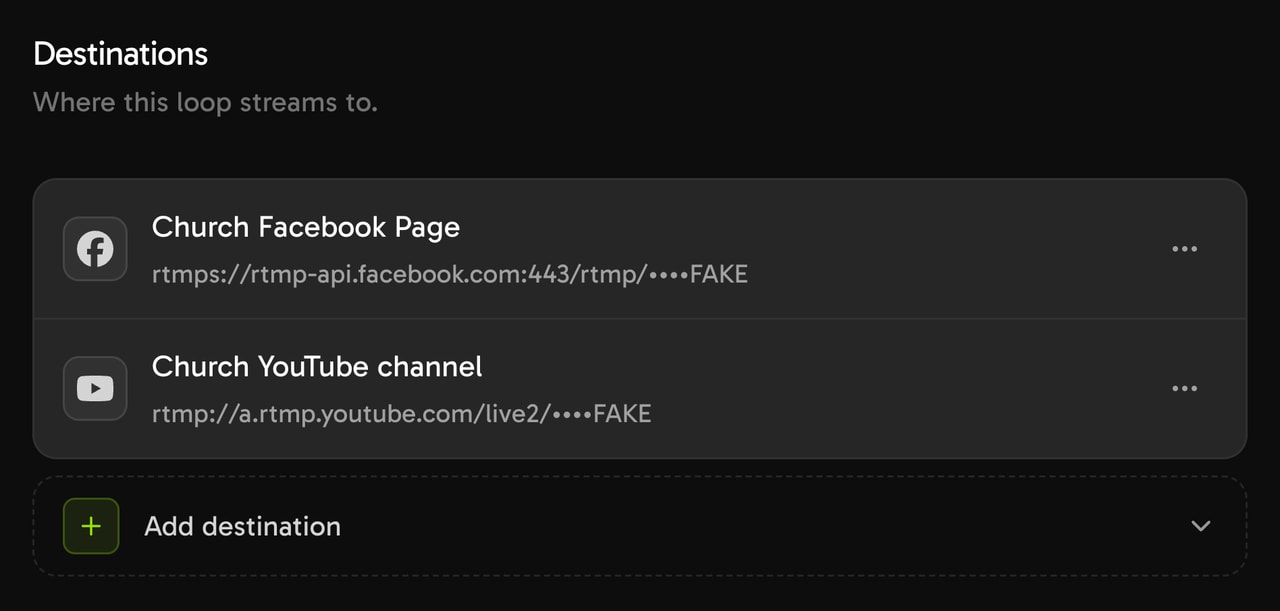
Facebook connects by stream key only, so Streamloop does not set the Facebook title. Use a persistent stream key, which does not change each week.
In the YouTube tab, set a title such as "Sunday service (recorded)" for every run. Answer "Made for kids?", or the run does not start.
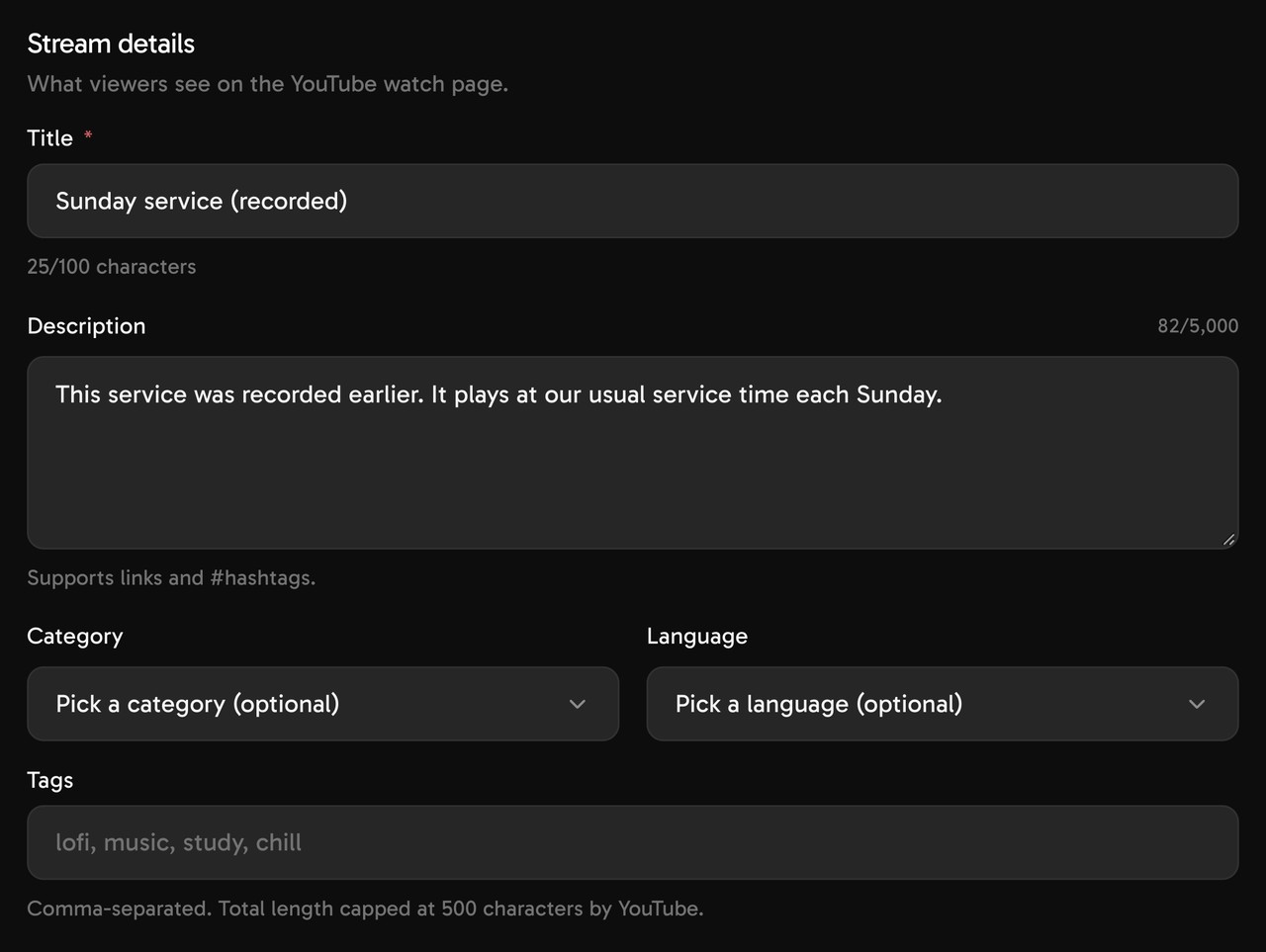
Say "recorded" in the title.
How do you schedule the recorded service every week?
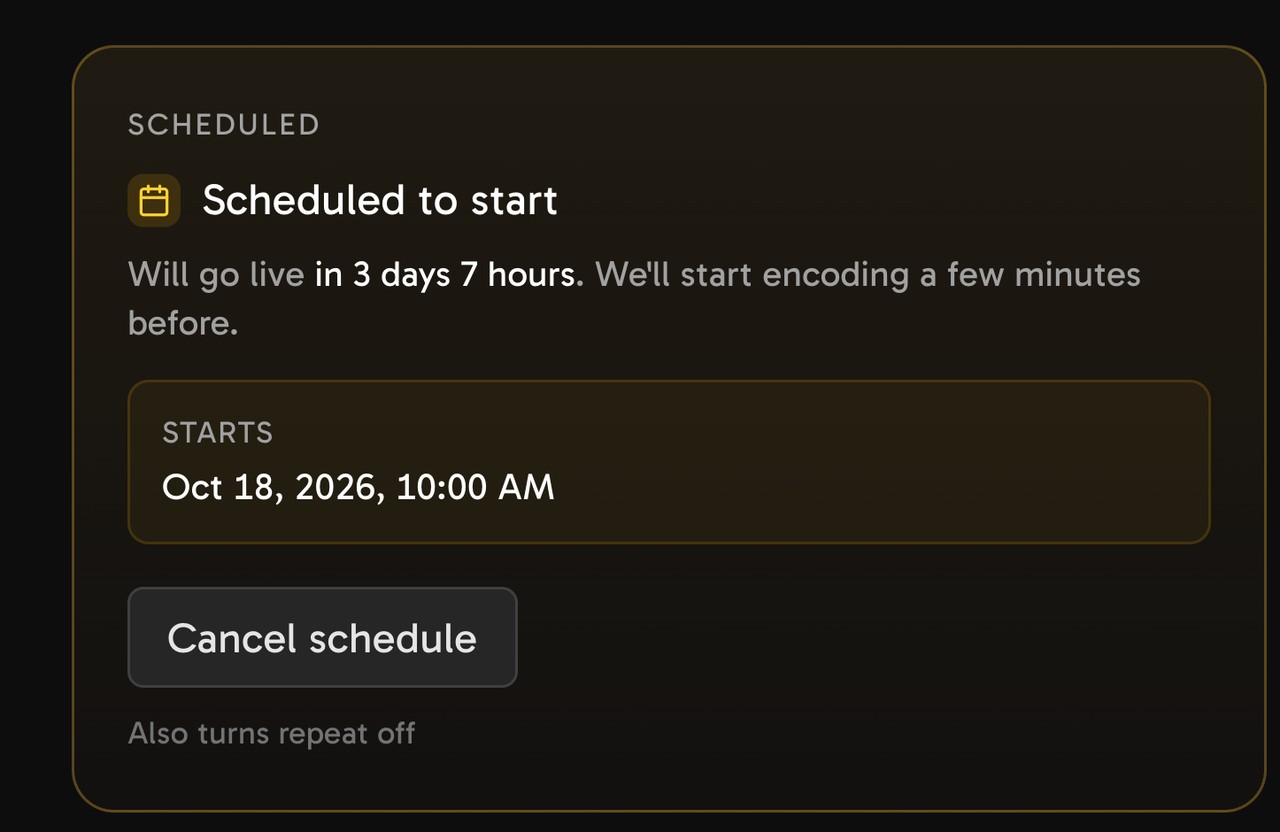
In Schedule, set Recurrence, how often the schedule repeats, to Weekly. Select the service day. Set From and To less than 24 hours apart, then select Schedule.
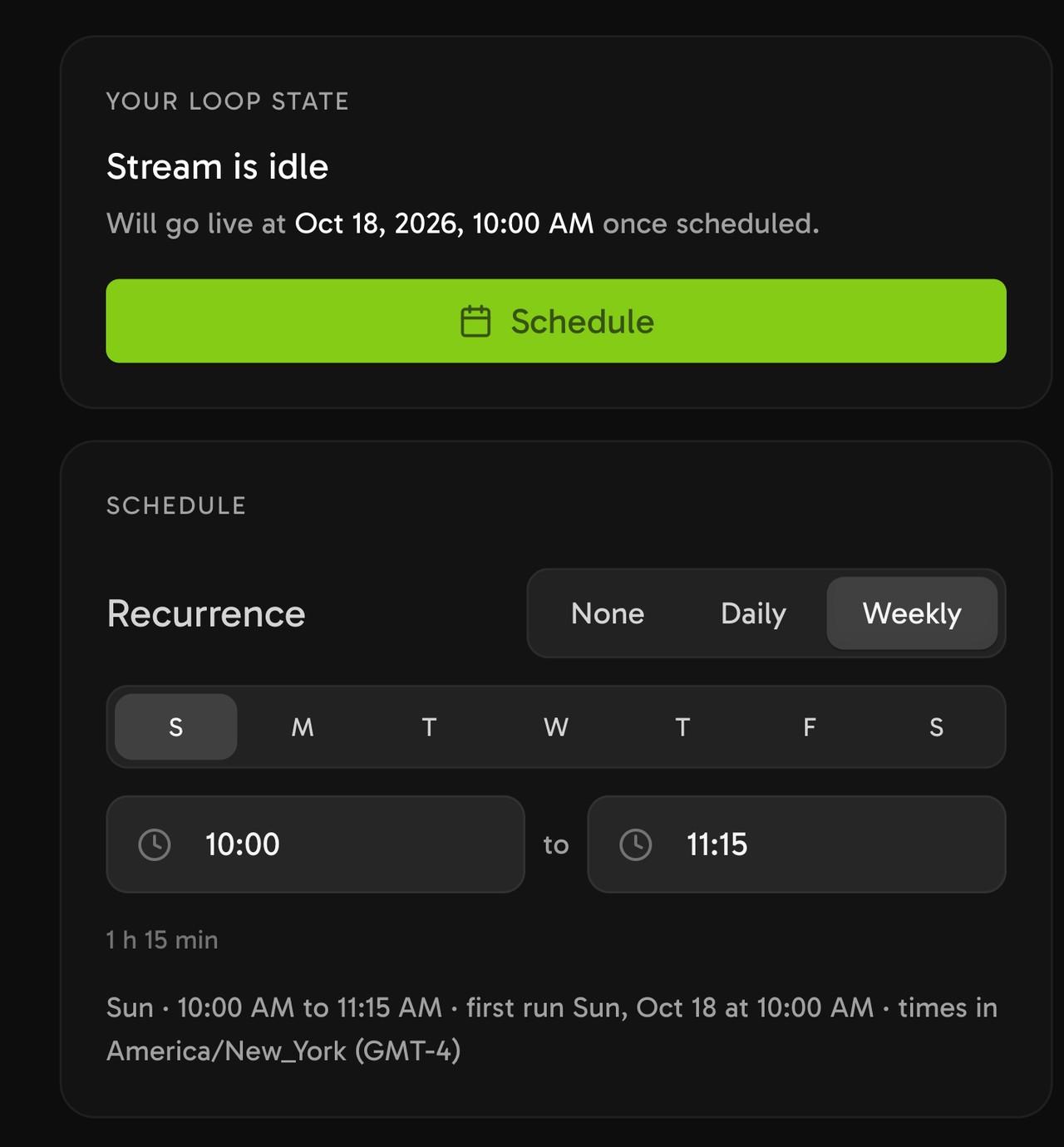
Each run starts from the first video, within a few minutes of the start time. The stream stops at the To time, even in the middle of a video.
A shorter playlist plays again from the start.

Set To just after the last video ends.
After each daylight-saving change, open Schedule, set From and To back to the service time, and select Save schedule.
Add destinations before you schedule. You cannot add or remove a destination while the stream is scheduled. A change to quality, frame rate or a stream key cancels the schedule, so schedule it again.
How do you replay a service you streamed live with OBS?
Streamloop can play an OBS recording of the live service at a later service time.
- Record the live service in OBS.
- Upload the recording to a Pre-recorded video stream, and add the destinations.
- In Schedule, set From to the replay time, converted to your own time zone.
For YouTube only, a free Premiere of the OBS recording also works. A second replay time needs a second stream. The live streaming guide has a replay checklist.
OBS can also play the files as a VLC playlist at service time, but the church computer must stay on. YouTube and Facebook can schedule live streams too, but a computer must send the video at that time.
How much does it cost to stream a recorded service each week?
At 1080p and 30 frames per second, a 1-hour weekly window to YouTube and Facebook costs about $0.022 a week, or about $0.10 a month. Three such windows a week cost about $0.29 a month.
For one 1-hour service a week, a $5 top-up lasts more than four years, because credits do not expire. A card top-up can add a fee, and the top-up window shows it before you pay. Each top-up also adds $3 of credit for encoding, which some videos need.
The $1 trial week is optional, and its credit covers your first weeks. After day 7, it becomes the monthly plan at the quality you picked, unless you cancel in Billing.
If the balance runs out, the stream fails after a short wait unless you top up, and no email is sent.
The $10 figure below is the price of one stream that runs all month, so a weekly service costs a small part of it.
Schedule your weekly service
Streaming is billed by the minute, only while live: one 24/7 stream at 1080p is about $10 per 30 days. Start with a $1 trial week, which becomes a monthly plan unless you cancel, or top up and pay as you go. See all prices. Questions before you start? Contact us.
How do you stream two services, or a midweek service?
One stream has one From and To window, and that window applies to every day you select. So each service time needs its own stream.
For example: Sunday at 9:00 and 11:00, plus Wednesday at 19:00, need three streams. For the same time on two days, use one stream and select both days.
Add the same videos to each stream with From library, with no second upload.
How do you change the sermon each week?
In the Playlist tab, add the new sermon and drag it into the old sermon's place. Select Remove, the trash icon, on the old sermon. The weekly schedule stays as it is.
Do not change quality or frame rate at the same time, because that cancels the schedule.
Can you run a 24/7 sermon stream?
Yes, on YouTube. A playlist of past sermons plays all day and night.
Do not send a 24/7 loop to a Facebook Page. Facebook says that Facebook Live should not be used to broadcast looping videos. A weekly playlist that repeats inside its window may also count as looping.
To set it up, follow Run a 24/7 live stream from pre-recorded video.
A sermon channel that never stops
Your sermon library stays live, so new viewers can find it at any hour. See all prices.
Why did the recorded service not start, or stop early?
First check the recorded replay checklist: the To time, "Made for kids?" and a paused repeat.
| Symptom | Cause | Fix |
|---|---|---|
| The first run did not show on YouTube | Enabling live streaming the first time can take 24 hours | Enable live streaming a day before |
| The stream did not start | A video has no sound, so the start is blocked | Use a video that has audio |
| It stopped during the service | The balance ran out | Top up or use auto-refill. Next week stays scheduled |
| Facebook did not receive the stream | The stream key changed or is not persistent | Update the destination, then schedule again |
Frequently asked questions
What is a simulated live church service?
It is a recording that plays as a live stream at a set time, as if the service were live. Church platforms use the name. This guide calls it a recorded service.
Does each Sunday replay stay on YouTube and Facebook afterwards?
With a YouTube sign-in destination, each run makes a new live video with its own link. YouTube archives streams under 12 hours. Facebook deletes a live video after 30 days, unless you save it.
Can people chat during a prerecorded service?
Yes. Viewers chat on YouTube or Facebook, as in any live stream, and a church member can answer there. Streamloop does not read or answer chat.
What happens if we skip a week?
You cannot skip a future week in advance. When the run is live, select Stop for today: billing stops, and the next run stays scheduled. Cancel schedule also turns the repeat off.
Do we need a CCLI license to replay a recorded service?
Yes, if the service has copyrighted worship songs: the CCLI Streaming License covers churches that stream or upload their services. CCLI does not address a scheduled replay, so ask CCLI. See the CCLI section.
Sources
YouTube Help: Premiere a new video, YouTube premiere tips, and Create a YouTube live stream with an encoder.
YouTube Help on accounts: Upload videos longer than 15 minutes, and Verify your YouTube account.
Facebook: Facebook Live Policies. Facebook Help Center: Schedule a post for your Facebook Page, Schedule a live video on Facebook, and Time limit and guidelines for live streaming on Facebook.
Church of England Digital Labs, on the end of Facebook Premieres.
OBS Studio Knowledge Base: Media Sources, and Standard Recording Output Guide.
Checked on October 14, 2026 against YouTube Help, Facebook Help, the OBS Knowledge Base and the Streamloop dashboard. A correction? Contact us