


Streamloop vs Playout.video
Streamloop turns your recorded videos into a 24/7 live stream from the cloud, with no OBS and your computer off. It suits lofi, music, sermon-replay and podcast-replay channels, because a live stream stays live and new viewers can find it at any hour. Live Scenes, a Streamloop stream type, adds layouts, live data and a live feed from OBS to the same stream. Playout.video does the same job, built around a calendar and a browser studio for guests.
The short version
Choose Streamloop for a 24/7 playlist, multistreaming or a branded channel with live data. For one 24/7 channel at 1080p30, it costs about $10 a month, against $29 for Playout.video Creator, or $19 a month billed yearly. Choose Playout.video for a weekly calendar grid, live shows with guests, or audience quizzes and polls.
Start with a $1 trial week, which becomes a monthly plan unless you cancel, or top up and pay as you go.
Already on Playout.video? See how to switch, read the full Playout.video review, or compare all 6 alternatives.
Published by Streamloop, a competitor. Playout.video facts come from its pricing page, help center and changelog. We did not run a test stream on Playout.video.
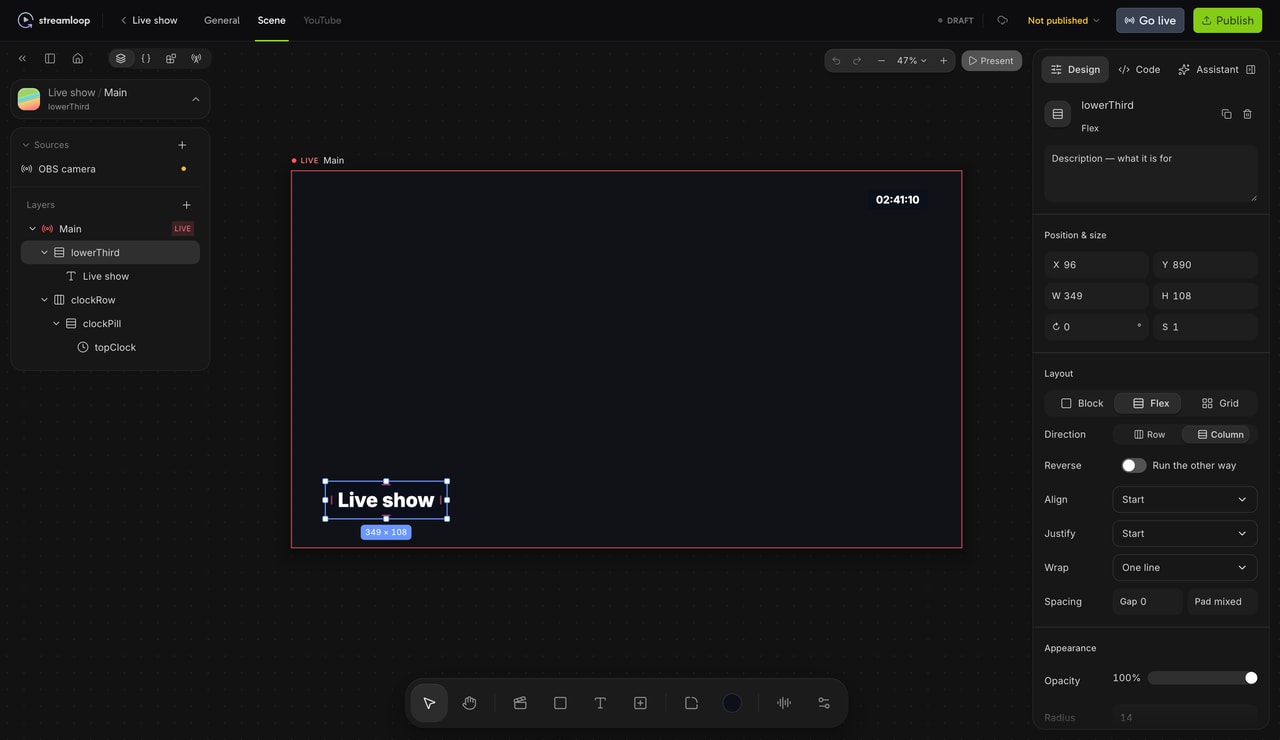
A Live Scene in the Streamloop studio: a camera feed from OBS, a lower third and a clock. Select any layer to change it, or ask the assistant.
Where do they differ most?
How does the same channel get built in each product?
Take one channel: a branded 24/7 playlist with a weekly live segment from OBS and a lower third fed by a spreadsheet. Each step shows how Streamloop does it, then how Playout.video does it, based on its help pages.
Describe the show
Choose Scene when you create a stream, then describe the show and attach a logo. The assistant builds the scene and asks you before anything goes live.
On Playout.video, the assistant imports videos and builds playlists. Graphics come from the editor, or from a prompt on Channel and up.
Add the recorded segment and the live feed
Add a Video playlist source with your recorded clips. Then add an RTMP or SRT input and point OBS at it. Give that input a backup, such as a slate, a hidden layer or another source.
On Playout.video, the playlist is the channel. A guest can join from the browser on every plan, but an OBS feed needs Business, and Studio sessions stop after 24 hours.
Feed the lower third from a spreadsheet
Upload an Excel or CSV file, or connect Google Sheets or a JSON feed. Then bind the lower third text to a row. Google Sheets refresh every 30 seconds by default, or as often as every 5 seconds.
On Playout.video, Google Sheet rows on a Studio graphic need Business.
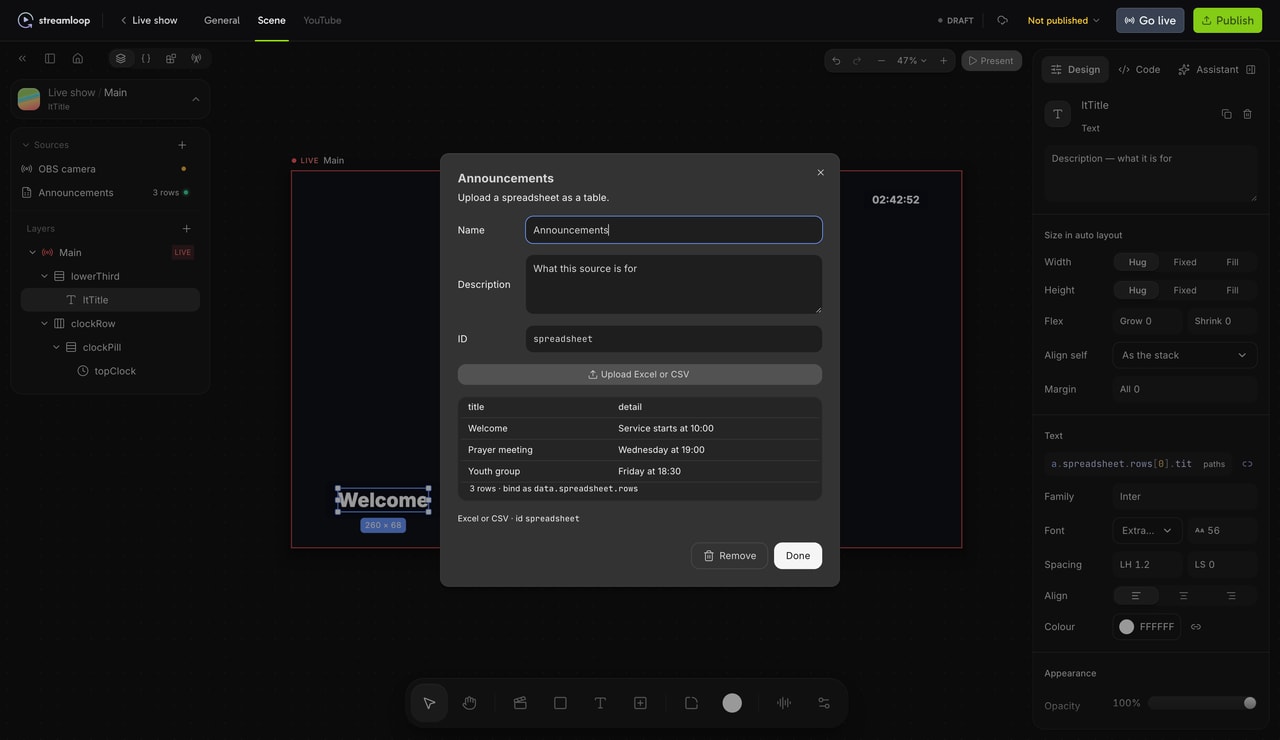
A spreadsheet becomes a table. The lower third shows its first row.
Connect destinations
Connect YouTube with Google sign-in and add other platforms with a stream key, up to 5 in all. Add them before the stream starts, because a live stream cannot take a new destination.
On Playout.video, each plan includes 2 to 10 destinations, and you can add one while live.
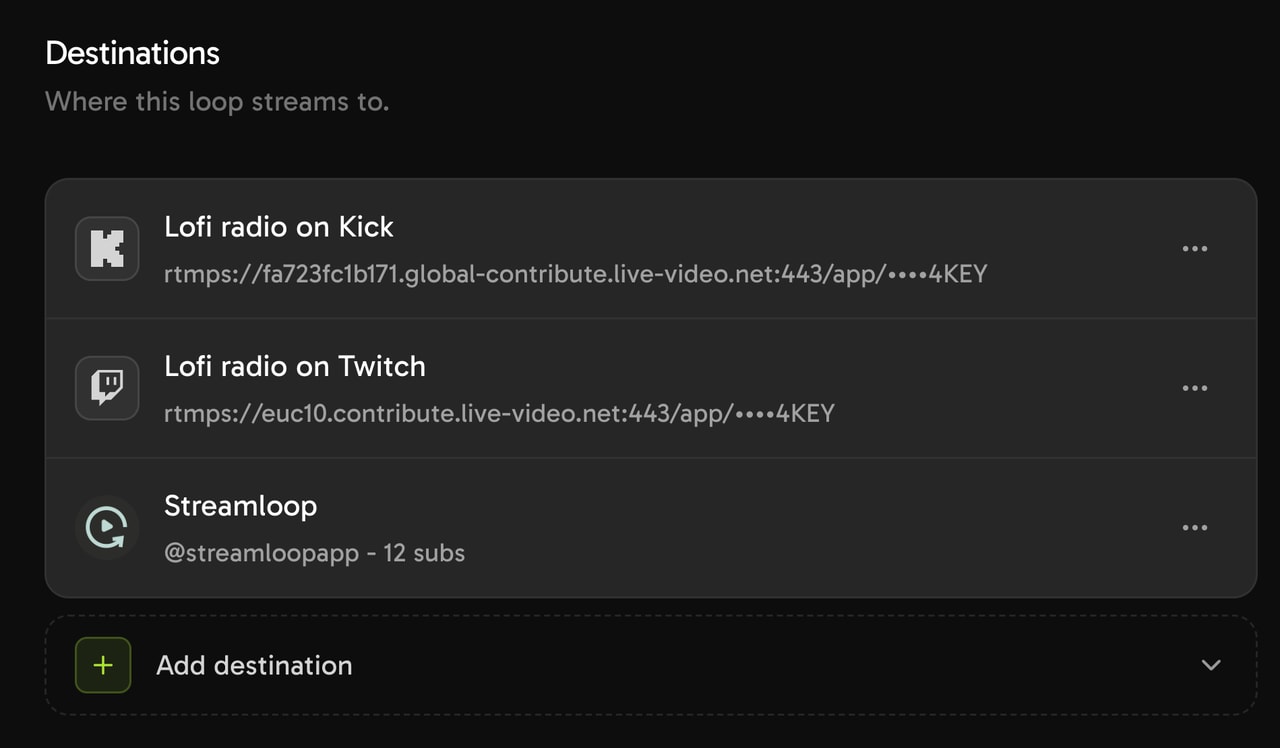
One Scene stream can go to several platforms at once.
Schedule it and go live
Set a later start, or repeat the stream daily or weekly in one time window. Scene streams use the same schedule panel as video streams. When the stream starts, it shows Live on each destination.
On Playout.video, the calendar starts the stream by itself on Channel and up.


What do the same screens look like in each product?
Here are the screens for steps 1, 2 and 5. Playout.video has no public screen for steps 3 and 4.
Playout.video


The assistant on the Free plan, which includes 20 messages a month.
Streamloop

The Streamloop assistant, with a logo attached to the request.
Playout.video

Camera, screen share and guests work on every plan. An RTMP or WHIP feed from OBS needs Business.
Streamloop

A scene takes RTMP, SRT, IP cameras, HLS feeds, playlists, video files and web pages. Each input has a backup.
Playout.video

Every plan can build a calendar, but only Channel and up can go live from it on schedule.
Streamloop
A stream set to repeat every Sunday. Every stream has this panel.
What does a running Streamloop stream look like?
Two more screens from a video stream: one stream sent to five platforms, and a playlist changed while it is live.

Five destinations on one stream, the most a stream can take.
Move a video to a new place and publish. The change starts after the current video, with no restart.
When should you choose Playout.video instead?
Use Playout.video when you need:
- A weekly calendar grid with a fallback for each slot
- Live shows with guests over the running channel, with screen share
- Live quizzes and polls for your viewers
- More than 5 destinations on one stream
- A Twitch title that changes with each video
Use Streamloop when you need:
- A 24/7 playlist for less, with no plan required
- One stream on two to four platforms, for less than Creator billed monthly
- 4K 60fps with no add-ons
- Branded scenes with live data, built by an AI assistant
- Live inputs over RTMP, SRT, RTSP or HLS
- Control from your own AI agent through MCP
Test the same channel on Streamloop.
Streaming is billed by the minute, only while live: one 24/7 stream at 1080p is about $10 per 30 days. Start with a $1 trial week, which becomes a monthly plan unless you cancel, or top up and pay as you go. See all prices
What does the same channel cost on each?
Four setups at 1080p30, each on the cheapest plan that does the job, with a playlist of 15 GiB or less. Amounts are monthly, and the note under each Playout.video price gives the yearly price.
One playlist, one platform
Streamloop
$10 /mo
Playout.video · Creator
$29 /mo
$19 a month billed yearly, $228 paid up front.
Same playlist, two platforms
Streamloop · $10 + $6
$16 /mo
Playout.video · Creator
$29 /mo
$19 a month billed yearly. Up to 5 destinations included. Billed yearly, Creator costs less from three platforms; billed monthly, from five.
A stream every evening
Streamloop · 180 h × $0.0139 in credits
$2.50 /mo
Playout.video · Channel
$49 /mo
$39 billed yearly. The calendar runs itself only on Channel and up.
Live camera feed with graphics
Streamloop · Live Scenes $20 + 2 × $6
$32 /mo
Playout.video · Business
$149 /mo
$119 billed yearly. OBS input and Sheet data start on Business. A browser guest camera instead works on Creator.
Streamloop bills by the minute while live, so a part-time stream costs less, and a Live Scene at 1080p60 costs about $35 a month. Files that need encoding add a one-time fee of $0.005 per minute of encoding time. Add-ons and extra storage cost more on both products; the Storage row below has those prices.
Which features does each one have?
Look up the specs that the sections above do not cover. "Not documented" means that the vendor pages do not say; it does not mean that the feature is missing.
| Feature | Playout.video | Streamloop |
|---|---|---|
| Pricing | ||
| 24/7 at 720p | Creator, $29 a month | $4 a month at 24fps, $5 at 30fps |
| 24/7 at 1080p60 | Channel and 60fps add-on, $59 a month, or about $47 a month billed yearly | $15 a month |
| 24/7 at 1440p | Not offered | $20 a month; $30 at 60fps |
| 24/7 at 4K60 | Business and both add-ons, $199 a month, or about $161 a month billed yearly; 250 GB included | $45 a month; $30 at 30fps. About $51 with a 50 GB playlist. Twitch, Kick and Facebook take up to 1080p |
| Extra destinations | Included up to the plan limit | First one included, then $3.50 to $12.50 a month each, by resolution |
| Team members | Included, with roles | Included, with roles |
| Unused credit | Not applicable | Credits never expire |
| Output quality | ||
| Resolution | 1080p standard; 4K add-on from Business | 720p, 1080p, 1440p or 4K; Live Scenes up to 1080p60 |
| Frame rate | 30fps; 60fps add-on from Channel | 24, 25, 30 or 60fps |
| HDR | Not documented | To YouTube only, not in Live Scenes |
| Portrait output | Yes: 16:9, 9:16 or 1:1 | Yes, from portrait source video |
| Media and playlists | ||
| Upload formats | MP4, MOV, MKV, AVI, WebM | MP4, MOV, MKV, WebM, AVI, MPEG, MXF |
| File limit | 1 hour on Free up to 12 hours on Business | 15 GiB per file |
| Import from | Links from YouTube, TikTok, Vimeo, X and 7 more sites | Google Drive, YouTube or a direct link |
| Separate audio | Audio tracks in compositions | Audio playlists over the video: MP3, WAV, FLAC, AAC and more |
| Play order | Loop, shuffle, playlist swaps | In order, shuffle without repeats, or an order you describe in plain words |
| Edit while live | Calendar changes apply at the next slot | Publish changes; they start after the current video, with no restart |
| Storage | 10 GB on Free up to 250 GB on Business; $25 per 100 GB a month more | Library free; playlists up to 15 GiB included; extra storage free to 30 GiB, then $0.35 per GiB a month while live |
| Destinations and inputs | ||
| YouTube | Native connection | Google sign-in for one channel per stream, or a stream key |
| Other platforms | 20+ platforms; custom RTMP from Creator | Twitch, Facebook, Kick, TikTok, X, LinkedIn or any RTMP server |
| Add destinations while live | Yes | No; you can stop any one except the last |
| Scheduling and automation | ||
| Schedules | Calendar blocks: daily, weekly, monthly or cron | Start now or later; repeat daily or weekly in one time window |
| Runs automatically | Channel plan and up | On every stream, one time window each |
| Fallback content | For each slot: a playlist, standby video, slate or black | Live Scenes: a backup for each input |
| YouTube broadcast settings | Optional split every 11 hours on paid plans, with an archive list | Title, description, thumbnail and privacy stay in sync, also while live |
| Edit title live | Twitch title and category follow each video | Yes, on YouTube |
| API | Not documented | REST (OpenAPI) and GraphQL; hosted MCP server for your own AI agent |
| Production | ||
| Web pages in the stream | Not documented | Yes, a full browser layer in Live Scenes |
| Reliability and trust | ||
| Monitoring and recovery | Moves to a different server; the calendar keeps its place | 24/7 monitoring with automatic restart; Streamloop reports over 99.9% uptime |
| Uptime SLA | Enterprise only | Enterprise only |
| Watermark | On the Free plan | None |
| Sign-in | Password or Google; two-factor not documented | Passkeys, email link or Google; no two-factor |
| Support | Email in 1 business day; live chat on Business | Email, usually answered within 24 hours, and in-app chat |
| Trustpilot | No reviews yet | 4.0 from 3 reviews (Trustpilot, checked October 14, 2026) |
How do you switch from Playout.video?
Nothing imports from Playout.video, so calendars, overlay templates, Studio recordings, quiz boards and viewer history stay behind. Keep the old channel live until your test passes.
Bring your media
Upload files up to 15 GiB each, or import from Google Drive, YouTube or a direct link. Download your Studio recordings first.
Rebuild the playlist
Set the order, shuffle without repeats, or describe the order in plain words.
Connect destinations again
Sign in to YouTube with Google again, and add each other platform with a new stream key.
Recreate schedules and overlays
Set a start time, and repeat daily or weekly if you need to. Overlays need Live Scenes. Choose Scene when you create a stream. Then describe the overlays, and the assistant builds the scene.
Test before you change over
Run an unlisted test stream and check it on each platform, then stop the old channel. Try it for $1
Frequently asked questions
Are Streamloop and Playout.video direct competitors?
Yes, for 24/7 cloud channels. Both stream playlists from the cloud to several platforms. Playout.video adds a calendar grid, a guest studio and audience quizzes and polls. Streamloop costs less for most single channels, has 4K60 with no add-ons, and has Live Scenes that an AI assistant builds for you.
Is Playout.video Creator enough for automated calendar programming?
No. Creator can build a calendar, but it cannot run it. Automatic start, stop and playlist swaps need Channel, at $49 a month or $39 a month billed yearly.
Can a live host take over a Playout.video channel?
Yes. A Live Studio show replaces the channel output, and the playlist continues behind it. When the show ends, the channel continues from the current point. Streamloop has no guest studio, but a Live Scene can switch to a live feed from OBS and back.
What does one Playout.video seat include?
Playout.video now prices plans per stream. Each paid plan includes one live stream, and team members are free. That stream can go to 5, 8 or 10 destinations, by plan.
Which is better for recurring weekly programming?
Playout.video Channel, if you need a calendar grid with a fallback for each slot. Streamloop fits a stream that repeats daily, or on chosen weekdays, in one time window. You pay only for the minutes you stream: about $2.50 a month for 6 hours a day at 1080p30.
Can one Streamloop stream run at two different times?
Each stream has one time window. For example, Sunday 10:00 to 12:00 is one window. For weekday evenings too, set up a second stream and add the same videos from your library. A stream that is not live costs nothing.
How does Streamloop billing work?
Streaming spends credits by the minute, only while a stream is live. All streams in a workspace spend from one balance. A monthly plan adds a fixed amount of credits every month, for example $10 at 1080p30. You do not need a plan: you can top up from $5 instead. If you have no plan, auto-refill can top up from your card when credits run low. Credits never expire.
What does a weekly service schedule cost?
Take a 2-hour service on Sunday and 2 hours on five weekday evenings. That is about 52 hours a month, or about $0.72 of credits at 1080p30. A $5 top-up lasts about seven months, plus the card fee. For a new recording each week, upload it and publish the playlist before the next window.
Do I need to cancel Playout.video first?
No. Run both during the test, and stop the old channel when the new one is healthy. Cancelling Playout.video stops the next renewal, and access runs to the end of the period you paid for.
What happens when the $1 trial ends?
On day 7, the monthly plan for the quality you chose is charged to the same card, for example $10 a month at 1080p30. The plan adds that amount as credits. To pay nothing more, cancel from Billing during the trial. The trial credits cover one platform for 7 days, so extra platforms use them up sooner.
Can I pay without a subscription?
Yes. Buy credits from $5 by card or crypto, and spend them only while you stream. A card top-up can add a fee of up to 5%, at least $0.50, depending on the payment method. The top-up window shows the fee before you pay. Crypto has no fee. Credits never expire.
Is Live Scenes open to everyone?
Yes, it is available now. Choose Scene when you create a stream. Scenes go up to 1080p60 and do not take guest cameras. The $1 trial is sized for video streams; a Scene uses its credits about twice as fast.
Sources
Checked on October 14, 2026 against Playout.video pricing and Help and the Streamloop dashboard.
Costs assume 720 hours a month at 1080p30, unless stated