
Playout.video Review
Playout.video is a real, paid cloud service that streams video playlists 24/7 from a calendar, with a browser Live Studio for guests. A nonstop channel needs a paid plan, because Free sessions stop after two hours. Creator costs $29 a month per stream, or $19 billed yearly. It fits best when a weekly schedule mixes playlists with live guest shows. This review compares each plan with Streamloop, which streams pre-recorded videos 24/7 from the cloud, with no OBS and your computer off. It suits lofi, sermon-replay, podcast and study channels, because a live stream stays live and new viewers can find it at any hour.
- Starting price
- Free; paid from $29/mo
Or $19 a month billed yearly, for each stream. See the plan for each job.
- Best for
- Scheduled channels with live guests
A calendar that runs itself needs Channel, at $49 a month.
- Website
- playout.video
A real service with public prices, a help center and a changelog. It has no Trustpilot reviews yet.
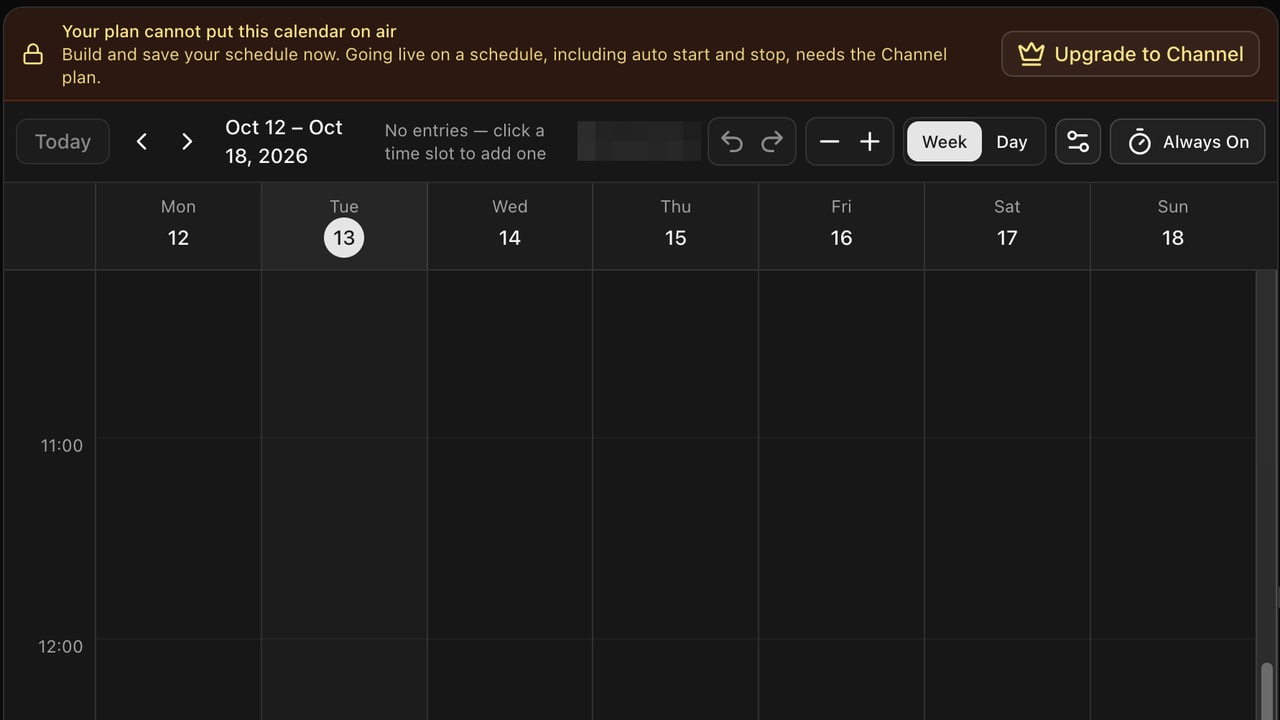
The calendar controls the channel: playlist blocks by day and time, recurring rules, and a fallback for each slot. On Free, a banner says that going live on a schedule needs the Channel plan.
Is it right for your channel?
Five common jobs, and the tool that fits each one better.
A playlist that streams 24/7
Try Streamloop for $1Free sessions stop after two hours, so a nonstop playlist needs Creator: $29 a month, or $19 billed yearly. Streamloop streams the same 1080p30 playlist for about $10 a month and bills only the minutes it is live. Its $1 trial week becomes a monthly plan unless you cancel.
Better fit: Streamloop, for about half the yearly Creator price.
A branded channel with live data
Streamloop Live Scenes puts your playlist, camera feeds and graphics in one layout, and graphics can read live data from Google Sheets, CSV or JSON. You describe the show, and the AI assistant builds it. Plain video streams have no overlays, so this job needs Live Scenes. On Playout.video, overlays show the title of each video, and Sheet data feeds are listed only on Business.
Start with Live Scenes →Better fit: Streamloop, at $20 a month for 1080p30. Choose Scene when you create a stream.
One stream on several platforms
Creator sends one stream to 5 platforms for $29 a month. Streamloop also sends one stream to up to 5 platforms: the first is included, and each extra one adds $6 a month at 1080p.
Better fit: Streamloop, for one or two platforms. From three, yearly Creator costs less, paid $228 up front; against monthly Creator, Streamloop stays cheaper up to four.
A weekly TV schedule
Recurring calendar blocks, with priorities and fallback content for the gaps. The calendar runs itself only on Channel, at $49 a month. Streamloop can repeat a stream daily or weekly, but it has no calendar grid.
Better fit: Playout.video.
Live shows with guests
Live Studio brings in guests over WebRTC, with screen share and layouts. The show replaces the channel output, and the schedule continues behind it. Streamloop has no guest studio.
Better fit: Playout.video.
Where Playout.video falls short.
Playout.video handles calendars and live takeovers well, and team members are free. For a 24/7 channel, five limits matter. You cannot test 24/7 on Free, and the calendar needs the $49 plan. Higher quality is an add-on, live inputs need Business, and on Free and Creator, you design overlays by hand.
You cannot test 24/7 on Free
Playout.video Free: two-hour sessions with a watermark. Streamloop: a full week for $1
Playout.video
The Free plan is permanent, but each session stops after two hours, and all output has a watermark. At busy times, paid accounts start first. You can try the editor, but you cannot see a night of streaming without Creator, at $29 a month. Source: Playout.video help center, Free plan.
On Streamloop
$1 buys a full week of nonstop streaming for one stream on one platform, at the quality you pick, with no watermark. On day 7 the trial becomes that quality’s monthly plan, unless you cancel, so you see a real week before you pay the full price. Start the $1 week
The calendar needs the $49 plan
Playout.video: calendars run on Channel and up. Streamloop: repeats on every stream
Playout.video
Free and Creator can build a calendar, but they cannot run it. Automatic start, stop and playlist swaps start on Channel, at $49 a month or $39 billed yearly. If you only want a stream to start every evening, you pay for the full TV plan.
On Streamloop
Any stream can start later and repeat daily, or on the weekdays you choose, in one time window. Scheduling costs nothing extra, because credits pay only for the minutes you stream: six hours every evening at 1080p30 uses about $2.50 a month. For a full TV grid with priorities, Playout.video is still the better fit.
Higher quality is an add-on
Playout.video: 60fps and 4K billed on top of the plan. Streamloop: one hourly price for each quality
Playout.video
Every plan streams at 1080p30. 60fps costs $10 a month more, from Channel up, and 4K costs $40 a month more, from Business up. A 4K60 channel costs $199 a month, or about $161 a month billed yearly. Playout.video's help center says Creator cannot buy either add-on.
On Streamloop
Each quality from 720p to 4K, at 24 to 60fps, has its own price, with no add-ons. A 1080p60 stream that runs 24/7 costs $15 a month, and 4K60 costs $45. Long 4K playlists add a storage fee: with a 50 GB playlist, 4K60 comes to about $51. Files can be up to 15 GiB each, so split long 4K videos.
Live inputs need Business
Playout.video: RTMP or WHIP input from $149 a month. Streamloop: RTMP, SRT, RTSP and HLS in Live Scenes
Playout.video
To bring a feed from OBS or an encoder into Live Studio, you need Business or Enterprise. Business costs $149 a month, or $119 billed yearly. The input accepts RTMP or WHIP, and Live Studio sessions stop after 24 hours. A phone or webcam can join as a browser guest on Creator.
On Streamloop
Live Scenes accepts RTMP and SRT from OBS, vMix or a hardware encoder, with no session time limit. It also pulls IP cameras over RTSP and HLS feeds. Each input has a backup: a slate, a hidden layer or a different source. At 1080p30, a scene that runs 24/7 costs $20 a month.
On Free and Creator, you design overlays by hand
Playout.video: a template editor, plus AI graphics from Channel up. Streamloop: describe the show, and the assistant builds it
Playout.video
The overlay editor is strong: text, tickers, countdowns, lower thirds and web overlays. On Free and Creator, you design each template yourself. On Channel and up, the AI assistant can also design a custom graphic from a prompt, such as a quiz board.
On Streamloop
In Live Scenes, you describe the show and attach a logo, an image or a data file. The assistant builds the scenes, layers, data tables and switch rules. It checks its work against a picture of each scene, and it asks you before anything goes live. You can edit any part yourself, but you do not have to.
What it does well.
- Calendar automation
Daily, weekly or monthly blocks, cron rules, priorities when blocks overlap, and fallback content for each slot.
- Live takeover
A Live Studio show replaces the channel output. The schedule continues behind it, and the channel continues from the correct point.
- Free seats, many platforms
Team members cost nothing extra. By its own count, it reaches 20+ platforms and imports links from 11 sites, and you can add a destination during a live stream.
Which features does Playout.video have?
Each row comes from Playout.video's own pages.
| Feature | Playout.video |
|---|---|
| Pricing and access | |
| Pay as you go, no subscription | No |
| Free trial | No trial; a permanent Free plan with two-hour sessions |
| Starting price for 24/7 | Creator, $29/mo or $19 billed yearly |
| 720p, 24/7 | Creator, $29/mo |
| 1080p, 24/7 | Creator, $29/mo |
| 1440p, 24/7 | Not offered |
| 4K, 24/7 | Business and 4K add-on, $189/mo |
| Streaming quality | |
| 60fps | $10/mo add-on, from Channel up |
| Up to 4K 60fps | Business and both add-ons, $199/mo |
| Portrait output | Yes: 9:16 and 1:1 |
| HDR | Not documented |
| Production and design | |
| Layout builder | Preset and custom layouts, lower thirds |
| Image, video and logo overlays | Overlay templates, also for each calendar block |
| Live data in graphics | Variables for each video; Google Sheet rows on Business |
| Web pages in the stream | Web overlays |
| AI builds the show for you | Graphics from a prompt, Channel and up |
| Browser studio with guests | WebRTC guests, screen share, takeover of the channel |
| Audience widgets | Quizzes, polls and cross-platform chat |
| Sources and inputs | |
| Upload formats | MP4, MOV, MKV, AVI, WebM |
| Separate audio track | Studio mixer |
| Import from links or cloud | Links from YouTube and 10 more sites |
| Play order | Loop, shuffle, playlist swaps |
| Edit the stream while live | Calendar changes apply at the next slot |
| RTMP ingest | RTMP or WHIP, Business and up |
| SRT ingest | Not documented |
| IP cameras (RTSP) and HLS feeds | Not documented |
| Destinations | |
| YouTube without a stream key | Native connection |
| Custom RTMP | From Creator |
| Twitch, Facebook, Kick, TikTok | 20+ platforms, by its own count |
| Multistream | 2 to 10 destinations by plan, included |
| Lifecycle and automation | |
| True 24/7 | Paid plans only |
| Scheduling | Calendar; runs itself on Channel and up |
| YouTube broadcast settings | Optional split every 11 hours, with an archive list |
| Edit title live | Twitch title and category follow each video |
| Public API | Not documented |
| MCP and AI agents | Not documented |
| Limits and inclusions | |
| Storage | 10 GB on Free up to 250 GB on Business |
| Longest upload | 1 hour on Free up to 12 hours on Business |
| Streams at the same time | One per paid plan; you can add more |
| Team access | Members free, with roles |
| Watermark | On the Free plan |
| Reliability and support | |
| Monitoring and recovery | Moves to a different server; the calendar keeps its place |
| Fallback content | For each calendar slot |
| Support | Email in 1 business day; live chat on Business |
| Uptime SLA | Enterprise only |
| Trust and account | |
| Trustpilot | No reviews yet |
| Sign-in | Password or Google |
| Two-factor authentication | Not documented |

What does each Playout.video plan include?
Limits for one stream on each plan. Enterprise limits are custom.
| Limit | Free | Creator | Channel | Business |
|---|---|---|---|---|
| Session length | 2 hours | No limit | No limit | No limit |
| Calendar runs itself | No | No | Yes | Yes |
| Destinations | 2 | 5 | 8 | 10 |
| Storage | 10 GB | 100 GB | 150 GB | 250 GB |
| Longest upload | 1 hour | 4 hours | 8 hours | 12 hours |
| Studio guests | 2 | 8 | 10 | 20 |
| Studio session | 2 hours | 24 hours | 24 hours | 24 hours |
| Custom RTMP output | No | Yes | Yes | Yes |
| RTMP or WHIP input | No | No | No | Yes |
| 60fps add-on | No | No | $10/mo | $10/mo |
| 4K add-on | No | No | No | $40/mo |
| AI messages a month | 20 | 200 | 500 | 2,000 |
| Support reply target | None | 1 business day | 1 business day | 4 business hours |
| Watermark | Yes | No | No | No |
Which Playout.video plan does your job need?
Prices are for each stream, and you can add more streams. Add-ons are billed on top of the plan.
| Job | Plan | Monthly | Billed yearly | Add-ons |
|---|---|---|---|---|
| 24/7 playlist, 1080p30 | Creator | $29 | $19/mo ($228) | None |
| Live show with guests | Creator, 8 guests | $29 | $19/mo ($228) | None |
| A calendar that runs itself | Channel | $49 | $39/mo ($468) | None |
| 1080p60 output | Channel | $59 | $39/mo + $100/yr | 60fps, $10/mo or $100/yr |
| Website embed | Channel | $78 | $39/mo + embed add-on | Embed, $29/mo |
| Live feed from OBS | Business | $149 | $119/mo ($1,428) | None |
| 4K60 output | Business | $199 | $119/mo + $500/yr | 4K, $40/mo or $400/yr; 60fps, $10/mo or $100/yr |
Extra storage costs $25 per 100 GB a month on any paid plan, or $250 a year with yearly billing.
What does Streamloop do instead?
Streamloop streams playlists 24/7 and sends each stream to up to 5 platforms. Live Scenes adds layouts, graphics, live data and camera feeds, and an AI assistant builds them. You choose a quality, see the monthly price, and the stream runs until you stop it. To plan a full channel step by step, see how to create an online TV channel.
- YouTube
- Included
- Twitch
- +$6/mo
- Kick
- +$6/mo
- 1080p30 to 3 platforms, 24/7
- $22/mo

Describe the show, and the assistant builds the layout, logo, ticker and data.
Costs. Each extra platform adds $6 a month at 1080p. You do not need a plan: top up from $5 by card or crypto and pay only while live. A card top-up can add a fee of up to 5%, at least $0.50. Converting a file that needs it costs $0.005 per minute of encoding, and playlist storage above 30 GiB costs $0.35 per GiB a month. See all prices.
Try a real week of 24/7 streaming.
Streaming is billed by the minute, only while live: one 24/7 stream at 1080p is about $10 per 30 days. Start with a $1 trial week, which becomes a monthly plan unless you cancel, or top up and pay as you go.
Compare them side by side →Alternatives to Playout.video →How Live Scenes works →
What do you give up if you switch?
If you pay for Creator yearly and stream to one platform, Streamloop saves about $9 a month. If you move, you lose these features.
- Guests and the calendar grid
Streamloop has no guest studio, no screen share, no live quizzes or polls, and no calendar of blocks with priorities.
- Wider import and output
Streamloop imports video links from Google Drive, YouTube or a direct file URL. There is no Twitch title for each video, and no more than 5 destinations. You cannot add a destination while a stream is live.
- Overlays on plain streams
Plain video streams have no overlays. For graphics, live inputs and the AI assistant, you need Live Scenes, which streams at up to 1080p60.
Common questions about Playout.video.
Is Playout.video a 24/7 looper or a live-production platform?
It is both. Live Channels stream playlists 24/7 from a calendar, and Live Studio is a browser studio for hosts and guests. Streamloop can replace the 24/7 part. Its Live Scenes add graphics, live data and camera feeds, but Streamloop has no guest studio.
Is Playout.video legit?
Yes, it is a real, paid service. It publishes its prices, a help center and a changelog, and its Free plan needs no card. It does not pay you to watch or stream: you pay it to run your channel. Independent feedback is thin: on October 15, 2026, its Trustpilot profile had no reviews. Try the Free plan, or pay for one month, before you pay for a year.
Is the Playout.video Free plan really free, and can it run 24/7?
The Free plan is permanent and needs no card. It includes one 1080p30 stream, two destinations, 10 GB of storage and a watermark. It cannot run 24/7, because each session stops after two hours. You must start the next session yourself.
How much does Playout.video cost per month?
Creator costs $29 a month, Channel $49 and Business $149, for each stream. Billed yearly, they cost $19, $39 and $119 a month. 60fps, 4K, a website embed and extra storage cost more. Enterprise prices are custom.
How many simultaneous channels and destinations does each plan include?
Prices are per stream. Each paid plan includes one stream, and you can add more. Free sends to 2 destinations, Creator to 5, Channel to 8 and Business to 10.
What is the difference between Playout.video Creator and Channel?
Creator runs one 24/7 channel at 1080p30, with 5 destinations, 100 GB and 4-hour uploads. It can build a calendar, but it cannot run it. Channel runs the calendar: automatic start, stop and playlist swaps. It also gives 8 destinations, 150 GB, 8-hour uploads and the 60fps add-on.
Can Playout.video switch from a playlist to a live show without ending the broadcast?
Yes. A Live Studio show replaces the channel output, and the playlist continues behind it. When the show ends, the channel continues from the current point in the schedule.
Does Playout.video include 4K or 60 FPS?
Every plan streams at 1080p30. 60fps costs $10 a month more, from Channel up. 4K costs $40 a month more, from Business up. On Streamloop, 1080p60 costs $15 a month and 4K60 costs $45, and neither is an add-on.
Is Streamloop cheaper than Playout.video?
For most single channels, yes. One 1080p30 playlist that streams 24/7 costs about $10 a month on Streamloop, against $29 on Creator, or $19 billed yearly. A stream that runs 6 hours every evening uses about $2.50 of credits a month. On Playout.video, a calendar that runs itself needs Channel, at $49.
Does Playout.video have an AI assistant?
Yes. With your approval, it imports videos, reorders playlists, schedules broadcasts and starts or stops streams. On Channel and up, it can also design a graphic from a prompt. Plans include 20 to 2,000 messages a month. The Streamloop Live Scenes assistant also builds the scene itself: layers, graphics, data tables and switch rules.
Can I move a channel to Streamloop?
Yes, but by hand. Upload or import the media, connect the destinations again and rebuild the playlist. Calendars and overlay templates do not transfer. What switching involves
What are the main Playout.video alternatives?
Streamloop, for 24/7 playlists, multistreaming and AI-built scenes. LiveReacting and Upstream, for a browser studio with a 24/7 channel. OneStream Live and Livepush, for wide distribution. Castr, for TV playout in a larger video stack. See all alternatives
Sources
Playout.video pricing section
Help center: Understanding plans and pricing
Help center: Free plan, what is included
Help center: AI assistant
Changelog: Background playlist behind Live Studio, July 28, 2026
Changelog: RTMP source in Live Studio
Changes
October 15, 2026. Rechecked Playout.video prices and plans, and shortened the review. Corrected Live Scenes access and Streamloop storage, upload, fee and trial details. Added Playout.video AI graphics, quizzes, polls and Sheet data feeds.
October 12, 2026. Free sessions are now two hours (were five). Plans are priced per stream, and team members are free. Monthly prices confirmed at $29, $49 and $149. Added the AI assistant, Streamloop multistreaming and Live Scenes.
August 4, 2026. First published.