
How to Create an Online TV Channel That Plays 24/7
To create an online TV channel, choose where people will watch, get the rights to what you play, and stream it as one continuous channel.
For most creators, a simple way to start is a 24/7 live stream on a platform people already use, such as YouTube.
This guide is for creators, churches, schools, clubs and small media teams who want a channel that plays all day, whichever route they choose.
- Play your videos all day on YouTube, Twitch, Kick or Facebook
- Run a branded channel with live shows, a logo and a ticker
- Get a Roku, Fire TV or Apple TV app, or a website player
- Get onto Pluto TV, Samsung TV Plus, cable or broadcast TV
On this page
What kind of online TV channel can you create?
The four kinds differ in who lets you in. The first two need only a platform account. A TV app needs an app store review, and a FAST channel needs a distribution deal.
| Kind | Where people watch | What you need | Who decides |
|---|---|---|---|
| 24/7 live stream channel | YouTube, Twitch, Kick, Facebook, X | Videos you have rights to, and a service that streams them nonstop | You, inside the platform rules |
| Branded live channel | The same platforms | Live sources, graphics and a studio that mixes them | You, inside the platform rules |
| TV app or website player | Roku, Fire TV, Apple TV, your own website | An app builder, or a video platform with apps | Each app store |
| FAST channel (free ad-supported streaming TV) | Pluto TV, Samsung TV Plus, The Roku Channel | A content library you hold rights to, and a partner deal | The FAST service |
Cable and over-the-air broadcast TV need a carriage deal or a licence (see getting onto FAST or cable).
Do you need a licence to start an online TV channel?
Usually you need rights, not a broadcast licence. In the U.S., copyright gives owners the right to perform their work in public. So you need permission for every show, film, clip and song you play.
A broadcast licence depends on the country. In the UK, Ofcom licenses some TV services that are sent over the internet.
Three YouTube rules matter here:
- YouTube scans every live stream. If it finds third-party content, it can interrupt or end the stream.
- A licence alone may not stop this. The content owner must add your channel to their allowlist in Content ID.
- Music from the YouTube Audio Library is copyright-safe. YouTube does not vouch for other "royalty-free" music.
Before you sell the channel as TV, ask your media regulator.
How do you start a 24/7 TV channel on YouTube, Twitch or Kick?
A 24/7 TV channel on YouTube, Twitch or Kick is one live stream that never ends. A cloud service plays your videos in order, around the clock, and sends them to the platforms. Your computer can be off.
Streamloop turns pre-recorded videos into a 24/7 live stream from the cloud, with no OBS. It suits sermon replays, music sets, lofi and ambient streams, and local channels that replay shows. A live stream stays live, so new viewers can find it at any hour. Streamloop sends your channel to YouTube, Twitch, Kick, Facebook or X.
Each stream you create in Streamloop is a loop, and each platform that a loop sends to is a destination.
Step 1. On YouTube, verify your channel with a phone number before your first live stream.
Step 2. Create a Streamloop account, then start a new loop. On the "Pre-recorded video" card, select "Choose video".
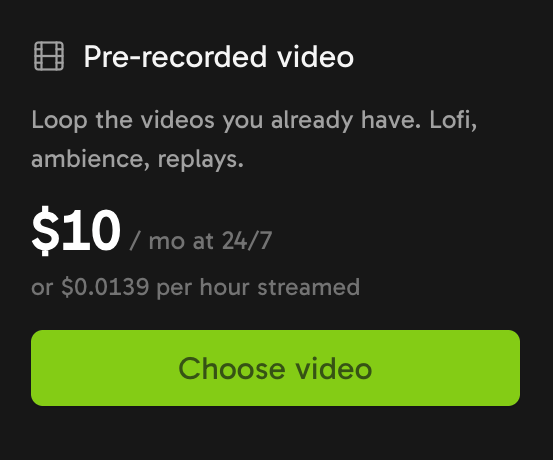
Choose "Pre-recorded video" to make a channel from the videos you already have.
Step 3. Upload your shows, then drag them into the order you want. Each file can be up to 15 GB. A playlist over 15 GiB in total needs extra storage (see what a channel costs).
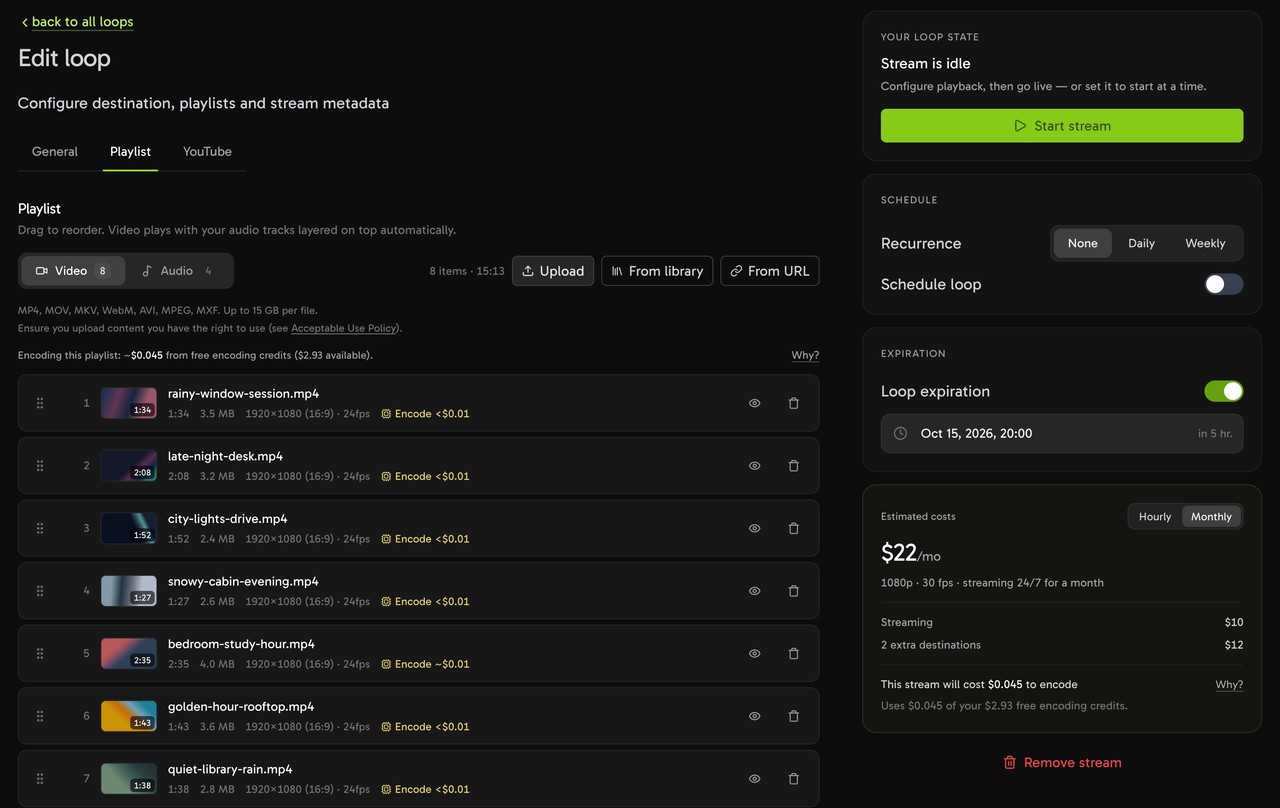
Upload your videos, then drag them into the order you want.
Step 4. Choose "Add destination" and pick each platform. For YouTube, choose "Connect channel" or "RTMP stream key". Twitch and Kick use "RTMP stream key". Facebook and X use "Live RTMP".
A loop can send to up to five destinations, with one YouTube channel per loop. See how to multistream.

Pick the platforms for your channel.

One loop can send the same channel to several platforms.
Step 5. Choose "Start stream", then check the stream on each platform.
YouTube may not save a replay of a stream longer than 12 hours. Twitch ends a broadcast at 48 hours and Facebook at 8 hours, so Streamloop reconnects before each limit. Viewers see a short break at each reconnect, and on Facebook each reconnect opens a new live video.
For every setting, replays and fixes, see how to run a 24/7 YouTube live stream from pre-recorded video.
Can your channel play shows at set times, like a TV schedule?
Partly. Streamloop has no programme grid or TV guide. A loop can start and stop on a schedule, with one window per loop.
Under "Recurrence", choose "None", "Daily" or "Weekly". Set a start and an end time, shorter than 24 hours, and pick the days for a weekly window. Then choose "Schedule". For a 24/7 channel, the playlist order is your lineup.
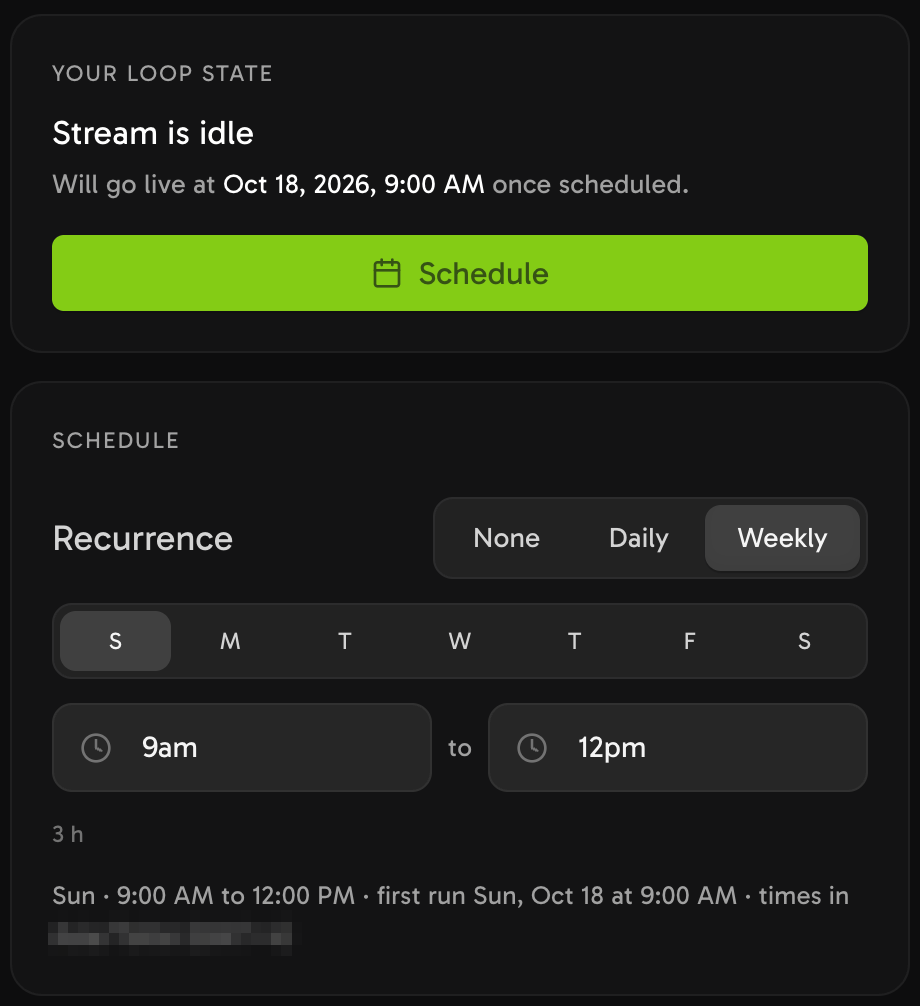
Set one daily or weekly window for the loop.
A channel that needs an hour-by-hour guide with fixed slots needs a scheduling playout tool instead (see TV apps and other tools).
How do you add live shows, a logo, a clock or a ticker?
Streamloop runs 24/7 live streams from the cloud. Its Live Scenes studio mixes live sources and graphics into one stream, at up to 1080p and 60 fps. Create an account, choose "Scene" when you create a stream, and describe your use case. Access is granted within 24 hours. Then add destinations as in step 4.
A scene is one layout of layers. Layers include video files and playlists, images, text, a clock and a ticker. You can switch between scenes with a cut or a fade.
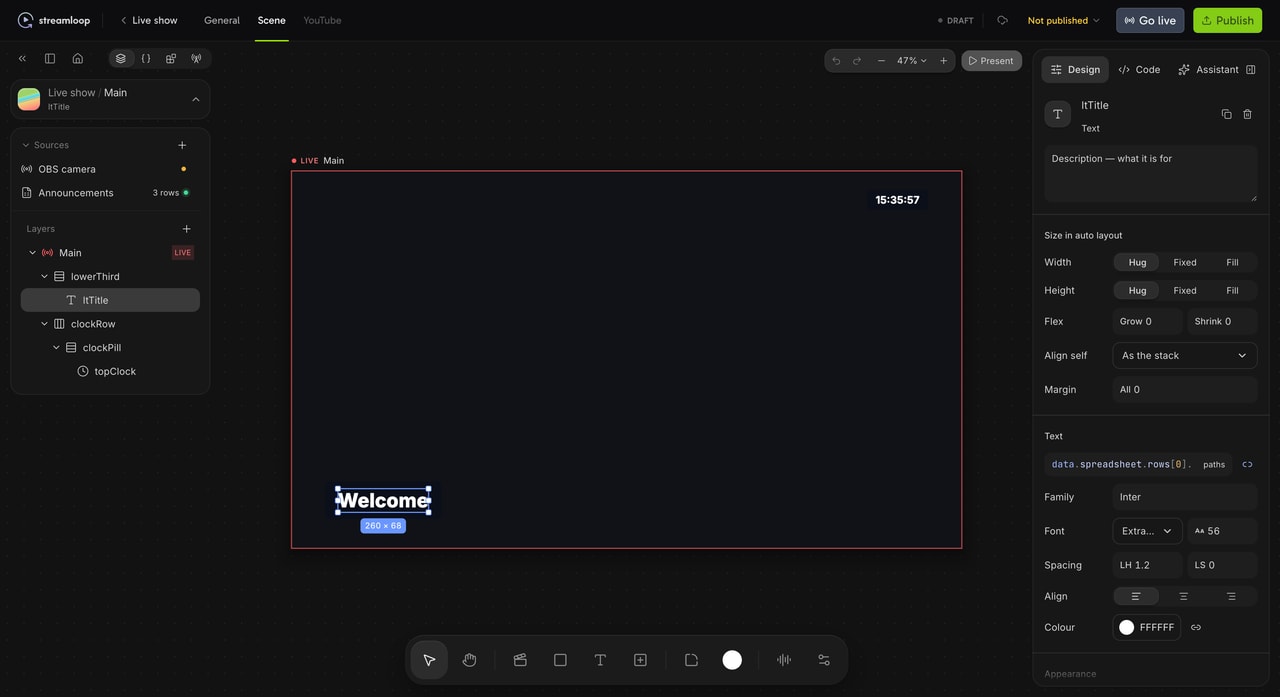
Build the channel look from layers. Select a layer to change it in the inspector.
Text can show rows from a spreadsheet. Choose "Upload Excel or CSV", or connect "Google Sheets" or a JSON feed. When you change the data, the text on screen changes too.
Live inputs are "RTMP input", "SRT input", "IP camera" and "HLS stream". So OBS or a camera encoder can send a live show into the channel. Live Scenes has no guest cameras, so a call-in show needs a browser studio with guest links. See Live Scenes for the full studio.

Upload a spreadsheet, then show its rows as text on screen.

Add a live input for a camera or an encoder, or add a video playlist.
How much does it cost to run an online TV channel?
Starting a channel on YouTube, Twitch or Kick costs nothing. You pay for the rights to what you play, and for a service that streams it all day. On Streamloop, these are the prices for a channel that is live around the clock:
| Channel at 1080p and 30 fps, live 24/7 | Price per 30 days |
|---|---|
| From your videos, on one platform | About $10 |
| Each extra platform | $6 |
| Branded, with Live Scenes, on one platform | About $20 |
| Extra storage, for a playlist over 15 GiB | Free up to 30 GiB in total, then $0.35 per GiB above that, a month, while live |
Top-ups by card can add a fee of up to 5%, at least $0.50, depending on the payment method; the top-up window shows the fee before you pay.
Rights, TV apps and FAST deals are priced by their owners: see rights, TV apps and FAST channels.
Start a 24/7 channel from your videos
Streaming is billed by the minute, only while live: one 24/7 stream at 1080p is about $10 per 30 days. Start with a $1 trial week, which becomes a monthly plan unless you cancel, or top up and pay as you go. See all prices
How do you get a TV app on Roku, Fire TV or Apple TV?
A TV app needs an app builder or a video platform with apps. Each app store then reviews the app before viewers can install it.
Roku removed its no-code Direct Publisher on January 18, 2024. A Roku channel is now an SDK app. Roku points to its SceneGraph channel template, or to an experienced Roku developer.
Streamloop does not build apps or host a website player. It only sends live streams, by RTMP or RTMPS. A video platform that accepts RTMP can be a "Custom RTMP" destination (see custom RTMP streaming). For a player on your site, see how to show your channel on your own website.
For a TV app, use a web TV channel maker or an app builder, such as Viloud or Muvi. For an hour-by-hour guide, use a scheduling playout tool.
How do you get a channel onto Pluto TV, Samsung TV Plus or cable?
FAST services and cable networks pick channels through partner deals. You need a content library that you hold the rights to, and a distribution deal.
We found no public page where you can submit a channel to Pluto TV or Samsung TV Plus. As a next step, contact the content partner team of the service, or a FAST distributor that already supplies channels to it.
For broadcast TV, check the licence rules first (see do you need a licence).
Streamloop is not a FAST or broadcast playout system. For this route, use a broadcast-grade cloud playout service or a FAST distribution service.
Frequently asked questions
Can you make money from a 24/7 TV channel on YouTube?
Yes, if the channel joins the YouTube Partner Program. The channel needs 1,000 subscribers, plus 4,000 qualified watch hours in the last 12 months or 10 million Shorts views in the last 90 days. Reused content cannot earn money, for example song collections from different artists, even with permission.
Can you run a TV channel from your own computer for free?
Yes. OBS is free software for live streaming. It can play your video files, and with VLC installed it can play a playlist. The stream comes from your computer, so the computer and its internet connection must stay on all day. For other tools, see the best 24/7 streaming software.
Can you show your channel on your own website?
Yes, with the platform's own player. On YouTube, open the watch page of the live stream, choose "Share", then "Embed", and copy the HTML code into your page. YouTube Help gives the same steps for a video or a playlist. The embedded player shows the live stream on your page, while YouTube still hosts it.
Can you make a TV channel from your own movie library at home?
Yes, as a private channel. Media server add-ons such as ErsatzTV or Tunarr build TV-style channels and a guide from a Plex or Jellyfin library. These channels are for your home network, not for public viewers. A public channel needs a platform that viewers use and the rights to every show.
Sources
Checked on October 15, 2026 against YouTube Help, Twitch Help, Meta for Developers, Ofcom, the U.S. Copyright Office, the Roku developer blog, the OBS Project and the Streamloop dashboard.