
Custom RTMP Streaming: Connect Any Server With a URL and a Key
Custom RTMP sends a live stream to any server that accepts RTMP or RTMPS. You need two values from the destination: a server URL and a stream key.
Use it for Instagram, your own server or any platform that your encoder does not list. For one server, OBS alone is enough, and OBS is free.
- Server URL
- rtmp:// or rtmps://, a host and an app path
Example: rtmps://live.example.com:443/app
- Stream key
- The secret last part
- Where to paste
- OBS: Settings, Stream, Service Custom...
Streamloop: Add destination, then Custom RTMP.
- Default ports
- 1935 for RTMP, 443 for RTMPS
On this page
What do you want to do?
Skip to your track if you already have the server URL and the key.
- Stream live from OBS to one server
Track A. Free, with OBS only. Go to Track A
- Send one live feed to several servers
Track B. One upload through a relay. Go to Track B
- Run a 24/7 loop of video files
Track C. Your files play from the cloud. $1 for 7 days. Go to Track C
- Fix a stream that does not connect
Causes and fixes by symptom. See the table
Server URL and stream key: the two parts of a custom RTMP address
The server URL says where the stream goes. The stream key says which channel or broadcast it is.

The stream key is secret, so treat it like a password. If a platform shows one long address that ends in the key, split it at the last slash.
RTMP or RTMPS: which one to use
RTMPS is RTMP inside an encrypted TLS connection.
| Setting | RTMP | RTMPS |
|---|---|---|
| Default port | 1935 | 443 |
| Encryption | None | TLS, from your sender to the ingest server |
| When to use | When the destination offers only rtmp:// | When the destination offers it. Facebook asks for RTMPS if your software supports it. LinkedIn and X offer both. |
Where each platform shows its server URL and stream key
Copy both values exactly. Some keys work for one broadcast only.
| Platform | Where the URL and key are | Key and limits |
|---|---|---|
| facebook.com/live/create: select Go live, then Streaming software as the video source | A standard key works for one broadcast. Turn on Persistent stream key to reuse it. You need an account 60 days old and 100 followers. | |
| instagram.com on a computer: Create, then Live video. Enter a title and pick an audience. | The key changes each time you use Live Producer. You need a public account with 1,000 or more followers. | |
| Live Studio: Manage stream, Prepare to go live, Stream settings, then Get URL | Available 1 hour before the event, or 2 hours for verified Pages. LinkedIn Live has access criteria. | |
| X | Live Studio, studio.x.com/live: select or create a Source with a name and a region | You can reuse a source, for one livestream at a time. RTMP authentication is not supported. |
| YouTube | YouTube Studio: Create, Go live, then the Stream tab | Your key loads again for the next stream. Reset it if it leaks. |
| Twitch | Creator Dashboard: Settings, then Stream | Most encoders pick the Twitch server for you. |
| Kick | Creator Dashboard: Channel, then Stream URL and Key | Per Kick Help, this page shows the Stream URL and the key. The Streamloop Kick preset fills in the URL. |
| Your own server | The address in your server settings, for example nginx-rtmp or MediaMTX | A cloud sender needs a public address. It cannot reach a home or office network. |
Step-by-step key guides: YouTube, Twitch, Kick and TikTok.
From each platform's help pages, read on October 14, 2026.
Track A: stream live from OBS to a custom RTMP server
OBS pushes your stream to one custom RTMP server for free. Your computer stays on while you stream.
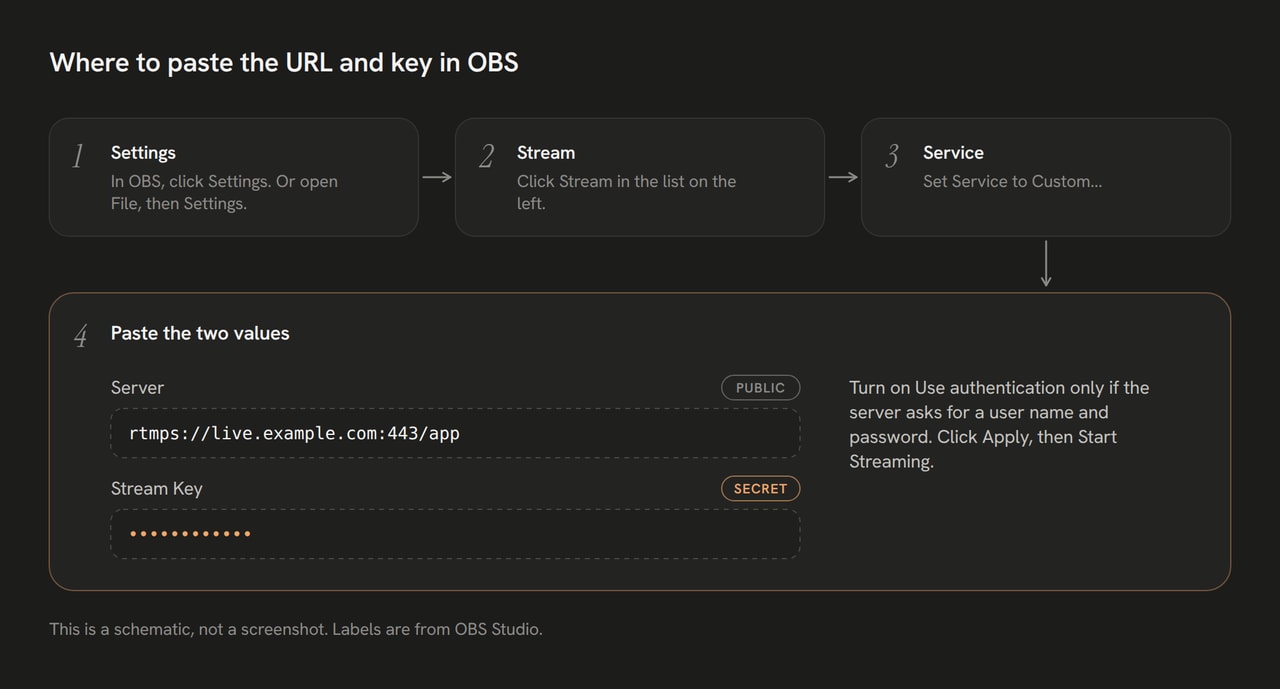
Open the stream settings
In OBS Studio, select Settings, then Stream.
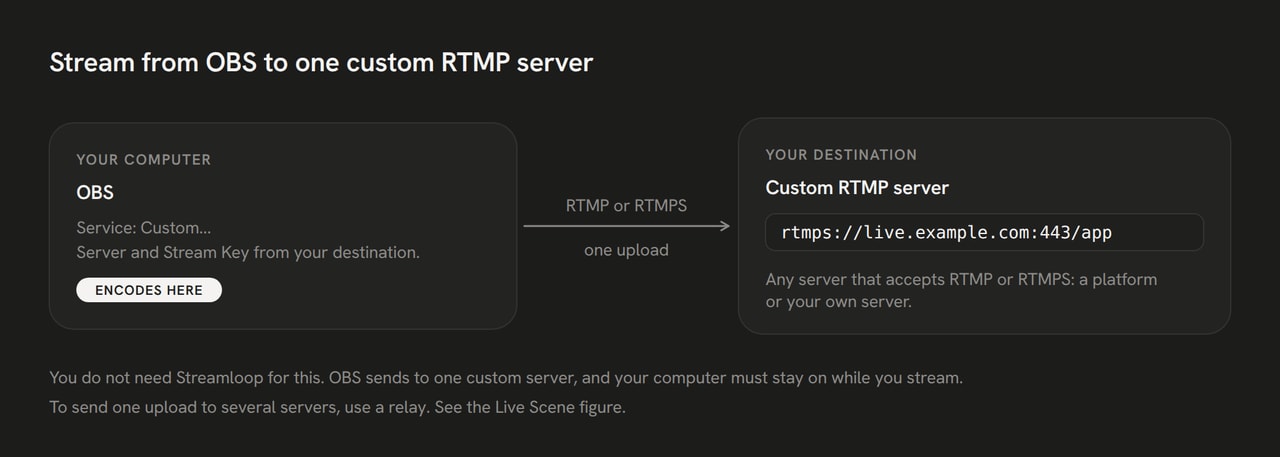
Choose Custom
Set Service to Custom...
Paste the two values into OBS
Paste the server URL into Server and the key into Stream Key. Turn on Use authentication only if the server gives you a user name and a password.
Start streaming
Select Apply, then OK, then Start Streaming. Then check that the destination receives your stream.


Track B: relay one live feed to several servers
An RTMP relay is a server that receives one stream and sends a copy to each destination. You upload only one copy.
To restream to a platform with no preset, add it as a Custom RTMP destination with its server URL and key.
| Method | Upload | Cost |
|---|---|---|
| OBS alone | One copy, one destination | Free |
| OBS multiple output plugin | One copy per destination | Free |
| nginx-rtmp | One copy | Your server |
| Restream | One copy | From $19 per month, billed monthly. Custom RTMP needs a paid plan. |
| Streamloop Live Scene | One copy | $20 per 30 days at 1080p30, $35 at 1080p60, one destination included. Each extra: $3.50 (720p) or $6 (1080p). |
Prices as of October 14, 2026, Restream from restream.io/pricing. See Restream alternatives.
Example: three destinations at 1080p30 cost $20 plus $6 twice, so $32 per 30 days.

A Live Scene sends your OBS feed to up to 5 destinations. It encodes the video again, up to 1080p60, with no guest cameras.
- Choose Scene when you create a stream, and describe your use case. We reply within 24 hours. See Live Scenes
- In the studio, select Add source, then RTMP input, then Add.
- Select Create stream key. Copy the Server URL or Server URL (RTMPS), and the Stream key. The key shows only once.
- In OBS, set Service to Custom... and paste both values. Drag the source onto the canvas, then publish.
- In the General tab, under Destinations, add each platform with its preset or Custom RTMP, server URL and key.
- Start the stream.
See live input setup. Then check that the destination receives your stream.
Track C: run a 24/7 loop of video files to a custom RTMP destination
Use a key that stays valid. Instagram keys change each time, a standard Facebook key works for one broadcast, and X ends a livestream after 24 hours.
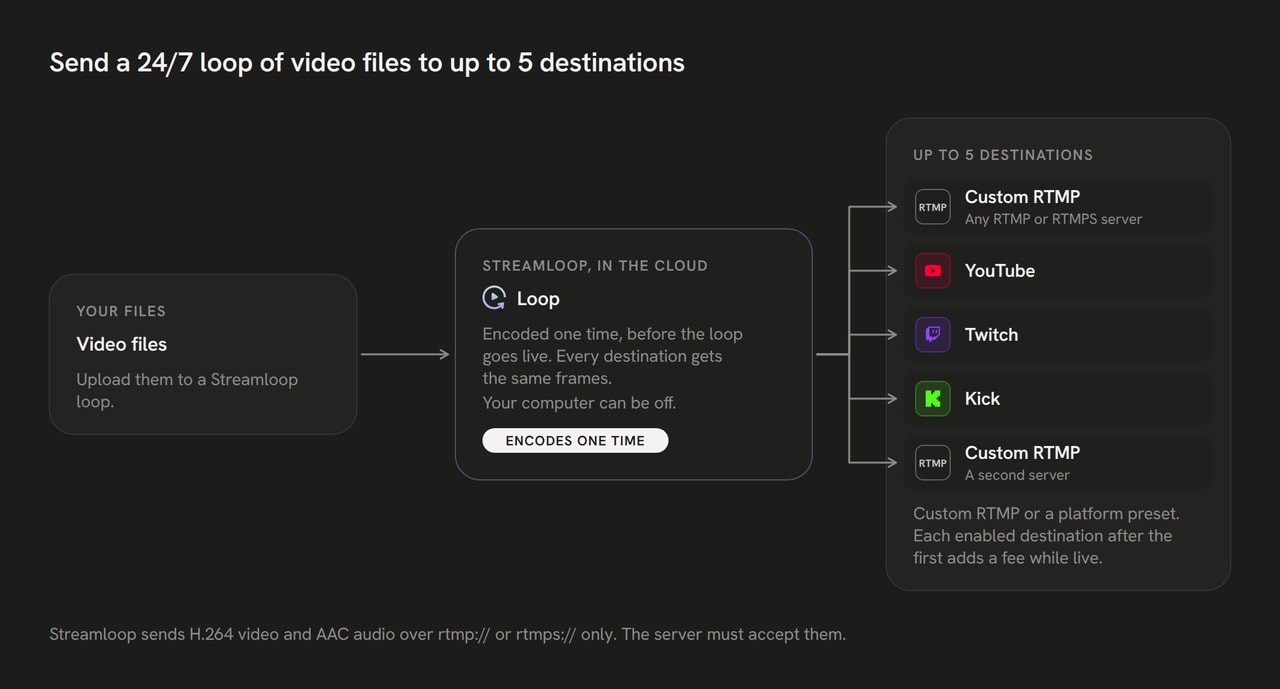
Streamloop plays your video files from the cloud, so your computer can be off. One loop sends one encode to up to 5 destinations.
Pick a quality that every destination accepts. See prices and the $1 trial.
Open Add destination
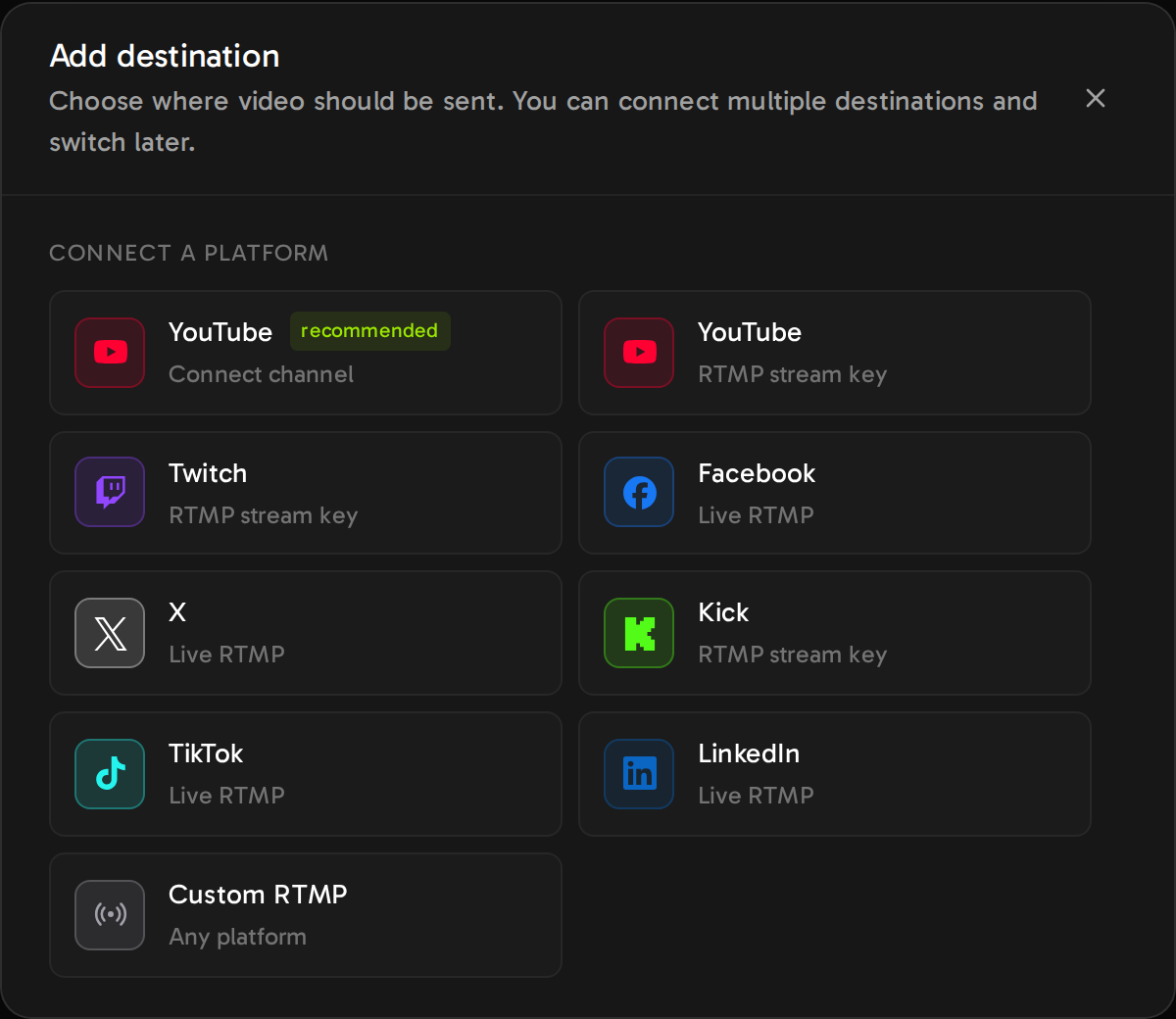
In your loop, open the General tab. Under Destinations, select Add destination, then Connect new destination.
Choose Custom RTMP
Select Custom RTMP when your platform has no preset or a different URL. LinkedIn has its own preset.
Paste the two values into Streamloop
Paste the server URL into RTMP URL and the key into Stream key.
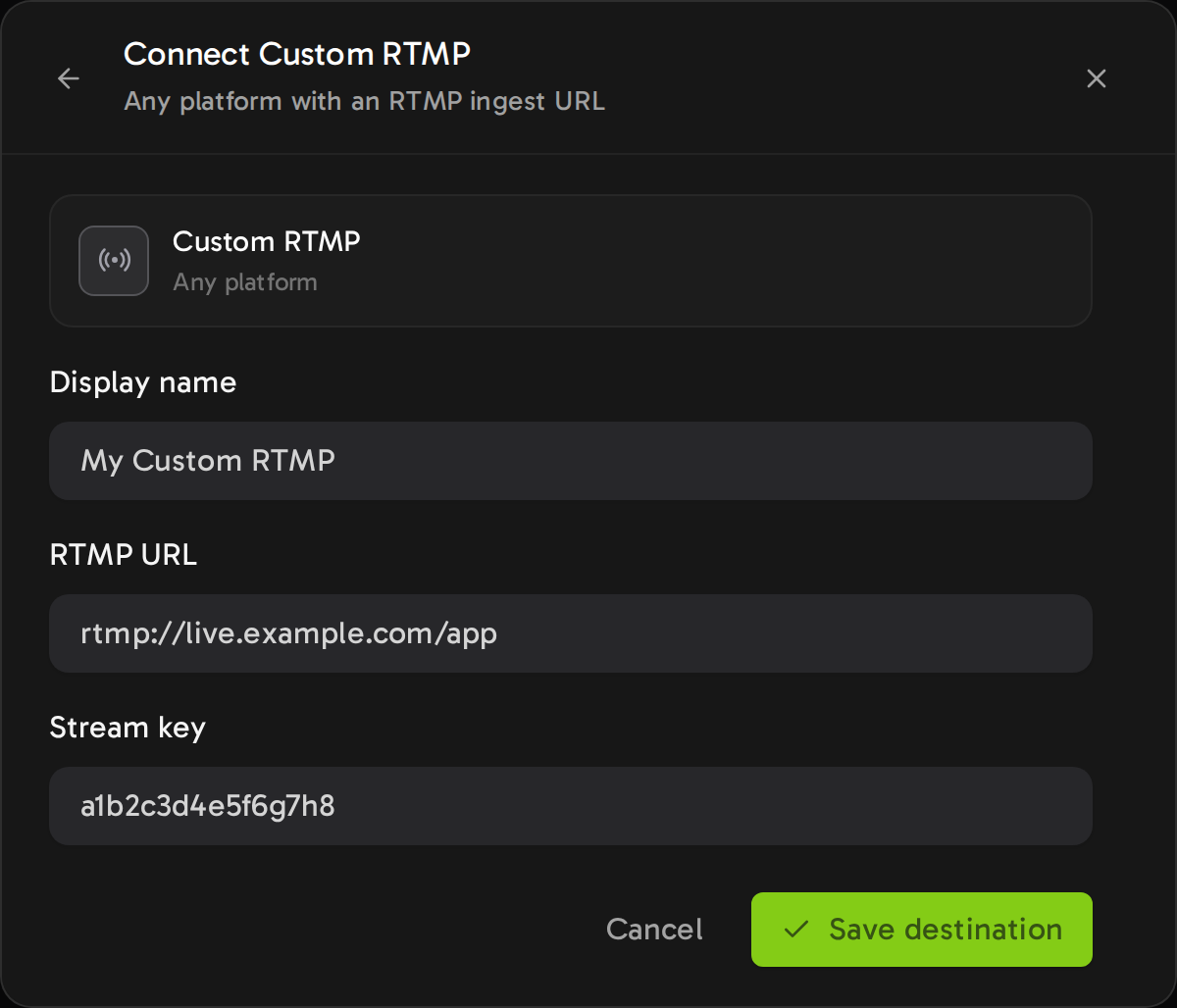
Example values. The key field shows the key while you type.
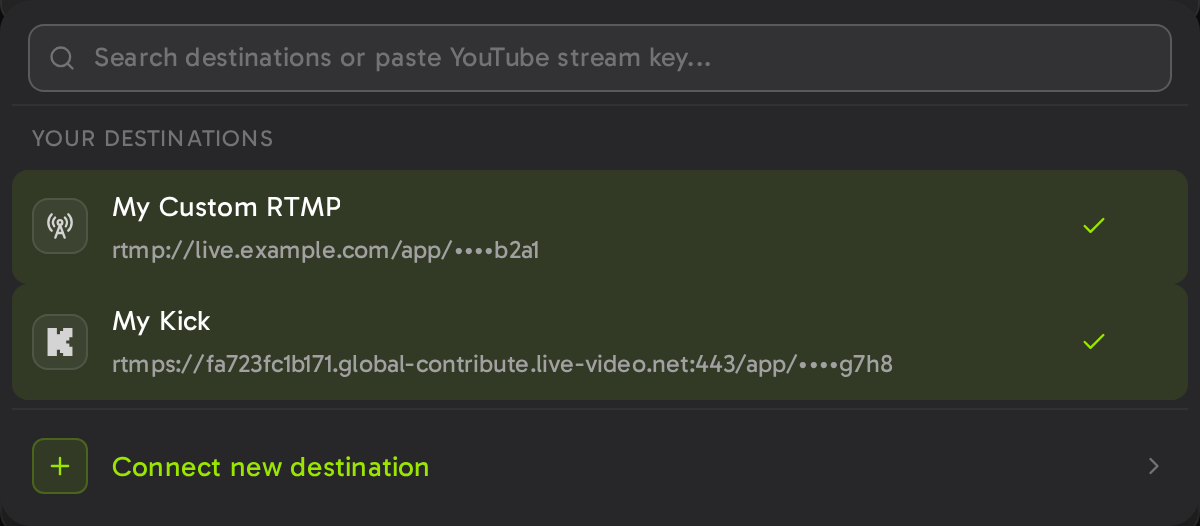
Save the destination
Select Save destination. The saved row shows only the last four characters of the key.
Start the loop
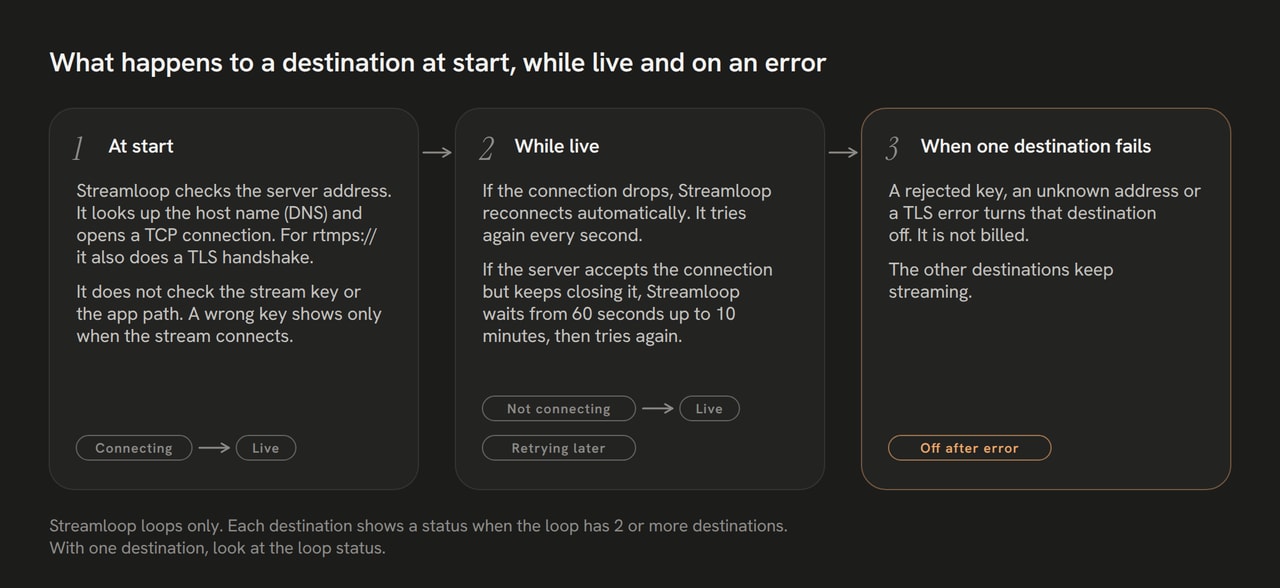
Destinations are locked while the loop is live or scheduled.
There is no test button, so a wrong key shows only at connect.
Streamloop retries a dropped connection. A long disconnect stops the loop with an error.
Then check that the destination receives your stream.


Check that the destination receives your stream
Look at the preview on the platform.
- Facebook: a live preview appears after your software starts streaming.
- Instagram: Live Producer shows a preview before Go live. Practice does not start the live for anyone.
- LinkedIn: a preview in Live Studio means the connection works. Do not select Go live during a test.
- X: Live Studio shows Waiting for stream until video arrives. Test with a Private livestream.
Why a custom RTMP stream does not connect
Rows marked Streamloop only apply to Streamloop.
| What you see | Likely cause | Fix |
|---|---|---|
| The platform says offline, or Waiting for stream | The server URL or the key was copied wrong | Copy both values again, with no spaces at the start or end |
| The key is rejected | The key was for one broadcast only, as on Instagram or with a standard Facebook key | Get a new key for this broadcast |
| The connection fails at once | The protocol or the port differs from what the platform shows | Copy the URL again with its rtmp:// or rtmps:// and its port |
| The server refuses the stream name | The key is at the end of the URL and also in the key field | Split the address at the last slash |
| Streamloop only: the server address cannot be found | A typo in the host name | Add the destination again with the correct URL |
| Streamloop only: the server address is private or local | A home or office network address | Use a public address |
| Streamloop only: a destination shows Off after error | The platform rejected the key, or the address cannot be found | Add the destination again with the correct values. It is not billed, and the other destinations keep streaming. |
| Streamloop only: the destination does not accept the loop resolution | Every destination gets the same encode, and some destinations refuse a resolution above what they accept | Lower the loop resolution to one that every destination accepts |
| Streamloop only: it connects, then the platform drops it | The server does not accept the video or audio format | Check the encoder settings of the platform. Streamloop sends H.264 video and AAC audio. |
Next steps and loop prices
| Loop quality | Plan per 30 days | Each extra destination |
|---|---|---|
| 720p at 30 fps | $5 | $3.50 |
| 1080p at 30 fps | $10 | $6 |
| 1440p at 30 fps | $20 | $8 |
| 4K at 30 fps | $30 | $12.50 |
| Other frame rates | $4 at 720p24 up to $45 at 4K60 | Same fee at any frame rate |
Live prices as of October 14, 2026.
Run a 24/7 loop to any RTMP server
Pay $1 for 7 days at the quality you pick. A card is required. On day 7, the plan of that quality starts. Cancel in Billing during the trial and you pay nothing more.
Example: a 1080p30 loop to two destinations costs $10 plus $6, so $16 per 30 days.
Multistream a live show or a loop →Run a 24/7 stream from pre-recorded video →Streamloop help for other RTMP platforms →
Frequently asked questions
What is custom RTMP?
Custom RTMP sends a live stream to any server that accepts RTMP or RTMPS. You need two values from the destination: a server URL and a stream key. Use it when your encoder or service has no preset for the platform.
What is the difference between RTMP and RTMPS?
RTMPS is RTMP inside an encrypted TLS connection. An RTMPS address starts with rtmps:// and usually uses port 443. Plain RTMP uses port 1935 by default and has no encryption. Facebook asks you to turn on RTMPS if your software supports it.
What is an RTMP relay?
An RTMP relay is a server that receives one RTMP stream and sends a copy to each destination. You upload only one copy. Examples are nginx-rtmp on your own server, Restream and a Streamloop Live Scene.
Can I stream to Instagram with custom RTMP?
Yes, from instagram.com on a computer: select Create, then Live video. You need a public account with 1,000 or more followers. The key changes each time, so it does not suit a 24/7 loop.
Can I stream to my own RTMP server, such as nginx-rtmp or MediaMTX?
Yes. Use the address of your server as the server URL and the stream name as the key. A cloud service needs a public address. Streamloop refuses private, loopback and local network addresses.
Can Streamloop send SRT, HLS or WHIP to a custom destination?
No. Streamloop destinations take rtmp:// and rtmps:// addresses only. SRT works as an input to Live Scenes, not as an output.
How do I change the stream key of a saved destination?
The Streamloop dashboard cannot edit a saved key. Stop the loop, add the destination again with the new key, and delete the old one. Then start the loop again.
Sources
Read on October 14, 2026
Facebook Help: facebook.com/help/587160588142067 and facebook.com/business/help/165076674943644
Instagram Help: help.instagram.com/292478487812558. LinkedIn Help: answers a564446 and a554240
X Help: help.x.com/en/using-x/live-studio
Restream: support.restream.io/en/articles/369436-stream-to-a-custom-rtmp-channel and restream.io/pricing
YouTube, Twitch and Kick rows: the help pages cited in our key guides for each platform
OBS Studio labels: en-US.ini in github.com/obsproject/obs-studio
Streamloop product code and live prices. Questions or a correction? Contact us