Restream alternatives

7 Best Restream Alternatives for Multistreaming and Live Studios (2026)

Updated August 5, 2026

Restream is primarily a live multistreaming platform and browser production studio. Its core plans center on simultaneous destinations, guests, scenes, branding, recordings, chat, and team workflows rather than indefinite prerecorded playout.

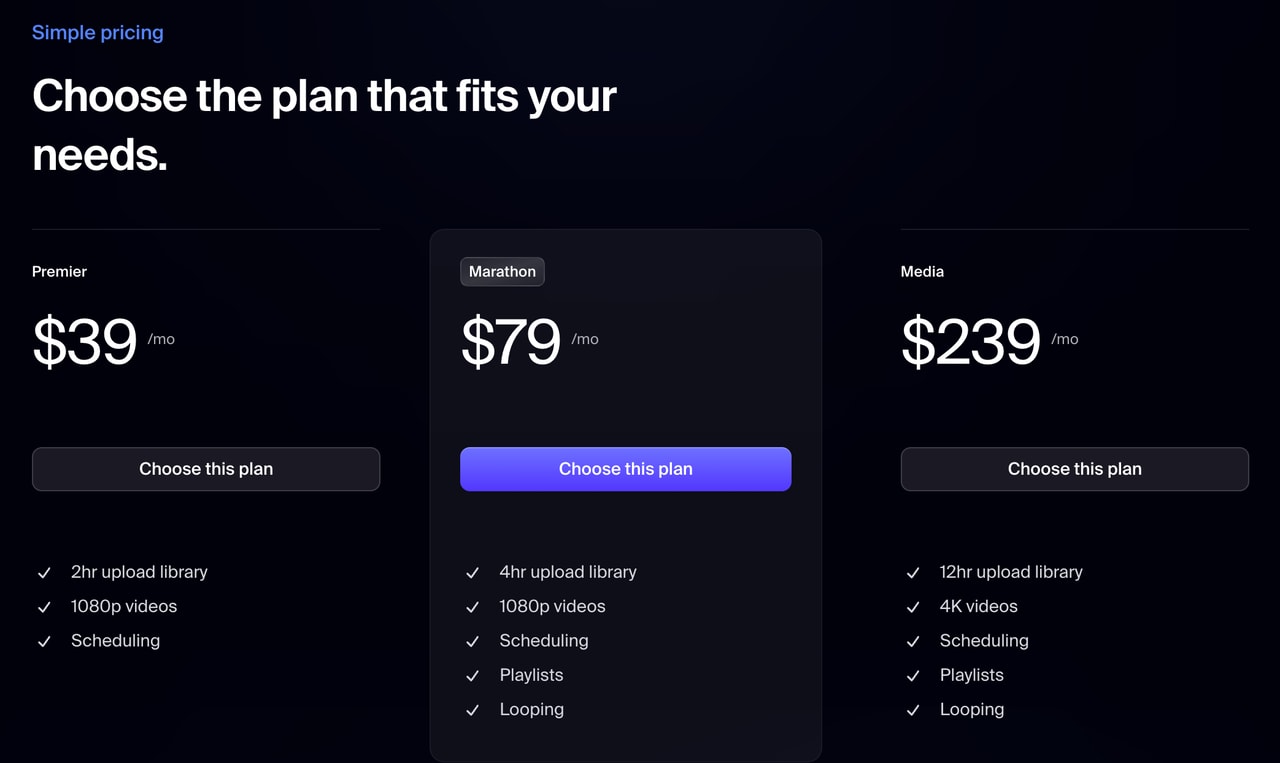
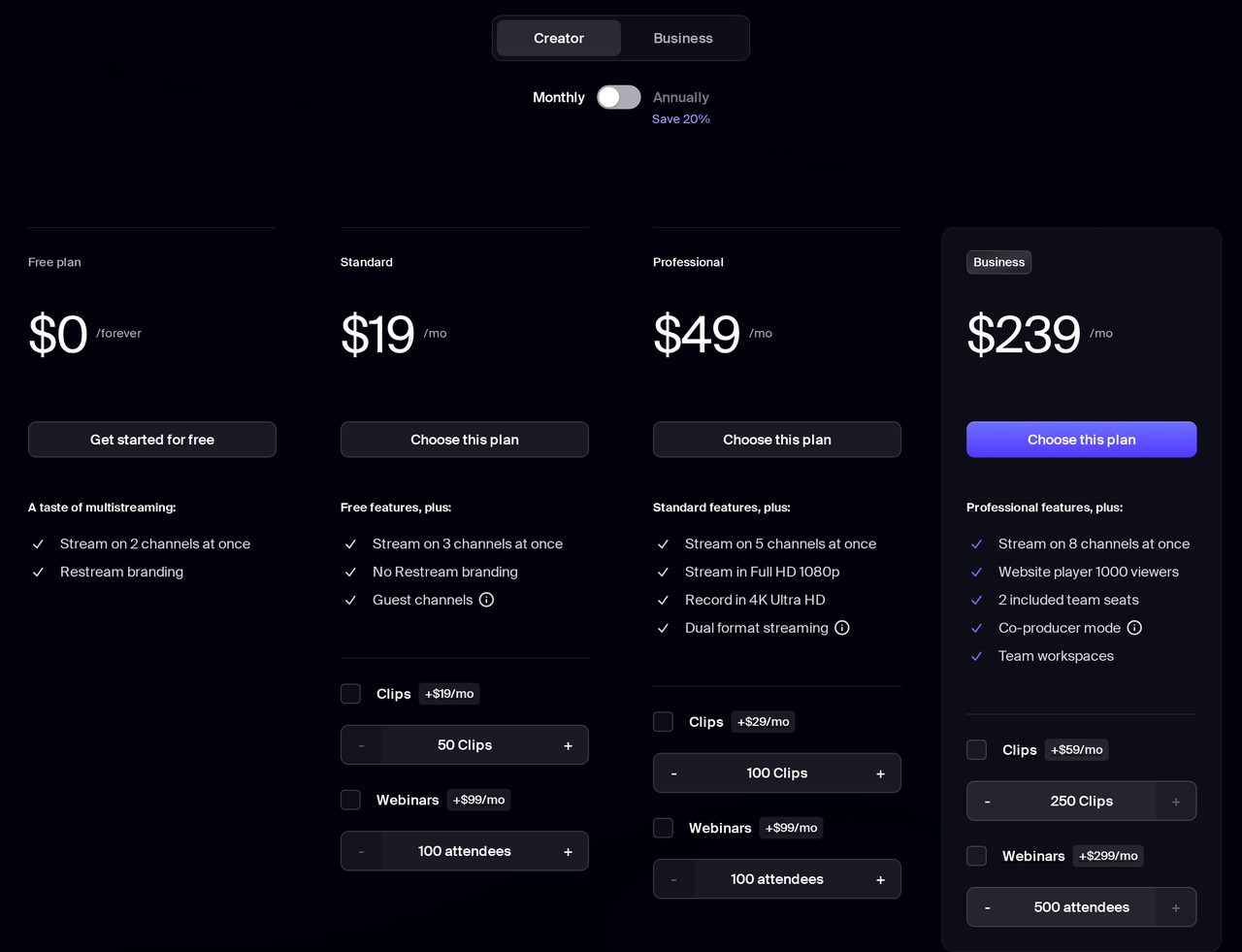
Core pricing is currently Free, Standard at $19 monthly, Professional at $49, and Business at $239, with lower annual equivalents. Prerecorded video uses separate Upload & Stream add-ons: Premier is $39, Marathon is $79, and Media is $239 per month; looping starts on Marathon.

Restream's uploaded-video loop is limited to 10 plays and 40 hours. Playlists require Marathon or Media, are capped at 40 videos and 24 hours, and cannot be edited after they start. The alternatives below are therefore dominated by real multistreaming and browser-Studio peers, with Streamloop included only as one clearly labeled 24/7 specialist.

Plans and limits were last verified on August 5, 2026 from Restream and competitor first-party sources. This is not a hands-on performance test.

Best alternatives

  1. 1Castr logo
    Castr

    Broader live-video infrastructure with multistreaming, hosting, monetization, APIs, TV playout, and delivery tools.

  2. 2OneStream Live logo
    OneStream Live

    A broad Restream-style mix of multistreaming, browser Studio, scheduled recordings, and optional 24/7 streaming.

  3. 3LiveReacting logo
    LiveReacting

    Interactive browser shows with games, polls, giveaways, guests, prerecorded scheduling, and a dedicated 24/7 plan.

  4. 4L
    Livepush

    High-capacity multistream distribution with recurring prerecorded schedules and Creators-tier 24/7 channels.

  5. 5Playout.video logo
    Playout.video

    Persistent programmed channels that combine a browser Studio, multistreaming, fallback, and calendar automation.

  6. 6Upstream logo
    Upstream

    A creator-friendly browser designer and Studio with 24/7 cloud channels and multistreaming.

  7. 7Streamloop logo
    Streamloop

    Unattended prerecorded playlists when one destination per stream is enough and no live Studio is needed.

★ Our pick
1Castr logo

Castr

Broader live-video infrastructure with multistreaming, hosting, monetization, APIs, TV playout, and delivery tools.

Starts at
Core plans from $19.99/month; infinite looping from $199.99/month
Best for
Broader live-video infrastructure with multistreaming, hosting, monetization, APIs, TV playout, and delivery tools.

Castr is a broad live-video platform rather than a focused looper. Premium and higher can run infinitely looping MP4 playlists through Pre-Recorded Live, while TV Playout offers structured scheduling, live inputs, EPG, and larger playlists but limits loops to 15 or 30 days.

What's good
  • Broad multistreaming, hosted VOD, player, monetization, and API stack
  • Documented infinite Pre-Recorded Live looping on Premium and above
  • Account-wide delivery to 6–30 destinations depending on plan
  • TV Playout adds scheduling, live inputs, breaks, and EPG on higher tiers
  • Cloud Production provides browser-based switching and external URL overlays
Where it's not a fit
  • Its browser Cloud Production switcher is not as guest- and chat-centric as Restream Studio.
  • Loop-capable plans are expensive for creators who only need social multistreaming.

Free trial available; Trial TV Playout output is branded

2OneStream Live logo

OneStream Live

A broad Restream-style mix of multistreaming, browser Studio, scheduled recordings, and optional 24/7 streaming.

Starts at
Free forever; paid from about $10/mo
Best for
A broad Restream-style mix of multistreaming, browser Studio, scheduled recordings, and optional 24/7 streaming.

OneStream Live is a mature multistreaming platform that also streams pre-recorded video as scheduled or looping live broadcasts to 45+ platforms, with playlists, scheduling up to 60 days, overlays, a browser Live Studio, and cloud import from Google Drive, Dropbox, OneDrive and more. It caps at 1080p, and true 24/7 looping is gated behind Enterprise or a per-stream add-on.

What's good
  • Genuine pre-recorded looping with playlists and scheduling up to 60 days ahead
  • Very broad reach: multistream to 45+ platforms simultaneously
  • Generous free-forever tier with no credit card
  • Mature product with overlays, a browser Live Studio, unified chat and recording
  • Cloud import from Google Drive, Dropbox, OneDrive, pCloud, Box and S3
  • Consistently strong support: named agents, live chat, and long-tenured users reporting four to five years without switching
Where it's not a fit
  • Persistent 24/7 streaming is separately gated rather than included in ordinary scheduled plans.
  • Current public pricing rendering should be confirmed at checkout because localized values are inconsistent.

Free forever plan, no card (720p, 2 destinations, 15-min pre-recorded)

3LiveReacting logo

LiveReacting

Interactive browser shows with games, polls, giveaways, guests, prerecorded scheduling, and a dedicated 24/7 plan.

Starts at
Free; dedicated 24/7 from $39.99/month
Best for
Interactive browser shows with games, polls, giveaways, guests, prerecorded scheduling, and a dedicated 24/7 plan.

LiveReacting combines a full browser studio and interactive show tools with cloud prerecorded uploads and a separate persistent 24/7 product. Normal paid tiers allow unlimited monthly starts but remain limited to one, three, eight, or 24 hours per event; destination counts are not independent program concurrency.

What's good
  • Full browser studio with guests, scenes, layouts, branding, and live editing
  • Games, polls, trivia, giveaways, comments, countdowns, and AI Host features
  • Cloud prerecorded streaming with playlists and advanced schedules
  • Direct YouTube, Facebook, and Twitch integrations plus custom RTMP
  • Dedicated 24/7 tier with configurable quality and concurrency
Where it's not a fit
  • Normal plans have per-event duration caps and lower destination ceilings than some Restream use cases.
  • Custom RTMP destinations do not retain every interactive feature.

Permanent Free plan: 3 streams/month, up to 30 minutes each, 720p

4L

Livepush

High-capacity multistream distribution with recurring prerecorded schedules and Creators-tier 24/7 channels.

Starts at
Free; paid from $15/month
Best for
High-capacity multistream distribution with recurring prerecorded schedules and Creators-tier 24/7 channels.

Livepush accepts RTMP or SRT ingest and distributes it broadly while also offering cloud-uploaded prerecorded schedules and loops. Its persistent 24/7 entitlement begins on Creators; its browser webcam input is basic and is not a StreamYard-style multi-guest production studio.

What's good
  • Strong one-to-many distribution to major platforms and custom RTMP/SRT endpoints
  • Cloud scheduled uploads, playlists, loops, and recurring broadcasts
  • Creators includes 4K, continuous playback, and three prerecorded streams
  • Paid streaming hours are broadly unlimited outside the explicit continuous-24/7 gate
  • Separate hosted-delivery catalog offers player, CDN, HLS, and bandwidth packages
Where it's not a fit
  • It does not provide a full multi-guest browser production studio.
  • Its strongest fit is distribution and playout rather than live audience interaction.

Permanent Free plan with 20 streaming hours/month; no continuous 24/7 entitlement

5Playout.video logo

Playout.video

Persistent programmed channels that combine a browser Studio, multistreaming, fallback, and calendar automation.

Starts at
Free; persistent channels from $29/month
Best for
Persistent programmed channels that combine a browser Studio, multistreaming, fallback, and calendar automation.

Playout.video combines persistent cloud playlists, recurring calendar programming, fallback content, and a full browser Live Studio. A programmed channel can continue behind a live takeover and resume afterward, while standard plans multistream to two through ten simultaneous destinations.

What's good
  • Creator provides a persistent 24/7 channel from $29/month
  • Channel adds recurring calendar execution, fallback, and auto-start/stop
  • Full browser Live Studio with guests, screen sharing, layouts, and recording
  • Hybrid live takeover can sit over an autonomously progressing playlist
  • Broad native and custom RTMP destination support
Where it's not a fit
  • Its live chat and social engagement layer is less central than Restream's.
  • Calendar automation begins on Channel at $49 monthly.

Permanent Free plan; no time-limited trial. Free sessions stop after five hours and include a watermark.

6Upstream logo

Upstream

A creator-friendly browser designer and Studio with 24/7 cloud channels and multistreaming.

Starts at
From $24/mo yearly / $30/mo monthly
Best for
A creator-friendly browser designer and Studio with 24/7 cloud channels and multistreaming.

Upstream is a YouTube Verified software encoder for 24/7 streams, with a Canva-like Stream Designer for overlays, embedded websites and widgets, plus multistreaming to up to 10 destinations.

What's good
  • YouTube Verified software encoder
  • Stream Designer: overlays, embedded websites, widgets, custom fonts
  • Multistream to up to 10 destinations
  • Well-reviewed, responsive chat support
  • Up to 100GB storage on higher plans (65GB on Lite)
Where it's not a fit
  • It supports fewer simultaneous destinations than higher Restream or Livepush configurations.
  • The free tier is limited to 24 streaming hours per month.
7Streamloop logo

Streamloop

Unattended prerecorded playlists when one destination per stream is enough and no live Studio is needed.

Starts at
From $4.02 per 30 live days at 720p/24fps
Best for
Unattended prerecorded playlists when one destination per stream is enough and no live Studio is needed.

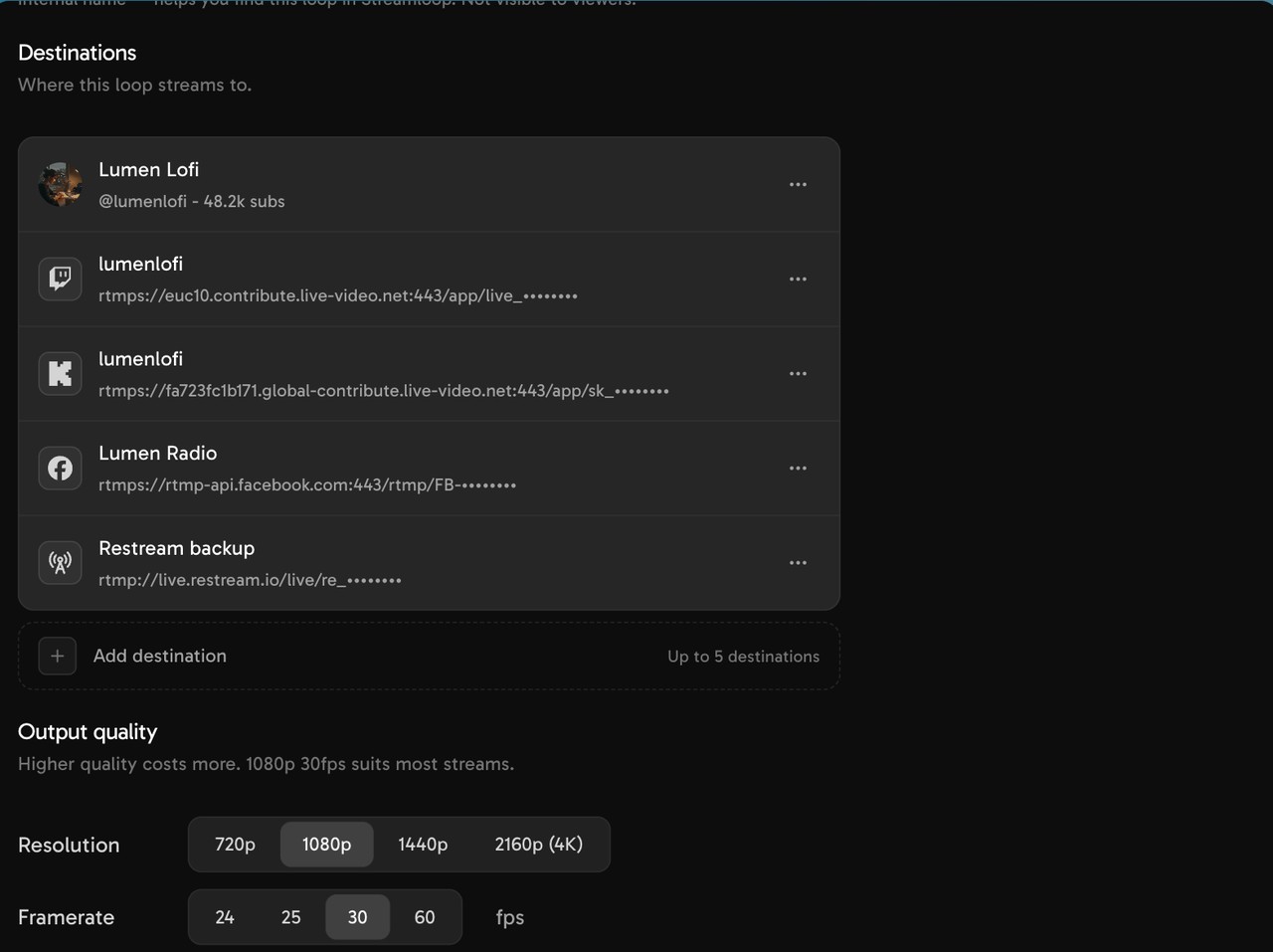
Streamloop turns prerecorded video and audio playlists into cloud streams at up to 4K60, including HDR where supported. Each stream sends to one managed YouTube connection or compatible RTMP destination; reaching several platforms requires separate streams rather than one-to-many fan-out.

What's good
  • Usage billing with exact resolution/frame-rate rates and no charge while idle
  • Ordered, non-repeating shuffle, and rule-based custom playlists
  • Published playlist edits take effect at the next clip boundary without restarting
  • Managed YouTube OAuth plus arbitrary compatible RTMP endpoints
  • Google Drive, Dropbox, YouTube, and direct-URL imports
  • Documented REST, GraphQL, and OAuth-protected MCP interfaces
Where it's not a fit
  • No browser guests, live camera production, unified chat, scenes, or one-to-many multistreaming.
  • It replaces only Restream's bounded prerecorded job, not Restream's primary product.

Eligible new accounts may receive starter credits without a card; no guaranteed public amount or duration

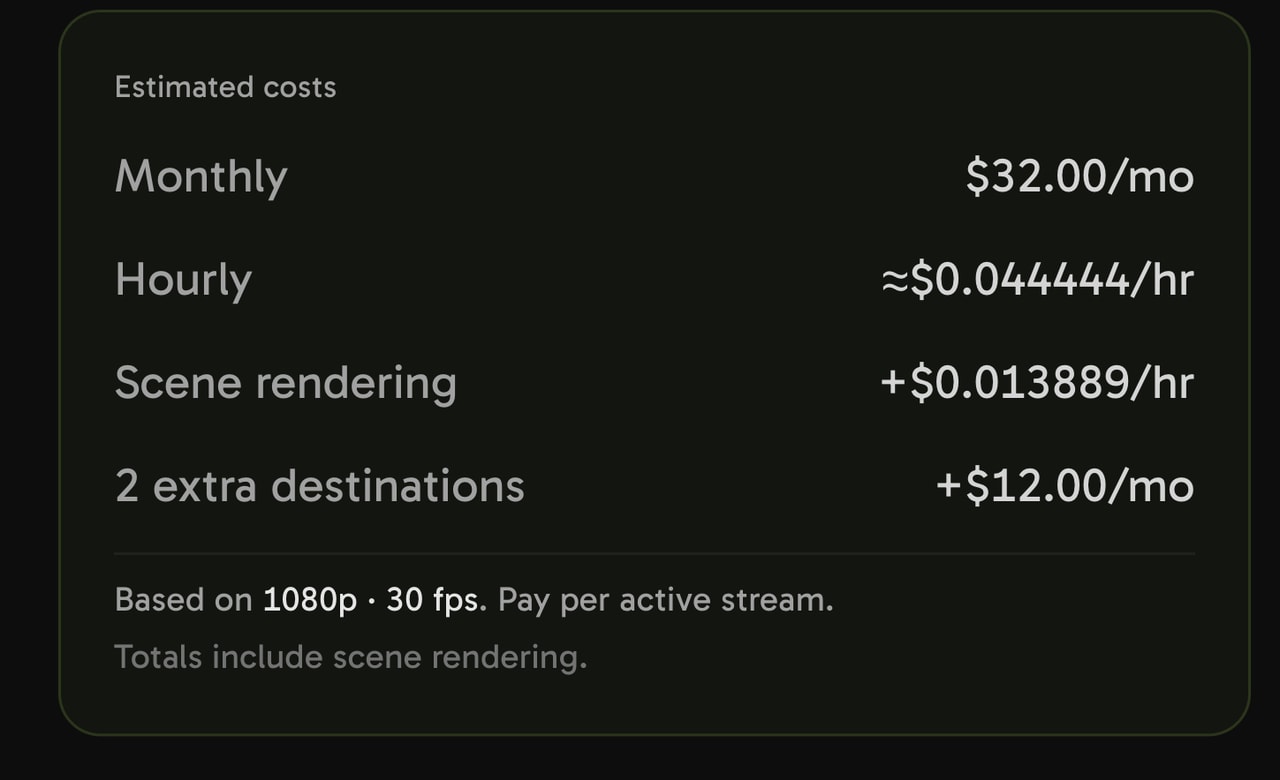
Real cost

What a 24/7 stream actually costs, by quality

Streamloop bills by the minute — pick a resolution and frame rate and pay only while you're live. Optional monthly credit plans are also available. Below is the cost of a stream running nonstop for a full 30 days.

720p

30 fps
$5
60 fps
$8

1080p

Most popular

30 fps
$10
60 fps
$15

1440p (2K)

30 fps
$20
60 fps
$30

4K (2160p)

30 fps
$30
60 fps
$45

Metered by the minute, so a week of streaming costs about a quarter of these figures, and a day about a thirtieth. Plus a one-time ~$0.005 per minute of video to encode it once. Uploads, storage, and idle loops are free.

A 1080p stream running 24/7 on Streamloop is about $10/monthand you only pay while it's live. Restream charges a flat Free core plan; prerecorded looping from $79/month whether you stream all month or not.

Comparison

Restream compared to the others

All the features that matter, side by side.

Streamloop stays fixed. Open a tool to compare its full feature set.

Restream logoRestreamVSCastr logoCastr

Pricing & access

Pay-as-you-go, no subscription
Restream
Castr
Free trial (no card)
Restream
Permanent Free plan, not a trial
Castr
Free trial available; Trial TV Playout is branded
Starting price
Restream
Free core; paid core $19/mo; Upload & Stream $39/mo; looping $79/mo
Castr
Core $19.99/mo; infinite Pre-Recorded Live loop from Premium $199.99/mo
720p 30-day price
Restream
$39/mo yr (looping tier)
Castr
TV Playout starts at $19.99/mo but Starter cannot loop indefinitely
1080p 30-day price
Restream
No 30-day prerecorded tier; 1080p looping starts at $79/mo and stops by 40 h
Castr
TV Playout 1080p starts on Ultra $349.99/mo; max 30-day loop
1440p / 2K 30-day price
Restream
$39/mo yr (looping tier)
Castr
$17/mo yr / $20 mo
2160p / 4K 30-day price
Restream
4K requires $239/mo Media but still cannot run 30 days continuously
Castr
No current 4K guarantee for cloud prerecorded playout

Streaming quality

720p / 30fps
Restream
Castr
1080p / Full HD
Restream
Castr
TV Playout 1080p on Ultra/Events; lower plans are fixed 720p30
60fps
Restream
Official prerecorded requirements recommend 30 or 60fps
Castr
TV Playout 50/60fps on Ultra and Events
Up to 4K @ 60fps
Restream
4K requires the $239/mo Media Upload & Stream tier
Castr
4K cloud prerecorded output is not established by current official sources
Vertical / portrait streaming
Restream
Castr
HDR streaming publicly documented
Restream
HDR prerecorded output is not publicly documented
Castr

Production & design

Stream designer / layout builder
Restream
Scenes, custom layouts, portrait/landscape, branding, and media
Castr
Cloud Production supports positioning, scaling, transitions, and slates
Image, video & logo overlays
Restream
Logos, overlays, lower thirds, captions, tickers, QR codes, and backgrounds
Castr
Images, tickers, lower thirds, alerts, and external URL overlays
Embed live websites & graphs
Restream
Embed player only
Castr
Hosted HTML5 player and video hosting
Interactive alerts & widgets
Restream
Unified chat and on-screen cross-platform comments
Castr
External URL widgets are supported; built-in interactive show tools are limited
Custom fonts in overlays
Restream
Castr
Browser Live Studio (camera)
Restream
Full browser Studio with up to 10 on-screen participants
Castr
720p Cloud Production switcher; not a full multi-guest studio

Sources & inputs

MP4 / MKV / AVI / MOV upload
Restream
MP4, MOV, M4V, MKV with H.264/AAC; AVI is not documented
Castr
Pre-Recorded Live documents MP4 only
Separate audio track (music / voiceover)
Restream
Separate Studio recording tracks do not provide a separate prerecorded audio playlist
Castr
Import from Google Drive / Dropbox
Restream
Current Upload & Stream pages reviewed do not verify Drive or Dropbox import
Castr
Playlists with custom ordering
Restream
Marathon/Media; 40 videos, 24 hours, no playlist looping
Castr
Ordered playlists with per-item enable/disable controls
Custom loop logic (shuffle, loop counts)
Restream
Castr
Edit the stream live (swap / skip / reorder)
Restream
Playlist items cannot be added, removed, or reordered after playback starts
Castr
Items can be managed, but the playing TV item should not be moved or replaced live

Destinations

YouTube (one-click OAuth)
Restream
Castr
Custom RTMP (any platform)
Restream
Paid core plan required; no Restream chat, analytics, or title control
Castr
Custom RTMP and SRT endpoints consume destination allowance
Twitch / Facebook / Kick / TikTok
Restream
30 integrated destinations plus custom RTMP/SRT/HLS/WHIP options
Castr
30+ platform catalog with native and custom endpoints
Multistream to several destinations
Restream
One live source can distribute to several enabled channels
Castr
One source can distribute to several account-wide destinations
One-click YouTube (no stream key)
Restream
Native YouTube integration
Castr
Native YouTube destination integration
SRT ingest
Restream
Castr

Lifecycle & automation

True 24/7 continuous loop
Restream
Maximum 10 loops and 40 hours per video event
Castr
Infinite Pre-Recorded Live looping on Premium+; TV Playout loops are time-limited
YouTube broadcast lifecycle automation
Restream
Scheduled event creation/attachment and advance posts; not full lifecycle ownership
Castr
Native YouTube destination and scheduling; complete lifecycle automation not established
Scheduling
Restream
Scheduled prerecorded events and playlists
Castr
One-time prerecorded schedules and TV-style timetables
MCP / agent integration
Restream
Castr
YouTube ad cue points
Restream
Castr
Edit title / description / thumbnail live
Restream
Castr
Public API
Restream
Castr
API access begins on Premium
Unlimited loop without manual rescheduling
Restream
No perpetual prerecorded loop; playlists cannot loop
Castr
Yes for Premium+ Pre-Recorded Live; no for TV Playout

Limits & inclusions

Storage included
Restream
Upload & Stream publishes 2-, 4-, and 12-hour libraries rather than GB quotas
Castr
Pre-recorded: 4/4/10/20/20 GB; hosted VOD storage is separate
Concurrent streams / slots
Restream
Published numbers are active destination channels, not independent program jobs
Castr
Created workflows, including inactive ones, count; prerecorded streams are 1/1/2/3/3
Max multistream destinations
Restream
2 Free; 3 Standard; 5 Professional; 8 Business; Enterprise custom
Castr
6 Starter; 10 Standard; 20 Premium; 30 Ultra/Events, account-wide
Videos per playlist
Restream
40 videos per playlist
Castr
Pre-recorded: 2/2/10/15/15; TV Playout: 5/10/30/30/50 files
Max upload size / length
Restream
2/4/12-hour libraries; playlists max 40 items and 24 hours
Castr
Pre-recorded max 240 min/file Premium+; TV caps range 500 MB–10 GB and 30–240 min
Team / multi-user access
Restream
Castr
3 members (Premium), 5 (Ultra)
No watermark
Restream
Free carries Restream branding; paid plans remove it
Castr
Trial, Starter, and Standard TV Playout output is branded

Reliability & support

Automatic monitoring & recovery
Restream
Castr
Backup streams
Restream
Disconnect protection on Business; true backup encoder ingest on Enterprise
Castr
Failover ingest begins on Ultra and Events
Chat / email support
Restream
Castr
Uptime guarantee / compensation
Restream
No public compensation-backed uptime SLA found
Castr
No standard public compensation-backed SLA found
In-app viewer analytics
Restream
Castr

Trust & account

Trustpilot rating
Restream
4.5 (~471)
Castr
~4.0 (54)
YouTube-Verified encoder
Restream
Castr
Not listed as verified encoder
Two-factor authentication
Restream
Castr
Restream logoRestreamVSOneStream Live logoOneStream Live

Pricing & access

Pay-as-you-go, no subscription
Restream
OneStream Live
Free trial (no card)
Restream
Permanent Free plan, not a trial
OneStream Live
Free forever
Starting price
Restream
Free core; paid core $19/mo; Upload & Stream $39/mo; looping $79/mo
OneStream Live
Free; from ~$10/mo
720p 30-day price
Restream
$39/mo yr (looping tier)
OneStream Live
~$10/mo + $30 add-on
1080p 30-day price
Restream
No 30-day prerecorded tier; 1080p looping starts at $79/mo and stops by 40 h
OneStream Live
~$10/mo + $30 add-on
1440p / 2K 30-day price
Restream
$39/mo yr (looping tier)
OneStream Live
2160p / 4K 30-day price
Restream
4K requires $239/mo Media but still cannot run 30 days continuously
OneStream Live

Streaming quality

720p / 30fps
Restream
OneStream Live
1080p / Full HD
Restream
OneStream Live
60fps
Restream
Official prerecorded requirements recommend 30 or 60fps
OneStream Live
Up to 4K @ 60fps
Restream
4K requires the $239/mo Media Upload & Stream tier
OneStream Live
Vertical / portrait streaming
Restream
OneStream Live
HDR streaming publicly documented
Restream
HDR prerecorded output is not publicly documented
OneStream Live
1080p ceiling, no HDR

Production & design

Stream designer / layout builder
Restream
Scenes, custom layouts, portrait/landscape, branding, and media
OneStream Live
Image, video & logo overlays
Restream
Logos, overlays, lower thirds, captions, tickers, QR codes, and backgrounds
OneStream Live
Embed live websites & graphs
Restream
Embed player only
OneStream Live
Embed player only, not web sources in-stream
Interactive alerts & widgets
Restream
Unified chat and on-screen cross-platform comments
OneStream Live
Unified chat
Custom fonts in overlays
Restream
OneStream Live
Browser Live Studio (camera)
Restream
Full browser Studio with up to 10 on-screen participants
OneStream Live
Up to 4 cameras

Sources & inputs

MP4 / MKV / AVI / MOV upload
Restream
MP4, MOV, M4V, MKV with H.264/AAC; AVI is not documented
OneStream Live
MP4, MOV, M4V, WebM
Separate audio track (music / voiceover)
Restream
Separate Studio recording tracks do not provide a separate prerecorded audio playlist
OneStream Live
Import from Google Drive / Dropbox
Restream
Current Upload & Stream pages reviewed do not verify Drive or Dropbox import
OneStream Live
Drive/Dropbox/OneDrive/Box/S3
Playlists with custom ordering
Restream
Marathon/Media; 40 videos, 24 hours, no playlist looping
OneStream Live
Custom loop logic (shuffle, loop counts)
Restream
OneStream Live
Edit the stream live (swap / skip / reorder)
Restream
Playlist items cannot be added, removed, or reordered after playback starts
OneStream Live

Destinations

YouTube (one-click OAuth)
Restream
OneStream Live
Custom RTMP (any platform)
Restream
Paid core plan required; no Restream chat, analytics, or title control
OneStream Live
Twitch / Facebook / Kick / TikTok
Restream
30 integrated destinations plus custom RTMP/SRT/HLS/WHIP options
OneStream Live
Multistream to several destinations
Restream
One live source can distribute to several enabled channels
OneStream Live
One-click YouTube (no stream key)
Restream
Native YouTube integration
OneStream Live
Connect account, no stream key
SRT ingest
Restream
OneStream Live

Lifecycle & automation

True 24/7 continuous loop
Restream
Maximum 10 loops and 40 hours per video event
OneStream Live
YouTube only, Enterprise/add-on
YouTube broadcast lifecycle automation
Restream
Scheduled event creation/attachment and advance posts; not full lifecycle ownership
OneStream Live
Scheduling up to 60 days ahead
Scheduling
Restream
Scheduled prerecorded events and playlists
OneStream Live
Up to 60 days
MCP / agent integration
Restream
OneStream Live
YouTube ad cue points
Restream
OneStream Live
Edit title / description / thumbnail live
Restream
OneStream Live
Public API
Restream
OneStream Live
Unlimited loop without manual rescheduling
Restream
No perpetual prerecorded loop; playlists cannot loop
OneStream Live
Enterprise/add-on

Limits & inclusions

Storage included
Restream
Upload & Stream publishes 2-, 4-, and 12-hour libraries rather than GB quotas
OneStream Live
1 GB (Free) to 150 GB (Enterprise); +10 GB for $10/mo
Concurrent streams / slots
Restream
Published numbers are active destination channels, not independent program jobs
OneStream Live
3 on Enterprise; add-on ($30/mo each) on lower plans
Max multistream destinations
Restream
2 Free; 3 Standard; 5 Professional; 8 Business; Enterprise custom
OneStream Live
45+
Videos per playlist
Restream
40 videos per playlist
OneStream Live
No published limit
Max upload size / length
Restream
2/4/12-hour libraries; playlists max 40 items and 24 hours
OneStream Live
15 min (Free) to 20 hrs (Enterprise) per stream
Team / multi-user access
Restream
OneStream Live
1 seat (Free) to 10 (Enterprise)
No watermark
Restream
Free carries Restream branding; paid plans remove it
OneStream Live

Reliability & support

Automatic monitoring & recovery
Restream
OneStream Live
Backup streams
Restream
Disconnect protection on Business; true backup encoder ingest on Enterprise
OneStream Live
Chat / email support
Restream
OneStream Live
Chat + email, 4.7/5 on Trustpilot
Uptime guarantee / compensation
Restream
No public compensation-backed uptime SLA found
OneStream Live
No published SLA
In-app viewer analytics
Restream
OneStream Live
Stream insights included

Trust & account

Trustpilot rating
Restream
4.5 (~471)
OneStream Live
4.7 (1,062)
YouTube-Verified encoder
Restream
OneStream Live
Not listed as verified encoder
Two-factor authentication
Restream
OneStream Live
Restream logoRestreamVSLiveReacting logoLiveReacting

Pricing & access

Pay-as-you-go, no subscription
Restream
LiveReacting
Free trial (no card)
Restream
Permanent Free plan, not a trial
LiveReacting
Permanent Free plan, not a time-limited trial
Starting price
Restream
Free core; paid core $19/mo; Upload & Stream $39/mo; looping $79/mo
LiveReacting
Free; Small $19.99/mo; dedicated 24/7 $39.99/mo
720p 30-day price
Restream
$39/mo yr (looping tier)
LiveReacting
$39.99/mo; $33 annual equivalent
1080p 30-day price
Restream
No 30-day prerecorded tier; 1080p looping starts at $79/mo and stops by 40 h
LiveReacting
$39.99/mo; $33 annual equivalent
1440p / 2K 30-day price
Restream
$39/mo yr (looping tier)
LiveReacting
Only on upgraded plans
2160p / 4K 30-day price
Restream
4K requires $239/mo Media but still cannot run 30 days continuously
LiveReacting
Only on upgraded plans

Streaming quality

720p / 30fps
Restream
LiveReacting
1080p / Full HD
Restream
LiveReacting
60fps
Restream
Official prerecorded requirements recommend 30 or 60fps
LiveReacting
Paid 1.5× option on Small+ and 24/7; 4K60 is 3×
Up to 4K @ 60fps
Restream
4K requires the $239/mo Media Upload & Stream tier
LiveReacting
Paid 2× quality option on Medium+, Enterprise, and 24/7
Vertical / portrait streaming
Restream
LiveReacting
HDR streaming publicly documented
Restream
HDR prerecorded output is not publicly documented
LiveReacting

Production & design

Stream designer / layout builder
Restream
Scenes, custom layouts, portrait/landscape, branding, and media
LiveReacting
Scenes, layouts, branding, media, text, and overlays
Image, video & logo overlays
Restream
Logos, overlays, lower thirds, captions, tickers, QR codes, and backgrounds
LiveReacting
Images, video, text, comments, branding, and interactive layers
Embed live websites & graphs
Restream
Embed player only
LiveReacting
Interactive alerts & widgets
Restream
Unified chat and on-screen cross-platform comments
LiveReacting
Polls, trivia, giveaways, countdowns, comments, and AI Host
Custom fonts in overlays
Restream
LiveReacting
Browser Live Studio (camera)
Restream
Full browser Studio with up to 10 on-screen participants
LiveReacting
Full browser studio with guests, cameras, screens, scenes, and layouts

Sources & inputs

MP4 / MKV / AVI / MOV upload
Restream
MP4, MOV, M4V, MKV with H.264/AAC; AVI is not documented
LiveReacting
MP4, M4V, MOV, FLV, MKV; AVI is not documented
Separate audio track (music / voiceover)
Restream
Separate Studio recording tracks do not provide a separate prerecorded audio playlist
LiveReacting
Studio music/audio is supported; a separate prerecorded replacement-audio workflow is not clearly documented
Import from Google Drive / Dropbox
Restream
Current Upload & Stream pages reviewed do not verify Drive or Dropbox import
LiveReacting
Current official pages reviewed do not verify Google Drive or Dropbox import
Playlists with custom ordering
Restream
Marathon/Media; 40 videos, 24 hours, no playlist looping
LiveReacting
Loop, rerun, and scheduled prerecorded playlists
Custom loop logic (shuffle, loop counts)
Restream
LiveReacting
Edit the stream live (swap / skip / reorder)
Restream
Playlist items cannot be added, removed, or reordered after playback starts
LiveReacting
Studio projects and live content can be edited while broadcasting

Destinations

YouTube (one-click OAuth)
Restream
LiveReacting
Custom RTMP (any platform)
Restream
Paid core plan required; no Restream chat, analytics, or title control
LiveReacting
Custom RTMP supported; interactive comments/games and metadata controls are limited there
Twitch / Facebook / Kick / TikTok
Restream
30 integrated destinations plus custom RTMP/SRT/HLS/WHIP options
LiveReacting
YouTube, Facebook, Twitch direct; other platforms through custom RTMP
Multistream to several destinations
Restream
One live source can distribute to several enabled channels
LiveReacting
Simultaneous destination distribution is plan-limited
One-click YouTube (no stream key)
Restream
Native YouTube integration
LiveReacting
Direct YouTube integration is documented
SRT ingest
Restream
LiveReacting
Custom plan

Lifecycle & automation

True 24/7 continuous loop
Restream
Maximum 10 loops and 40 hours per video event
LiveReacting
Persistent operation is a separate 24/7 product
YouTube broadcast lifecycle automation
Restream
Scheduled event creation/attachment and advance posts; not full lifecycle ownership
LiveReacting
Native destination and scheduling are documented; full lifecycle ownership is not established
Scheduling
Restream
Scheduled prerecorded events and playlists
LiveReacting
Basic on Small+; repeat/multi-date Medium+; four-week horizon and 3-minute gaps
MCP / agent integration
Restream
LiveReacting
YouTube ad cue points
Restream
LiveReacting
Edit title / description / thumbnail live
Restream
LiveReacting
Public API
Restream
LiveReacting
Limited, request-based API access priced by requirements
Unlimited loop without manual rescheduling
Restream
No perpetual prerecorded loop; playlists cannot loop
LiveReacting
Dedicated 24/7 plan has unlimited duration

Limits & inclusions

Storage included
Restream
Upload & Stream publishes 2-, 4-, and 12-hour libraries rather than GB quotas
LiveReacting
Plan allowances from 0.5 GB to 150 GB; 24/7 includes 100 GB at base quality
Concurrent streams / slots
Restream
Published numbers are active destination channels, not independent program jobs
LiveReacting
Standard program concurrency undisclosed; 24/7 selector offers 1–20 separately priced streams
Max multistream destinations
Restream
2 Free; 3 Standard; 5 Professional; 8 Business; Enterprise custom
LiveReacting
1 Free; 3 Small; 6 Medium; 10 Large; 20 Enterprise; 5 on 24/7
Videos per playlist
Restream
40 videos per playlist
LiveReacting
No published limit
Max upload size / length
Restream
2/4/12-hour libraries; playlists max 40 items and 24 hours
LiveReacting
24/7: 10 GB/file and 100 GB storage at base quality; standard limits vary by plan
Team / multi-user access
Restream
LiveReacting
No watermark
Restream
Free carries Restream branding; paid plans remove it
LiveReacting
Watermark on free plan

Reliability & support

Automatic monitoring & recovery
Restream
LiveReacting
Backup streams
Restream
Disconnect protection on Business; true backup encoder ingest on Enterprise
LiveReacting
Chat / email support
Restream
LiveReacting
Chat / email
Uptime guarantee / compensation
Restream
No public compensation-backed uptime SLA found
LiveReacting
No published SLA
In-app viewer analytics
Restream
LiveReacting

Trust & account

Trustpilot rating
Restream
4.5 (~471)
LiveReacting
4.2 (6)
YouTube-Verified encoder
Restream
LiveReacting
Not listed as verified encoder
Two-factor authentication
Restream
LiveReacting
Restream logoRestreamVSLLivepush

Pricing & access

Pay-as-you-go, no subscription
Restream
Livepush
Free trial (no card)
Restream
Permanent Free plan, not a trial
Livepush
Permanent Free plan: 20 hours/mo, 200 MB, no 24/7
Starting price
Restream
Free core; paid core $19/mo; Upload & Stream $39/mo; looping $79/mo
Livepush
Free; Pro $15/mo; continuous 24/7 from Creators $39/mo
720p 30-day price
Restream
$39/mo yr (looping tier)
Livepush
Persistent 24/7 starts on Creators at $39/mo or $33/mo annually
1080p 30-day price
Restream
No 30-day prerecorded tier; 1080p looping starts at $79/mo and stops by 40 h
Livepush
Persistent 24/7 starts on Creators at $39/mo or $33/mo annually
1440p / 2K 30-day price
Restream
$39/mo yr (looping tier)
Livepush
4K-class persistent playout begins on Creators at $39/mo or $33/mo annually
2160p / 4K 30-day price
Restream
4K requires $239/mo Media but still cannot run 30 days continuously
Livepush
4K persistent playout begins on Creators at $39/mo or $33/mo annually

Streaming quality

720p / 30fps
Restream
Livepush
1080p / Full HD
Restream
Livepush
60fps
Restream
Official prerecorded requirements recommend 30 or 60fps
Livepush
Higher-frame-rate support is marketed, but current plan-table gates are not consistently stated
Up to 4K @ 60fps
Restream
4K requires the $239/mo Media Upload & Stream tier
Livepush
4K begins on Creators
Vertical / portrait streaming
Restream
Livepush
HDR streaming publicly documented
Restream
HDR prerecorded output is not publicly documented
Livepush

Production & design

Stream designer / layout builder
Restream
Scenes, custom layouts, portrait/landscape, branding, and media
Livepush
Official comparisons recommend an external producer for scenes and guests
Image, video & logo overlays
Restream
Logos, overlays, lower thirds, captions, tickers, QR codes, and backgrounds
Livepush
Chat overlays
Embed live websites & graphs
Restream
Embed player only
Livepush
Interactive alerts & widgets
Restream
Unified chat and on-screen cross-platform comments
Livepush
No native games, polls, or guest-studio widgets documented
Custom fonts in overlays
Restream
Livepush
No overlay designer
Browser Live Studio (camera)
Restream
Full browser Studio with up to 10 on-screen participants
Livepush
Basic direct webcam input only; no full multi-guest scene studio

Sources & inputs

MP4 / MKV / AVI / MOV upload
Restream
MP4, MOV, M4V, MKV with H.264/AAC; AVI is not documented
Livepush
Cloud prerecorded uploads supported; current public plan table does not give a definitive format list
Separate audio track (music / voiceover)
Restream
Separate Studio recording tracks do not provide a separate prerecorded audio playlist
Livepush
Import from Google Drive / Dropbox
Restream
Current Upload & Stream pages reviewed do not verify Drive or Dropbox import
Livepush
Playlists with custom ordering
Restream
Marathon/Media; 40 videos, 24 hours, no playlist looping
Livepush
Cloud playlists and continuous looping
Custom loop logic (shuffle, loop counts)
Restream
Livepush
Edit the stream live (swap / skip / reorder)
Restream
Playlist items cannot be added, removed, or reordered after playback starts
Livepush
Official surfaces conflict on plan gating; active playlists can be changed

Destinations

YouTube (one-click OAuth)
Restream
Livepush
Custom RTMP (any platform)
Restream
Paid core plan required; no Restream chat, analytics, or title control
Livepush
Custom RTMP destinations supported
Twitch / Facebook / Kick / TikTok
Restream
30 integrated destinations plus custom RTMP/SRT/HLS/WHIP options
Livepush
YouTube, Facebook, Twitch, TikTok, Kick, LinkedIn, Instagram, X, Rumble, and more
Multistream to several destinations
Restream
One live source can distribute to several enabled channels
Livepush
One RTMP/SRT ingest can be relayed to many destinations
One-click YouTube (no stream key)
Restream
Native YouTube integration
Livepush
SRT ingest
Restream
Livepush
RTMP and SRT ingest

Lifecycle & automation

True 24/7 continuous loop
Restream
Maximum 10 loops and 40 hours per video event
Livepush
Continuous looping begins on Creators
YouTube broadcast lifecycle automation
Restream
Scheduled event creation/attachment and advance posts; not full lifecycle ownership
Livepush
Scheduling
Restream
Scheduled prerecorded events and playlists
Livepush
Scheduled starts and recurring broadcasts
MCP / agent integration
Restream
Livepush
YouTube ad cue points
Restream
Livepush
Edit title / description / thumbnail live
Restream
Livepush
Public API
Restream
Livepush
Unlimited loop without manual rescheduling
Restream
No perpetual prerecorded loop; playlists cannot loop
Livepush
Creators and higher include continuous 24/7 playback

Limits & inclusions

Storage included
Restream
Upload & Stream publishes 2-, 4-, and 12-hour libraries rather than GB quotas
Livepush
200 MB Free; 8 GB Pro; 20 GB Creators; 100 GB Business
Concurrent streams / slots
Restream
Published numbers are active destination channels, not independent program jobs
Livepush
Current official surfaces conflict: cards show 1/2/3/12, while the comparison table shows 1/3/5/custom
Max multistream destinations
Restream
2 Free; 3 Standard; 5 Professional; 8 Business; Enterprise custom
Livepush
Official cards, table, FAQ, and help pages conflict; use three on Free conservatively
Videos per playlist
Restream
40 videos per playlist
Livepush
No published limit
Max upload size / length
Restream
2/4/12-hour libraries; playlists max 40 items and 24 hours
Livepush
20 min Free; 4 h Pro; unlimited event duration Creators+
Team / multi-user access
Restream
Livepush
Published seat allowances increase by plan
No watermark
Restream
Free carries Restream branding; paid plans remove it
Livepush

Reliability & support

Automatic monitoring & recovery
Restream
Livepush
Backup streams
Restream
Disconnect protection on Business; true backup encoder ingest on Enterprise
Livepush
Chat / email support
Restream
Livepush
Chat / email
Uptime guarantee / compensation
Restream
No public compensation-backed uptime SLA found
Livepush
Enterprise advertises SLA options; standard plans do not
In-app viewer analytics
Restream
Livepush

Trust & account

Trustpilot rating
Restream
4.5 (~471)
Livepush
4/5 (16)
YouTube-Verified encoder
Restream
Livepush
Not listed as verified encoder
Two-factor authentication
Restream
Livepush
Restream logoRestreamVSPlayout.video logoPlayout.video

Pricing & access

Pay-as-you-go, no subscription
Restream
Playout.video
Free trial (no card)
Restream
Permanent Free plan, not a trial
Playout.video
Permanent Free plan, not a trial; 5-hour watermarked sessions
Starting price
Restream
Free core; paid core $19/mo; Upload & Stream $39/mo; looping $79/mo
Playout.video
Free; Creator $29/mo; Channel automation $49/mo
720p 30-day price
Restream
$39/mo yr (looping tier)
Playout.video
Persistent channels from Creator at $29/mo or $19/mo annually
1080p 30-day price
Restream
No 30-day prerecorded tier; 1080p looping starts at $79/mo and stops by 40 h
Playout.video
Persistent channels from Creator at $29/mo or $19/mo annually
1440p / 2K 30-day price
Restream
$39/mo yr (looping tier)
Playout.video
1080p30 is the documented base; no separate 1440p tier
2160p / 4K 30-day price
Restream
4K requires $239/mo Media but still cannot run 30 days continuously
Playout.video
Business $149/mo plus a $40/mo 4K add-on

Streaming quality

720p / 30fps
Restream
Playout.video
1080p / Full HD
Restream
Playout.video
60fps
Restream
Official prerecorded requirements recommend 30 or 60fps
Playout.video
Channel or Business plus $10/mo; 4K60 requires both add-ons
Up to 4K @ 60fps
Restream
4K requires the $239/mo Media Upload & Stream tier
Playout.video
Business plus $40/mo 4K add-on
Vertical / portrait streaming
Restream
Playout.video
Portrait production and output are supported
HDR streaming publicly documented
Restream
HDR prerecorded output is not publicly documented
Playout.video
HDR output is not publicly documented

Production & design

Stream designer / layout builder
Restream
Scenes, custom layouts, portrait/landscape, branding, and media
Playout.video
Preset/custom layouts, overlays, lower thirds, clips, and compositions
Image, video & logo overlays
Restream
Logos, overlays, lower thirds, captions, tickers, QR codes, and backgrounds
Playout.video
Overlay templates can be assigned to calendar blocks
Embed live websites & graphs
Restream
Embed player only
Playout.video
Channel add-on $29/mo; Business includes embed with higher viewer allowance
Interactive alerts & widgets
Restream
Unified chat and on-screen cross-platform comments
Playout.video
Custom fonts in overlays
Restream
Playout.video
Browser Live Studio (camera)
Restream
Full browser Studio with up to 10 on-screen participants
Playout.video
WebRTC guests, cameras, screen share, layouts, recording, and channel takeover

Sources & inputs

MP4 / MKV / AVI / MOV upload
Restream
MP4, MOV, M4V, MKV with H.264/AAC; AVI is not documented
Playout.video
Cloud media uploads supported; current pricing sources do not publish one definitive format list
Separate audio track (music / voiceover)
Restream
Separate Studio recording tracks do not provide a separate prerecorded audio playlist
Playout.video
Studio mixer
Import from Google Drive / Dropbox
Restream
Current Upload & Stream pages reviewed do not verify Drive or Dropbox import
Playout.video
YouTube URL only
Playlists with custom ordering
Restream
Marathon/Media; 40 videos, 24 hours, no playlist looping
Playout.video
Loop, shuffle, inline swaps, fallback, and autonomous progression
Custom loop logic (shuffle, loop counts)
Restream
Playout.video
Edit the stream live (swap / skip / reorder)
Restream
Playlist items cannot be added, removed, or reordered after playback starts
Playout.video
Playlist swaps and future schedule transitions can be edited live

Destinations

YouTube (one-click OAuth)
Restream
Playout.video
Custom RTMP (any platform)
Restream
Paid core plan required; no Restream chat, analytics, or title control
Playout.video
Custom RTMP/RTMPS output begins on Creator
Twitch / Facebook / Kick / TikTok
Restream
30 integrated destinations plus custom RTMP/SRT/HLS/WHIP options
Playout.video
25+ supported platforms including major native integrations
Multistream to several destinations
Restream
One live source can distribute to several enabled channels
Playout.video
One channel can send to several destinations
One-click YouTube (no stream key)
Restream
Native YouTube integration
Playout.video
Native YouTube destination integration
SRT ingest
Restream
Playout.video

Lifecycle & automation

True 24/7 continuous loop
Restream
Maximum 10 loops and 40 hours per video event
Playout.video
Persistent channels begin on Creator; Free stops after 5 hours
YouTube broadcast lifecycle automation
Restream
Scheduled event creation/attachment and advance posts; not full lifecycle ownership
Playout.video
Destination connection and scheduling are documented; complete lifecycle ownership is not
Scheduling
Restream
Scheduled prerecorded events and playlists
Playout.video
Free/Creator can build calendars; Channel+ executes one-time and recurring automation
MCP / agent integration
Restream
Playout.video
YouTube ad cue points
Restream
Playout.video
Edit title / description / thumbnail live
Restream
Playout.video
Public API
Restream
Playout.video
Unlimited loop without manual rescheduling
Restream
No perpetual prerecorded loop; playlists cannot loop
Playout.video
Paid Live Channels have no session cap

Limits & inclusions

Storage included
Restream
Upload & Stream publishes 2-, 4-, and 12-hour libraries rather than GB quotas
Playout.video
10 GB Free; 100 GB Creator; 150 GB Channel; 250 GB Business
Concurrent streams / slots
Restream
Published numbers are active destination channels, not independent program jobs
Playout.video
One concurrently live channel per seat; buy additional seats for more
Max multistream destinations
Restream
2 Free; 3 Standard; 5 Professional; 8 Business; Enterprise custom
Playout.video
2 Free; 5 Creator; 8 Channel; 10 Business
Videos per playlist
Restream
40 videos per playlist
Playout.video
No published limit
Max upload size / length
Restream
2/4/12-hour libraries; playlists max 40 items and 24 hours
Playout.video
1 h Free; 4 h Creator; 8 h Channel; 12 h Business
Team / multi-user access
Restream
Playout.video
Workspace members and per-seat concurrent channels
No watermark
Restream
Free carries Restream branding; paid plans remove it
Playout.video
Paid plans are unwatermarked; Free is watermarked

Reliability & support

Automatic monitoring & recovery
Restream
Playout.video
Fallback content and automatic recovery are documented
Backup streams
Restream
Disconnect protection on Business; true backup encoder ingest on Enterprise
Playout.video
Fallback programming and auto-recovery; redundant backup ingest is not generally documented
Chat / email support
Restream
Playout.video
Chat / email
Uptime guarantee / compensation
Restream
No public compensation-backed uptime SLA found
Playout.video
No public compensation-backed uptime SLA found
In-app viewer analytics
Restream
Playout.video

Trust & account

Trustpilot rating
Restream
4.5 (~471)
Playout.video
Profile claimed, no reviews yet
YouTube-Verified encoder
Restream
Playout.video
Not listed as verified encoder
Two-factor authentication
Restream
Playout.video
Restream logoRestreamVSUpstream logoUpstream

Pricing & access

Pay-as-you-go, no subscription
Restream
Upstream
Free trial (no card)
Restream
Permanent Free plan, not a trial
Upstream
Free, 24h/mo
Starting price
Restream
Free core; paid core $19/mo; Upload & Stream $39/mo; looping $79/mo
Upstream
From $24/mo yr / $30 mo
720p 30-day price
Restream
$39/mo yr (looping tier)
Upstream
$24/mo yr / $30 mo
1080p 30-day price
Restream
No 30-day prerecorded tier; 1080p looping starts at $79/mo and stops by 40 h
Upstream
$24/mo yr / $30 mo
1440p / 2K 30-day price
Restream
$39/mo yr (looping tier)
Upstream
$63/mo yr / $70 mo
2160p / 4K 30-day price
Restream
4K requires $239/mo Media but still cannot run 30 days continuously
Upstream
$63/mo yr / $70 mo

Streaming quality

720p / 30fps
Restream
Upstream
1080p / Full HD
Restream
Upstream
60fps
Restream
Official prerecorded requirements recommend 30 or 60fps
Upstream
Up to 4K @ 60fps
Restream
4K requires the $239/mo Media Upload & Stream tier
Upstream
Vertical / portrait streaming
Restream
Upstream
HDR streaming publicly documented
Restream
HDR prerecorded output is not publicly documented
Upstream

Production & design

Stream designer / layout builder
Restream
Scenes, custom layouts, portrait/landscape, branding, and media
Upstream
Image, video & logo overlays
Restream
Logos, overlays, lower thirds, captions, tickers, QR codes, and backgrounds
Upstream
Embed live websites & graphs
Restream
Embed player only
Upstream
Interactive alerts & widgets
Restream
Unified chat and on-screen cross-platform comments
Upstream
Custom fonts in overlays
Restream
Upstream
Browser Live Studio (camera)
Restream
Full browser Studio with up to 10 on-screen participants
Upstream

Sources & inputs

MP4 / MKV / AVI / MOV upload
Restream
MP4, MOV, M4V, MKV with H.264/AAC; AVI is not documented
Upstream
Separate audio track (music / voiceover)
Restream
Separate Studio recording tracks do not provide a separate prerecorded audio playlist
Upstream
Import from Google Drive / Dropbox
Restream
Current Upload & Stream pages reviewed do not verify Drive or Dropbox import
Upstream
Playlists with custom ordering
Restream
Marathon/Media; 40 videos, 24 hours, no playlist looping
Upstream
Custom loop logic (shuffle, loop counts)
Restream
Upstream
Edit the stream live (swap / skip / reorder)
Restream
Playlist items cannot be added, removed, or reordered after playback starts
Upstream

Destinations

YouTube (one-click OAuth)
Restream
Upstream
Custom RTMP (any platform)
Restream
Paid core plan required; no Restream chat, analytics, or title control
Upstream
Twitch / Facebook / Kick / TikTok
Restream
30 integrated destinations plus custom RTMP/SRT/HLS/WHIP options
Upstream
Multistream to several destinations
Restream
One live source can distribute to several enabled channels
Upstream
One-click YouTube (no stream key)
Restream
Native YouTube integration
Upstream
SRT ingest
Restream
Upstream

Lifecycle & automation

True 24/7 continuous loop
Restream
Maximum 10 loops and 40 hours per video event
Upstream
YouTube broadcast lifecycle automation
Restream
Scheduled event creation/attachment and advance posts; not full lifecycle ownership
Upstream
Scheduling
Restream
Scheduled prerecorded events and playlists
Upstream
MCP / agent integration
Restream
Upstream
YouTube ad cue points
Restream
Upstream
Edit title / description / thumbnail live
Restream
Upstream
Public API
Restream
Upstream
Unlimited loop without manual rescheduling
Restream
No perpetual prerecorded loop; playlists cannot loop
Upstream

Limits & inclusions

Storage included
Restream
Upload & Stream publishes 2-, 4-, and 12-hour libraries rather than GB quotas
Upstream
100GB
Concurrent streams / slots
Restream
Published numbers are active destination channels, not independent program jobs
Upstream
1
Max multistream destinations
Restream
2 Free; 3 Standard; 5 Professional; 8 Business; Enterprise custom
Upstream
10
Videos per playlist
Restream
40 videos per playlist
Upstream
No published limit
Max upload size / length
Restream
2/4/12-hour libraries; playlists max 40 items and 24 hours
Upstream
Team / multi-user access
Restream
Upstream
No watermark
Restream
Free carries Restream branding; paid plans remove it
Upstream

Reliability & support

Automatic monitoring & recovery
Restream
Upstream
Backup streams
Restream
Disconnect protection on Business; true backup encoder ingest on Enterprise
Upstream
Chat / email support
Restream
Upstream
Uptime guarantee / compensation
Restream
No public compensation-backed uptime SLA found
Upstream
In-app viewer analytics
Restream
Upstream

Trust & account

Trustpilot rating
Restream
4.5 (~471)
Upstream
4.7 (200)
YouTube-Verified encoder
Restream
Upstream
Two-factor authentication
Restream
Upstream
Restream logoRestreamVSStreamloop logoStreamloop

Pricing & access

Pay-as-you-go, no subscription
Restream
Streamloop
Pay as you go is available; official pages also reference optional monthly credit plans
Free trial (no card)
Restream
Permanent Free plan, not a trial
Streamloop
Eligible accounts may receive starter credits; no guaranteed public amount or duration
Starting price
Restream
Free core; paid core $19/mo; Upload & Stream $39/mo; looping $79/mo
Streamloop
720p24: $4.02 per 30 live days; usage billed, not a subscription
720p 30-day price
Restream
$39/mo yr (looping tier)
Streamloop
$4.02 at 24fps; $5.01 at 30fps
1080p 30-day price
Restream
No 30-day prerecorded tier; 1080p looping starts at $79/mo and stops by 40 h
Streamloop
$9.98 at 30fps
1440p / 2K 30-day price
Restream
$39/mo yr (looping tier)
Streamloop
$20.00 at 30fps
2160p / 4K 30-day price
Restream
4K requires $239/mo Media but still cannot run 30 days continuously
Streamloop
$29.98 at 30fps; $45.01 at 60fps

Streaming quality

720p / 30fps
Restream
Streamloop
1080p / Full HD
Restream
Streamloop
60fps
Restream
Official prerecorded requirements recommend 30 or 60fps
Streamloop
24, 25, 30, or 60fps
Up to 4K @ 60fps
Restream
4K requires the $239/mo Media Upload & Stream tier
Streamloop
Up to 2160p/4K
Vertical / portrait streaming
Restream
Streamloop
Portrait and landscape output
HDR streaming publicly documented
Restream
HDR prerecorded output is not publicly documented
Streamloop
HDR supported where destination and playback device support it

Production & design

Stream designer / layout builder
Restream
Scenes, custom layouts, portrait/landscape, branding, and media
Streamloop
No general-purpose live scene/layout builder
Image, video & logo overlays
Restream
Logos, overlays, lower thirds, captions, tickers, QR codes, and backgrounds
Streamloop
No general-purpose overlay designer is documented
Embed live websites & graphs
Restream
Embed player only
Streamloop
Interactive alerts & widgets
Restream
Unified chat and on-screen cross-platform comments
Streamloop
No live games, polls, alerts, or audience widgets
Custom fonts in overlays
Restream
Streamloop
Browser Live Studio (camera)
Restream
Full browser Studio with up to 10 on-screen participants
Streamloop
No webcam, guest, screen, or gaming production studio

Sources & inputs

MP4 / MKV / AVI / MOV upload
Restream
MP4, MOV, M4V, MKV with H.264/AAC; AVI is not documented
Streamloop
Docs list MP4, MOV, MKV with AV1/HEVC/H.264; homepage file-limit copy conflicts
Separate audio track (music / voiceover)
Restream
Separate Studio recording tracks do not provide a separate prerecorded audio playlist
Streamloop
Separate audio and audio playlists: MP3, WAV, FLAC, AAC, Opus
Import from Google Drive / Dropbox
Restream
Current Upload & Stream pages reviewed do not verify Drive or Dropbox import
Streamloop
Google Drive, Dropbox, YouTube, and direct-download URL imports
Playlists with custom ordering
Restream
Marathon/Media; 40 videos, 24 hours, no playlist looping
Streamloop
Ordered, non-repeating shuffle, and natural-language custom order
Custom loop logic (shuffle, loop counts)
Restream
Streamloop
Ordered playback, shuffle without repeats, and rule-based sequencing
Edit the stream live (swap / skip / reorder)
Restream
Playlist items cannot be added, removed, or reordered after playback starts
Streamloop
Publish playlist edits live; changes apply after the current clip

Destinations

YouTube (one-click OAuth)
Restream
Streamloop
Custom RTMP (any platform)
Restream
Paid core plan required; no Restream chat, analytics, or title control
Streamloop
Any compatible RTMP destination
Twitch / Facebook / Kick / TikTok
Restream
30 integrated destinations plus custom RTMP/SRT/HLS/WHIP options
Streamloop
Twitch, Facebook, Kick, TikTok, and others through compatible RTMP endpoints
Multistream to several destinations
Restream
One live source can distribute to several enabled channels
Streamloop
No one-to-many fan-out; create separate streams for several destinations
One-click YouTube (no stream key)
Restream
Native YouTube integration
Streamloop
Official Google OAuth connection; manual stream-key option also available
SRT ingest
Restream
Streamloop

Lifecycle & automation

True 24/7 continuous loop
Restream
Maximum 10 loops and 40 hours per video event
Streamloop
Continuous cloud loop while active and funded
YouTube broadcast lifecycle automation
Restream
Scheduled event creation/attachment and advance posts; not full lifecycle ownership
Streamloop
Can create and synchronize broadcast metadata, privacy, thumbnail, latency, DVR, recording, and schedule
Scheduling
Restream
Scheduled prerecorded events and playlists
Streamloop
Immediate/future start; duration, end time, or open-ended
MCP / agent integration
Restream
Streamloop
OAuth-protected hosted MCP for streams, playlists, uploads, destinations, usage, and billing
YouTube ad cue points
Restream
Streamloop
Edit title / description / thumbnail live
Restream
Streamloop
Public API
Restream
Streamloop
Public OpenAPI REST interface plus documented GraphQL
Unlimited loop without manual rescheduling
Restream
No perpetual prerecorded loop; playlists cannot loop
Streamloop
Can run indefinitely until stopped, credit is exhausted, or destination action is required

Limits & inclusions

Storage included
Restream
Upload & Stream publishes 2-, 4-, and 12-hour libraries rather than GB quotas
Streamloop
Uploads and storage are free; no published hard total quota
Concurrent streams / slots
Restream
Published numbers are active destination channels, not independent program jobs
Streamloop
Multiple separate streams are supported; no public account hard cap is documented
Max multistream destinations
Restream
2 Free; 3 Standard; 5 Professional; 8 Business; Enterprise custom
Streamloop
One destination per stream
Videos per playlist
Restream
40 videos per playlist
Streamloop
No published limit
Max upload size / length
Restream
2/4/12-hour libraries; playlists max 40 items and 24 hours
Streamloop
Current docs say 10 GB/file; homepage still says 1.5 GB free and 5 GB paid
Team / multi-user access
Restream
Streamloop
Shared workspaces with separate sign-ins; no public RBAC or seat limit
No watermark
Restream
Free carries Restream branding; paid plans remove it
Streamloop
No Streamloop output watermark documented

Reliability & support

Automatic monitoring & recovery
Restream
Streamloop
Reports over 99.9% uptime with automatic monitoring, restart, and reconnection
Backup streams
Restream
Disconnect protection on Business; true backup encoder ingest on Enterprise
Streamloop
Standby capacity is reported; zero downtime and recovery time are not guaranteed
Chat / email support
Restream
Streamloop
Uptime guarantee / compensation
Restream
No public compensation-backed uptime SLA found
Streamloop
No contractual uptime compensation or recovery-time SLA published
In-app viewer analytics
Restream
Streamloop

Trust & account

Trustpilot rating
Restream
4.5 (~471)
Streamloop
No profile yet
YouTube-Verified encoder
Restream
Streamloop
Two-factor authentication
Restream
Streamloop
Passkeys
Key differentiator Feature included Not included Not publicly documented
Decision guide

Which one should you choose?

A quick decision framework based on what you actually need.

The familiar live Studio, chat, guests, and social multistream workflowRestream · Restream remains the reference choice when live production is the main job and its destination limits fit.
A broader hosting, monetization, API, and delivery stackCastr · Castr adds infrastructure capabilities that sit outside Restream's Studio-first scope.
Studio, scheduled video, and a separate continuous-stream optionOneStream Live · Its product breadth is the closest overall category match among the listed peers.
Interactive games, polls, and giveawaysLiveReacting · It specializes in engagement formats while retaining multistreaming and prerecorded scheduling.
High destination capacity plus continuous playlistsLivepush · It is stronger as a distribution and cloud-playout layer than as a guest Studio.
A persistent calendar-programmed channel with live takeoversPlayout.video · Its browser Studio is integrated into an always-on channel rather than a standalone event.
Only an indefinite prerecorded playlistStreamloop · It is the narrow specialist and should not be chosen for live production or multistream fan-out.
FAQ

Restream alternatives: FAQ

The questions people actually ask before switching

What is the closest overall Restream alternative?

OneStream Live and LiveReacting are the closest broad category matches because both combine browser production, multistreaming, and scheduled prerecorded video. Castr is broader infrastructure; Livepush is more distribution-focused.

Which Restream alternative supports true 24/7 prerecorded streaming?

Livepush Creators, Playout.video paid channels, Upstream paid plans, LiveReacting's dedicated 24/7 plan, and Streamloop all provide explicit persistent cloud playout. Restream's own video loop stops after 10 plays or 40 hours.

How much does Restream prerecorded looping cost?

Looping begins on the Marathon Upload & Stream add-on at $79 per month. Premier costs $39 but does not loop; Media costs $239 and raises the library allowance and maximum resolution to 4K.

Can Streamloop replace Restream Studio?

No. Streamloop has no live camera production, guests, chat, scenes, screen sharing, or one-to-many multistreaming. It is relevant only when the job is an unattended prerecorded playlist.

Which Restream alternative is best for hosted video and monetization?

Castr is the strongest fit in this shortlist because it combines multistreaming with hosted VOD, players, paywalls, advertising, APIs, and OTT-oriented features.

Explore next

More 24/7 streaming research

Move between the full software roundup, tool reviews, and side-by-side comparisons.

Your 24/7 channel is one upload away

Stop leaving a PC running. Upload a video, point it at YouTube or any RTMP destination, and Streamloop loops it live around the clock.

r/lofi · 24/7
🔴 LIVE · lofi beats to study/relax to
YouTube · LIVE
Your highlight reel, looping all day
Twitch · LIVE
Marathon replay — no PC, no OBS
Kick · LIVE
Ambient channel running 24/7