
What Is Cloud Playout, and How Does It Work?
Cloud playout is the playout of a TV-style channel from servers in the cloud, not from a playout server in your building. The cloud plays your videos and live feeds in order, adds graphics, and sends one finished stream to your destinations.
You keep no playout equipment in your own rack. This guide is for small TV teams, FAST (free ad-supported streaming TV) channel teams, church and school media teams, 24/7 channel creators and broadcast students.

A playout chain: playout decides what plays, graphics go on top, and the encoder sends one stream to every destination.
On this page
What does playout mean in broadcasting?
In broadcasting, playout makes the signal of a radio or TV channel. It also sends that signal to a network, such as cable, satellite, IPTV or the internet.
The playout system runs a scheduled, time-accurate playlist of shows, ad breaks and promos. The result is one continuous linear channel. Broadcasters also call this step presentation or transmission, TX for short.
TV playout happens in a master control room. It can be at the broadcaster, or at a playout centre that a specialist company runs for many channels.
A channel in a box puts these jobs into one server, which is usually a standard PC.
Which jobs make up a playout chain?
A playout chain usually has six jobs. Traditional playout uses a separate device for most of them, and a channel in a box or a cloud service runs them together.
- Schedule and automation. The schedule lists what plays and when. The automation system loads it and controls the other devices, so each item starts on the exact frame.
- Playout server. It stores the video files and plays each one at its scheduled time. A switcher or a router brings in live sources.
- Graphics. A graphics inserter adds the channel logo, often called a bug, and "now" and "next" graphics. A character generator adds text such as news crawls and credits.
- Encoder. It turns the finished picture and sound into a stream that a network or a platform accepts.
- Destinations. A broadcast feed goes to a distribution company over SDI, ASI or IP. SDI carries uncompressed video over cable, and ASI carries an MPEG transport stream. On the internet, the encoder sends RTMP or RTMPS to a platform such as YouTube or Twitch.
- Monitoring. A person or a system watches the output for problems.
A destination such as YouTube does no playout: it only carries the stream that you send and delivers it to viewers. Graphics are a layer on top of playout, not a separate channel.
What changes when playout moves to the cloud?
The playout server, the graphics and the encoder become software on the servers of a provider. You manage the channel remotely, and you buy no playout server or SDI equipment.
Some things do not change. You still need the rights to your content, a schedule and a destination. A live feed still needs a computer or an encoder at the source, with a steady upload. See live stream settings for the bitrate.
Broadcast extras differ by service. Check each one for SCTE-35 ad markers, the cue messages that signal ad breaks, and for backup paths and compliance recording.
Playout can also be hybrid. Some broadcasters keep part of the chain on premises and move the rest to the cloud.
Should you use hardware playout, cloud playout or OBS on a PC?
Choose by who runs the machines and what must stay on.
| Question | Hardware playout server | Cloud playout | OBS on a PC |
|---|---|---|---|
| Where does it run? | A server or a channel in a box, in your rack or at a playout centre | On the servers of a cloud provider | On your own computer |
| How do you pay? | Equipment bought up front, and broadcast hardware is expensive | Often pay as you go, for the hours that you use | The software is free. You pay for the PC and its internet. |
| Who runs it? | Your engineers, or a playout centre | The provider runs the servers, and you run the schedule | You |
| What must stay on? | Your servers, their power and the spares | The provider servers, plus any live feed that you send | Your PC and its internet connection |
| Graphics | Graphics inserters and a character generator | Depends on the tool | OBS scenes and sources |
| Inputs | Files on video servers, and live sources through a switcher | Uploaded files and live feeds over the internet, depending on the tool | Files, a VLC playlist and cameras on the PC |
| Outputs | SDI, ASI or IP to a distribution company | Internet streams. Some services also deliver to FAST or broadcast partners. | RTMP to platforms, or SRT to a server |
- Choose hardware if you deliver a broadcast feed and have engineers who can run a rack.
- Choose cloud playout if the channel must run all day, without your own servers or a PC that stays on.
- Choose OBS if you produce live shows from one computer and can keep it on.
Can you run cloud playout for a YouTube or Twitch channel?
Yes. Streamloop turns pre-recorded videos into a 24/7 live stream from the cloud, so your computer can be off and you need no OBS. It suits lofi and ambient channels, sermon replays, music sets and local channels that replay shows. A 24/7 live stream stays live, so new viewers can find it at any hour.
In playout terms, Streamloop has two kinds of stream:
- A loop is playlist playout. It plays your videos in order or shuffled, nonstop or in one start and stop window that repeats daily or weekly. You can change the playlist while the stream is live, and the new version starts after the current video.
- Live Scenes is cloud playout with graphics. A scene is a canvas of layers, such as videos, images, text, clocks, tickers and logos. It takes live inputs over RTMP, SRT, RTSP and HLS, and text from Google Sheets, a CSV file or a JSON feed. An AI assistant builds a scene from your description, and a person publishes it. Scenes can switch on a schedule that you set. The output is up to 1080p60, to up to 5 destinations, such as YouTube, Twitch or any RTMP server.
If you only replay video files, a 24/7 loop is enough. For graphics, live data or live inputs, choose Live Scenes.
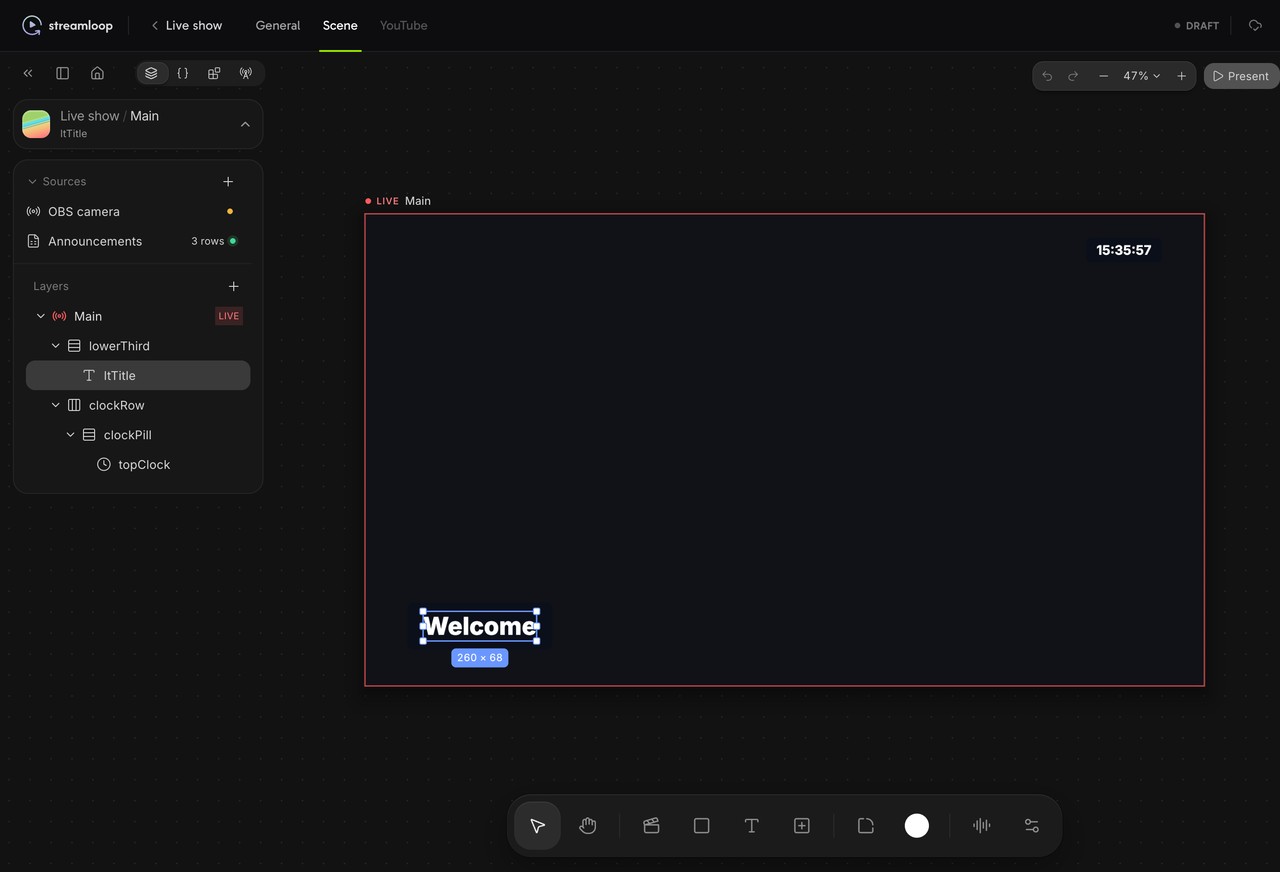
A draft scene in the Live Scenes studio: sources and layers on the left, a lower third and a clock on the canvas.
Streamloop is not a broadcast or FAST playout system. It has no SDI output, no SCTE-35 ad markers and no programme guide. It does not deliver HLS to your own player, or channels to FAST services, and scenes have no guest cameras.
For a FAST channel or a broadcast feed, a broadcast-grade cloud playout service fits better. See how to get a channel onto FAST services.
Run your channel with Live Scenes
Live Scenes is billed by the minute, only while live: one 1080p channel at 30 fps, live 24/7, is about $20 per 30 days. Choose Scene when you create a stream and describe your use case. Access is granted within 24 hours. See all prices
Frequently asked questions
Is cloud playout the same as live streaming?
No, but the two work together. Playout builds the channel: it plays the scheduled videos, live feeds and graphics in the right order. Streaming carries the finished channel to viewers over the internet. A cloud playout service usually does both jobs.
What is a playout server?
A playout server is the device or software that stores the video files of a channel and plays each one at its scheduled time. It sends the result to the next device in the chain, such as a graphics inserter or an encoder. In a channel in a box, the same server does those jobs too.
Is OBS a playout system?
Not in the broadcast sense. OBS is free software for recording and live streaming. It can play video files and scenes, and with VLC installed it can play a playlist. It runs on your computer, so the computer must stay on. It is live production software rather than scheduled playout automation.
Do FAST channels use cloud playout?
Often, yes. Vendor glossaries say that cloud playout is especially common for FAST channels, the free ad-supported channels on Pluto TV, Samsung TV Plus and similar services. A FAST channel also needs a distribution deal with each service, and its ad breaks can be signalled with markers such as SCTE-35. Streamloop does not deliver channels to FAST services.
Does cloud playout need a fast internet connection?
Not for files. You upload each video once, and the cloud plays it from there. A live feed is different. The computer or encoder that sends it needs a steady upload for as long as the feed runs. With files only and no live feed, your own computer can be off.
Sources
Checked on October 15, 2026 against Wikipedia, two vendor glossaries on playout, the OBS Project, AWS Elemental MediaLive pricing and the Streamloop dashboard.
The Wikipedia articles are Playout, Channel in a box, Character generator, SCTE-35 and Free ad-supported streaming television.