
What Is RTMP and How Does It Work?
RTMP (Real-Time Messaging Protocol) sends live audio and video from an encoder, the app that compresses your video, to a streaming server.
Today its main job is ingest, the upload to a platform.
OBS, FFmpeg or a cloud service pushes RTMP to YouTube, Twitch or Kick.
This guide is for anyone who saw "RTMP" in OBS or a stream dashboard, and for developers who need protocol basics.
To set up a stream now, follow the custom RTMP guide.
To run pre-recorded video, such as lofi or sermon replays, as a 24/7 live stream from the cloud, see the 24/7 section.
- Full name
- Real-Time Messaging Protocol
- Built on
- TCP, default port 1935
- Secure form
- RTMPS, usually port 443
- Main job today
- Ingest
Sending live video to a platform.
On this page
Where did RTMP come from?
RTMP began at Macromedia as the protocol of its Flash Communication Server. Adobe published the RTMP specification in December 2012.
IANA, the group that registers internet port numbers, still lists the RTMP port under the name of that Macromedia server. The specification describes RTMP for live broadcasts to many viewers, video on demand and video calls.
Flash itself is gone. Adobe stopped supporting Flash Player on December 31, 2020, and blocked Flash content from January 12, 2021. The major browsers disabled Flash Player as well.
How does RTMP work?
RTMP runs over TCP, not UDP. The encoder opens one connection to the server, and the audio and video travel through it in order.
Handshake. The client sends three chunks of fixed size, called C0 to C2. The server answers with S0 to S2.
Connect and publish. The encoder sends a connect command to an app on the server, then createStream and publish with a stream name. Platforms call this name the stream key, a private code for your channel. The server URL holds the app name, as in rtmp://server/app.
Audio and video. The encoder sends audio as message type 8 and video as message type 9. RTMP cuts each message into chunks of 128 bytes by default, so audio and video share the one connection.
Order. TCP sends lost data again, so the messages arrive in timestamp order. On a weak upload, the stream falls behind instead of losing data.
To set up OBS or another encoder, see the server URL and stream key in the custom RTMP guide. To build a sender or a server, read the Adobe RTMP specification and the Enhanced RTMP specification from Veovera.
Why can viewers not watch the RTMP stream itself?
Browsers cannot play RTMP. The platform receives the RTMP stream and transcodes it: it makes several copies at different qualities. A CDN, a network of delivery servers, then sends those copies to viewers over HLS or DASH.

The encoder pushes RTMP, or RTMPS (the encrypted form of RTMP), to the platform's ingest server. Viewers get HLS or DASH from a CDN.
YouTube Help says that YouTube "will automatically transcode your live stream to create many different output formats".
With HLS, each viewer's player can switch to a lower or higher quality when that viewer's network changes. So the protocol that you send is not the protocol that your viewers receive.
Is RTMP still used, and what replaces it?
Yes, as ingest. YouTube, Twitch and Kick still list RTMP ingest addresses for encoders, and YouTube says it has accepted RTMP since YouTube Live began. Newer protocols are better at some jobs, as the table shows.
| Protocol | Main job in a live stream | Built on | Defined by |
|---|---|---|---|
| RTMP | Sends live video from the encoder to the platform | TCP | Adobe specification |
| SRT | Sends live video over unstable networks | UDP, with resends of lost packets | Haivision, open source |
| WebRTC with WHIP | Sends live video with WebRTC, for example from OBS 30 or later | WebRTC, set up over HTTP | IETF RFC 9725, 2025 |
| HLS | Delivers the stream to viewers | HTTP | IETF RFC 8216 (Apple), 2017 |
Which port does RTMP use?
RTMP uses TCP port 1935 by default. The FFmpeg documentation says that an rtmp:// URL with no port uses 1935.
A URL can also name the port after the server name, as in rtmp://localhost:1935/testapp, the example in the RTMP specification.
A firewall can stop the connection. School and work networks can block streaming ports, as Kick Help notes, and Facebook Help tells you to check that your firewall allows RTMP.
RTMPS, the encrypted form of RTMP, uses a different port; the next section explains it.
If your encoder still does not connect, see why a custom RTMP stream does not connect.
What is the difference between RTMP and RTMPS?
RTMPS is RTMP inside a TLS connection, the encryption that HTTPS uses. YouTube Help calls it "RTMP over a Transport Layer Security (TLS/SSL) connection".
The RTMP messages stay the same, and only the connection is encrypted. The RTMPS guide from Google for Developers says that the connection "must be made to port 443 on the ingestion server."
Plain RTMP has no encryption. Google says that RTMPS prevents "man-in-the-middle attacks on the ingestion side of livestreams".
RTMPS protects only the path to the platform. Anyone with your stream key can still stream to your channel, so keep the key secret.
To pick one for each platform, see Should you use RTMP or RTMPS? in the custom RTMP guide.
Which video codecs can RTMP carry?
A codec is the format that compresses video or audio. Classic RTMP carries the H.264 video codec and the AAC audio codec.
Enhanced RTMP (E-RTMP) is an update published by Veovera, a not-for-profit group with contributors from Adobe, Google, Twitch, Meta, OBS and FFmpeg. It adds HEVC (H.265), AV1 and VP9 video, Opus and FLAC audio, and multitrack: several video or audio tracks in one stream.
Platforms accept different codecs. YouTube Help lists H.264, H.265 and AV1 for RTMP and RTMPS ingest. Kick Help asks for H.264 only. With Twitch Enhanced Broadcasting, OBS 30.2 or later sends several qualities at the same time.
For codec, bitrate and keyframe settings on each platform, see live stream settings.
Which software can send an RTMP stream?
OBS Studio sends RTMP and RTMPS, and it also has SRT, RIST and WHIP outputs. FFmpeg sends RTMP from the command line.
For an FFmpeg example, see how to loop a video with FFmpeg. Each platform gives you a server URL and a stream key. Our guides show where to find them on YouTube, Twitch, Kick, Facebook and TikTok.
For one live OBS stream to one platform, OBS alone is enough.
To receive RTMP yourself, run server software such as MediaMTX or the nginx RTMP module. Both are open source.
How do you send pre-recorded video as a 24/7 live stream over RTMP?
Streamloop turns pre-recorded videos into a 24/7 live stream from the cloud, so your computer can be off and you need no OBS. It suits lofi and music channels and sermon replays. A 24/7 live stream stays live, so new viewers can find it at any hour. Streamloop is the RTMP sender: it pushes your loop to YouTube, Twitch, Kick, Facebook or any RTMP server.
Streamloop uses RTMPS for Twitch, Kick, Facebook and X, and RTMP for a YouTube stream key. Any rtmp:// or rtmps:// address works as a Custom RTMP destination, and one stream can go to up to 5 destinations.
Streamloop sends only RTMP or RTMPS. If your platform needs SRT, HLS or WHIP input, Streamloop cannot send to it.
For the full setup, see how to run a 24/7 live stream of pre-recorded video.
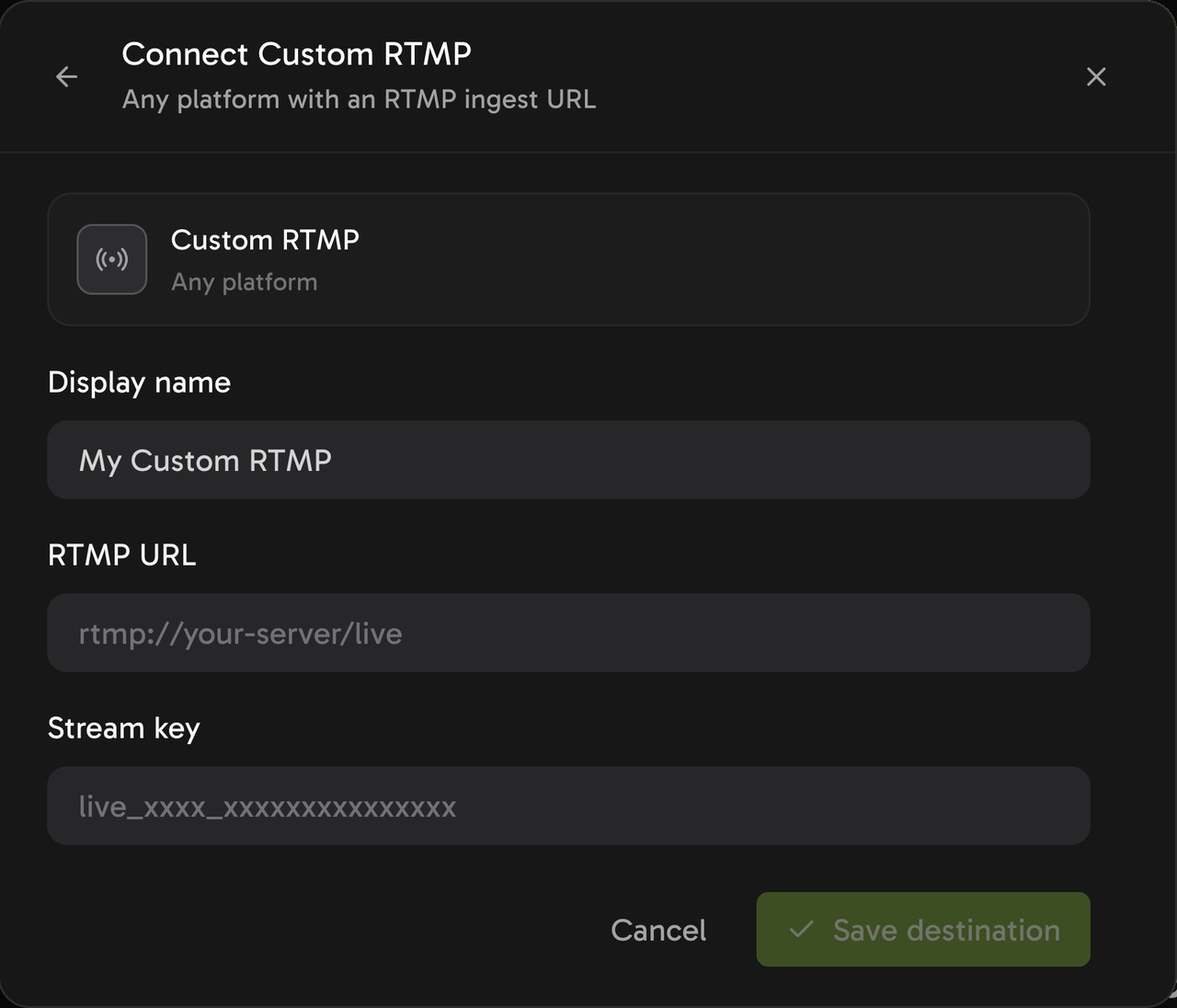
The Custom RTMP form takes the server URL and the stream key in separate fields.
Stream your videos 24/7 from the cloud
Streaming is billed by the minute, only while live: one 24/7 stream at 1080p is about $10 per 30 days. Start with a $1 trial week, which becomes a monthly plan unless you cancel, or top up and pay as you go. See all prices
Each extra destination adds $6 per 30 days at 1080p, only while live, and it uses up trial credits faster.
What if your source is a live OBS feed?
Live Scenes is the Streamloop tool for live sources, such as an OBS feed. It receives your feed on an RTMP or RTMPS input, adds graphics and sends the result to up to 5 destinations.
Choose Scene when you create a stream and describe your use case. Access is granted within 24 hours.
Live Scenes is billed by the minute, only while live: one 1080p channel at 30 fps, live 24/7, is about $20 per 30 days. It works up to 1080p60 and has no guest cameras. Each extra destination costs the same as on a loop.
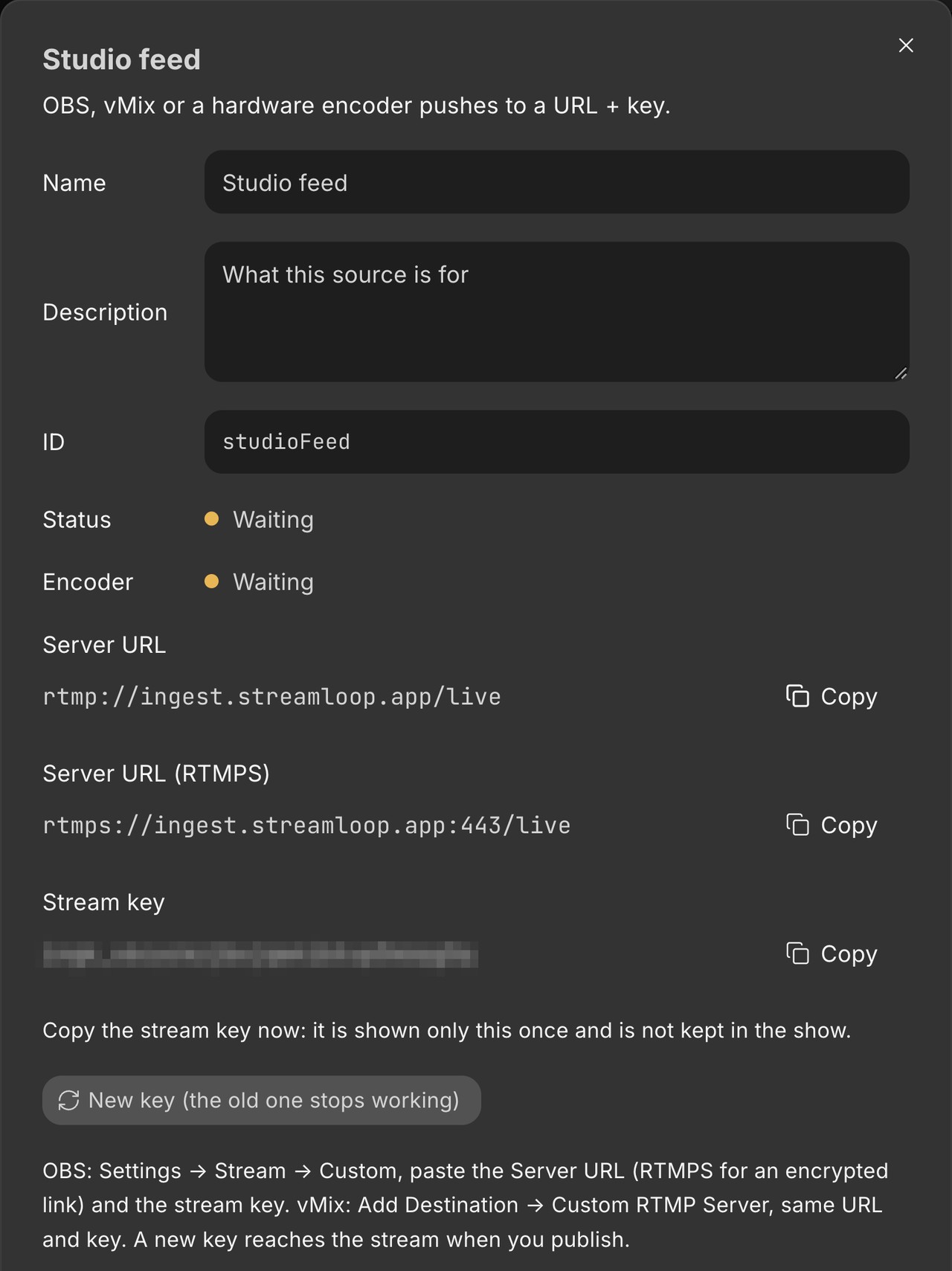
The RTMP input of a scene gives you an RTMP and an RTMPS server URL for OBS, and a stream key.
Frequently asked questions
How do I create an RTMP stream?
Create a live stream on your platform, and copy its server URL and stream key. Paste both values into the stream settings of your encoder, such as OBS. Then start streaming. The custom RTMP guide shows each step in OBS.
How can I watch an RTMP stream?
Use ffplay, the player that comes with FFmpeg. The FFmpeg documentation gives this example: ffplay rtmp://myserver/vod/sample plays the stream "sample" from the app "vod". This works only on a server that lets clients play streams, such as your own test server.
What is an RTMP server?
An RTMP server is the program that receives a published stream. The RTMP specification says that any client can then play the stream by its name. Platform ingest servers only receive your stream. Streamloop does not offer RTMP playback for your own player.
Is RTMP free to use?
Sending RTMP needs no paid software. OBS Studio is free and open source, and so is FFmpeg. Costs come from the services you choose, such as a host for your own RTMP server or a cloud service that streams for you.
Sources
Checked on October 15, 2026 against YouTube Help, Google for Developers, Twitch Help, Kick Help, Facebook Help and the Streamloop dashboard.
Protocol sources: the Adobe RTMP specification, the Veovera Enhanced RTMP specification, the FFmpeg documentation, the IANA port registry, and IETF RFC 8216 and RFC 9725.