
Streaming Bitrate and Encoder Settings by Platform
The best streaming bitrate for 1080p at 60 fps is 6,000 kbps on Twitch and up to 8,000 kbps on Kick.
YouTube recommends 17,000 kbps with H.264, and Facebook asks for 4,500 to 9,000 kbps. All four ask for constant bitrate (CBR) and a keyframe every 2 seconds.
Bitrate, the video data you send each second, must stay below your upload speed.
This guide is for anyone who streams live from OBS or another encoder. Want to stream a pre-recorded video 24/7 without OBS? See the 24/7 section.
On this page
What bitrate should you stream at on each platform?
Find your platform and resolution in the table. If your upload speed is too low for that number, drop to 720p.
Recommended H.264 video bitrate in kbps:
| Platform | 1080p60 | 1080p30 | 720p60 | 720p30 |
|---|---|---|---|---|
| Twitch | 6,000 | 4,500 | 4,500 | 3,000 |
| YouTube | 17,000 (min 6,000) | 14,000 (min 5,000) | 8,000 (min 3,000) | 8,000 (min 3,000) |
| 4,500 to 9,000 | 3,000 to 6,000 | 2,250 to 6,000 | 1,500 to 4,000 |
Kick accepts 1,000 to 8,000 kbps at any resolution, up to 1080p and 60 fps. Facebook recommends no more than 15,000 kbps.
In OBS, set the bitrate in Settings, then Output.
What is the maximum bitrate on Twitch?
Twitch does not publish a hard maximum for a standard stream. Its Broadcasting Guidelines recommend 6,000 kbps for 1080p at 60 fps.
7,000 or 8,000 kbps is above every per-stream recommendation Twitch publishes.
Enhanced Broadcasting is the one way to send more: with OBS 30.2 or newer, OBS sends several qualities at once.
The total bandwidth is 1.5 to 10.5 Mbps, and a 1080p H.264 rendition goes up to 6 Mbps. 2K (1440p) streams need Enhanced Broadcasting, and they are for Affiliates and Partners.
To set up OBS for Twitch, see how to get your Twitch stream key.
What are YouTube's recommended live stream settings?
YouTube accepts up to 60 fps over RTMP or RTMPS, and YouTube Help recommends RTMPS. YouTube makes many versions of your stream for its viewers, so send the best quality your upload can hold.
YouTube live bitrates in Mbps, recommended (minimum):
| Resolution | H.264 | AV1 or H.265 |
|---|---|---|
| 2160p60 | 50 (14) | 35 (10) |
| 2160p30 | 42 (11) | 30 (8) |
| 1440p60 | 34 (8) | 24 (6) |
| 1440p30 | 21 (7) | 15 (5) |
| 1080p60 | 17 (6) | 12 (4) |
| 1080p30 | 14 (5) | 10 (4) |
| 720p60 | 8 (3) | 6 (2) |
| 720p30 | 8 (3) | 6 (2) |
| 480p | 4 (0.4) | 3 (0.3) |
| 360p | 4 (0.4) | 3 (0.3) |
For HDR, use H.265, because AV1 does not support HDR. At 4K, YouTube offers no low-latency option.
To connect OBS to YouTube, see how to get your YouTube stream key.
What is the best bitrate for 1080p at 60 fps?
Use each platform's own number: 6,000 kbps on Twitch, 17,000 on YouTube with H.264, 4,500 to 9,000 on Facebook and up to 8,000 on Kick.
If your upload is too slow, use 720p at 60 fps and 4,500 kbps, as Twitch recommends.
How much upload speed do you need to stream?
Your upload speed must be higher than your video bitrate plus your audio bitrate, with a margin. For example, 6,000 kbps of video and 160 kbps of audio need about 6.2 Mbps before the margin.
A stable stream at a lower bitrate beats a high bitrate that drops frames.
YouTube Help recommends a speed test before you go live.
Streaming to several platforms from your own computer sends one copy to each, so your upload must carry all of them. See the multistream guide, the Twitch and YouTube guide, or multistream from the cloud.
What keyframe interval should you use?
Use a keyframe interval of 2 seconds on every platform. YouTube and Facebook recommend 2 seconds and allow no more than 4. Twitch and Kick use 2 seconds in all their recommended settings.
In OBS, open Settings, then Output, and set Keyframe Interval to 2.
A keyframe is a full picture. Viewers and the platform can start the video or change quality only at a keyframe.
Which OBS encoder settings should you use for streaming?
Use CBR, not VBR. Twitch Help explains that VBR drops in quiet scenes and jumps in action scenes, which can cause buffering and dropped frames. Kick does not support VBR.
For the preset, Twitch recommends x264 at veryfast to medium with profile Main or High. With NVENC, it recommends the Quality preset with 2 B-frames.
On a Mac, Kick Help says to select the x264 encoder to get CBR.
Streaming to more than one platform? See how to multistream a live feed.
Which video codec and audio bitrate does each platform accept?
H.264 works on every platform. YouTube also accepts H.265 and AV1, and Kick accepts H.264 only. For audio, AAC at 128 kbps fits every published limit. Twitch recommends 96 kbps and allows up to 160.
| Platform | Video codec | Audio |
|---|---|---|
| Twitch | H.264 | AAC-LC, 96 kbps recommended, 160 kbps maximum |
| YouTube | H.264, H.265 or AV1 | AAC or MP3, 128 kbps stereo, 44.1 kHz |
| H.264 (Level 4.1 for 1080p30, 4.2 for 1080p60) | AAC-LC, 128 kbps preferred, 256 kbps maximum, 44.1 or 48 kHz | |
| Kick | H.264 only | Stereo, up to 48 kHz (no bitrate published) |
Do you need bitrate settings to stream a pre-recorded video 24/7?
Yes, if you play it from OBS on your own computer or server. That route is free, but the machine must stay on.
Streamloop turns pre-recorded videos into a 24/7 live stream from the cloud, with your computer off and no OBS. It suits lofi, music and sermon replay channels. A 24/7 live stream stays live, so new viewers can find it at any hour. In Streamloop you choose only the resolution and the frame rate.
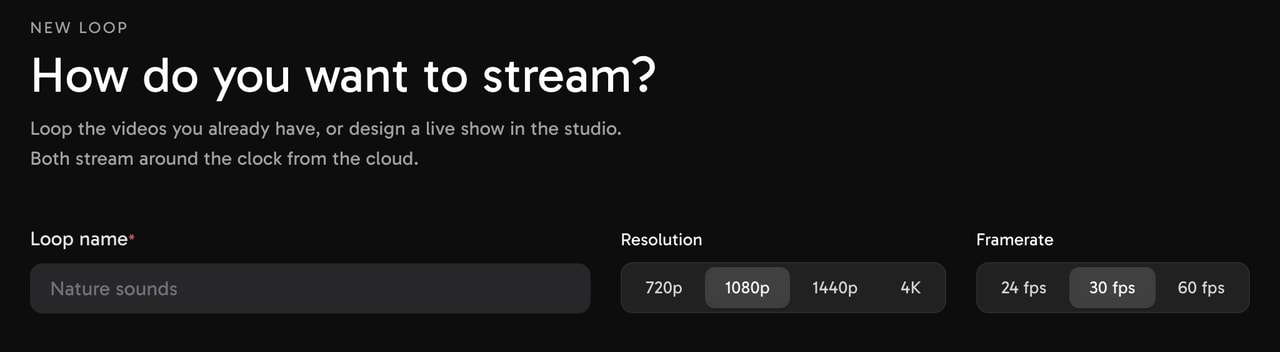
The New loop form. The default is 1080p at 30 fps.
Streamloop picks the codec, a 2 second keyframe interval and the bitrate cap, with quality-based encoding, not CBR. Audio is AAC at 192 kbps, above Twitch's 160 kbps maximum. Video by platform:
| Platform | Video |
|---|---|
| Twitch | H.264, up to 1080p, capped at 5,600 kbps for new encodes |
| YouTube | AV1, H.265 or H.264, up to 4K, no cap |
| H.264, up to 1080p, no cap | |
| Kick | H.264, up to 1080p, capped at 7,800 kbps |
For Twitch, an existing encode measured at up to 6,500 kbps is reused as it is, which is above Twitch's 6,000 kbps recommendation.
YouTube gets AV1 or H.265 and no cap only when it is the only platform. With others, the strictest wins: H.264 and the lowest cap, 5,600 kbps if Twitch is one of them.
Twitch ends a broadcast after 48 hours. Streamloop reconnects Twitch every 20 hours, about 100 seconds offline, and Facebook every 7 h 45 min, about 4 minutes, as a new live video.
Guides: 24/7 Twitch, 24/7 YouTube, 24/7 Facebook, Kick stream key and TikTok LIVE.
Stream a pre-recorded video 24/7 without OBS
$1 trial, card only, one per user: 7 days at the quality you pick. Then the monthly plan for that quality: $10 per 30 days at 1080p30 for one destination. Each extra destination: $6 per 30 days at 1080p. Encoding: $0.005 per minute, only for files that need it. Over 15 GiB of media, the first 30 GiB of extra storage per stream is free, then $0.35 per GiB a month while live. Card fee: usually 5%, at least $0.50.
How do you multistream a live feed without multiplying your upload?
Send one stream from OBS to Streamloop Live Scenes. It delivers your live feed to up to 5 platforms, so your upload carries one copy. It accepts RTMP, RTMPS, SRT, RTSP and HLS.
Live Scenes runs up to 1080p60, with no guest cameras, at the lowest cap among your platforms (5,600 kbps with Twitch). It costs $20 per 30 days at 1080p30 with one platform, plus $6 for each extra platform at 1080p. Choose Scene when you create a stream and describe your use case. Access is granted within 24 hours.
The free route, an OBS plugin with several RTMP outputs, sends one copy per platform, so your upload carries all of them. See how Live Scenes works.
Frequently asked questions
Is 720p at 60 fps better than 1080p at 30 fps?
It depends on motion. 720p at 60 fps looks smoother in fast motion, such as games and sports. 1080p at 30 fps looks sharper in slow scenes, such as talk shows and slides. Twitch gives both the same bitrate: 4,500 kbps. On YouTube, 1080p30 needs more: 14,000 kbps against 8,000 kbps for 720p60.
Does a higher bitrate always mean better quality?
No. Twitch Help says that a higher bitrate improves quality only up to a point. Above that point, viewers see little difference. A bitrate that is too high for your connection causes dropped frames and buffering. Use your platform's number from the table, and stay well under your upload speed.
What does "encoding overloaded" mean in OBS?
OBS shows this warning when your computer cannot encode the video fast enough. It is not an upload problem, so a lower bitrate does not fix it. Use a faster encoder preset, or lower the resolution or the frame rate. If the stream stutters, Kick Help suggests Superfast for x264 or P3 for NVENC and AMD.
What settings does TikTok LIVE use?
The TikTok LIVE Studio Help page gives no bitrate numbers. It recommends 720p, 30 fps and the default bitrate for most streams. LIVE Studio can also test your connection and choose the settings for you. To stream a pre-recorded video, see the TikTok LIVE guide.
Is 3,000 kbps good enough to stream?
For 720p, yes. 3,000 kbps is Twitch's number for 720p at 30 fps and YouTube's minimum for 720p. For 1080p it is low. It is under Twitch's 4,500 kbps and YouTube's 5,000 kbps minimum for 1080p at 30 fps, and at the bottom of Facebook's range.
Sources
Checked on October 15, 2026, against YouTube Help, Twitch Help, Facebook Help, Kick Help, TikTok LIVE Studio Help and the Streamloop dashboard.
Platform help
YouTube Help: Choose live encoder settings, bitrates, and resolutions
Twitch Help: Broadcasting Guidelines
Twitch Help: Enhanced Broadcasting
Facebook Help: Requirements for Facebook Live videos
Kick Help: How to stream on KICK.com
TikTok LIVE Studio Help: Adjust LIVE quality for smooth and clear video