
What Is a Stream Key and Where Do You Find It?
A stream key is a private code that tells a streaming platform that your live video belongs to your channel. Your streaming software needs it together with the server URL. Anyone who has your key can stream to your channel, so keep it secret.
This guide is for anyone who sets up OBS or another encoder. Streamloop, the publisher of this guide, is for channels that want recorded video live 24/7, such as lofi music or sermon replays.
Key stopped working? See why it happens and how to fix it. Want a 24/7 loop of recorded video? See how it works.
- You need
- Server URL and stream key
The URL says where, and the key says which channel.
- Who issues the key
- Your platform, not OBS
Copy it from the platform settings.
- After a reset
- The old key stops working
Paste the new key into every tool.
On this page
Where do you find your stream key on each platform?
Each platform shows the key in its creator settings, next to the server URL.
How long a key lasts depends on the platform. Twitch and Kick keys last until you reset them. A Facebook key lasts one live video unless you turn on a persistent key. Instagram gives a new key each time, and TikTok does not say.
| Platform | Where the key is | How long the key lasts |
|---|---|---|
| YouTube | YouTube Studio, Live Control Room, Stream tab | Reset it in the Live Control Room. To reuse one key, create a custom stream key. |
| Twitch | Creator Dashboard, Settings, Stream | Until you reset it or change your password |
| Kick | Streamer Dashboard, Stream URL and Key | Until you select Reset |
| Live video setup, Streaming software | One live video, unless you turn on Persistent stream key | |
| TikTok | LIVE Producer, only with LIVE access | TikTok does not say. Copy it again before each LIVE. |
| Live video setup on Instagram.com | A new key each time you use Live Producer |
Step-by-step key guides: YouTube, Twitch, Kick, Facebook and TikTok.

On Twitch, the key shows only as dots. Copy, Reset and Show are next to it.
For X, LinkedIn and any other server, see the custom RTMP guide.
Is a stream key the same as the RTMP URL?
No. The server URL says where to send the video, and the stream key says which channel it is. You need both.
Platforms also call the server URL the RTMP URL, the Stream URL or the RTMP server.

This is a schematic. The key in it is an example, not a real key.
Twitch Help shows how the two values join: rtmp://TWITCH-INGEST-SERVER/app/STREAM-KEY.
Where does the stream key go in OBS?
OBS does not issue a stream key. Your platform does.
- In OBS, open Settings, then Stream.
- In Service, choose your platform.
- Paste the key into Stream Key, and select OK.
For a platform that is not on the list, choose Custom. Then paste the Server and the Stream Key.
No Stream Key field? OBS is connected to your account, so it gets the key itself and hides the field. To paste a key instead, select Disconnect Account.
For a normal live show from OBS, this is all you need.
Can you go live without copying a stream key?
Yes. OBS can sign in to YouTube and Twitch with Connect Account, so you copy no key. The Twitch app on iOS or Android also needs no stream key.
Sign in if OBS is your only encoder. Use a key when several tools stream to one channel, or when OBS cannot sign in to the platform.
Why did your stream key stop working, and how do you fix it?
A stream key stops working for one of four reasons:
- The encoder has an old key, a typing error or the wrong server URL.
- You or a co-owner reset the key. On YouTube, only a channel owner or manager can reset it.
- You changed your Twitch password, so Twitch reset the key. Twitch can also reset it after an account takeover.
- The key was for one broadcast. See how long each key lasts.
To fix it, copy the current key and server URL from the platform. Then paste both into every tool that streams for you.
Reset the key at once if someone else saw it.
If a cloud service streams for you, replace the key there too. See how to replace a key in a cloud loop.
Can you stream pre-recorded video 24/7 with a stream key?
Yes. OBS can play a video file, but your computer must stay on for the whole stream. If your computer can stay on, OBS is the better free choice.
Streamloop turns pre-recorded videos into a 24/7 live stream from the cloud, with your computer off and no OBS. It suits channels such as lofi music, sermon replays and study streams. A 24/7 live stream stays live, so new viewers can find it at any hour. Streamloop uses a YouTube sign-in or your stream key to send the loop to your channel.
- YouTube: choose Connect channel to sign in, or RTMP stream key to paste a key.
- Twitch and Kick: paste the stream key. Streamloop fills in the server URL.
- Facebook: turn on Persistent stream key, then paste that key. A standard key works for one live video only. With a persistent key, you can have one live video at a time.
- TikTok and LinkedIn: these platforms may give a new server URL and key for each LIVE or event, so check both before each stream.
One loop can stream to up to 5 destinations at the same time.
Podcast? A loop needs at least one video file, so use a video of a still image. Add your episodes as audio tracks. Streamloop plays them over the video.
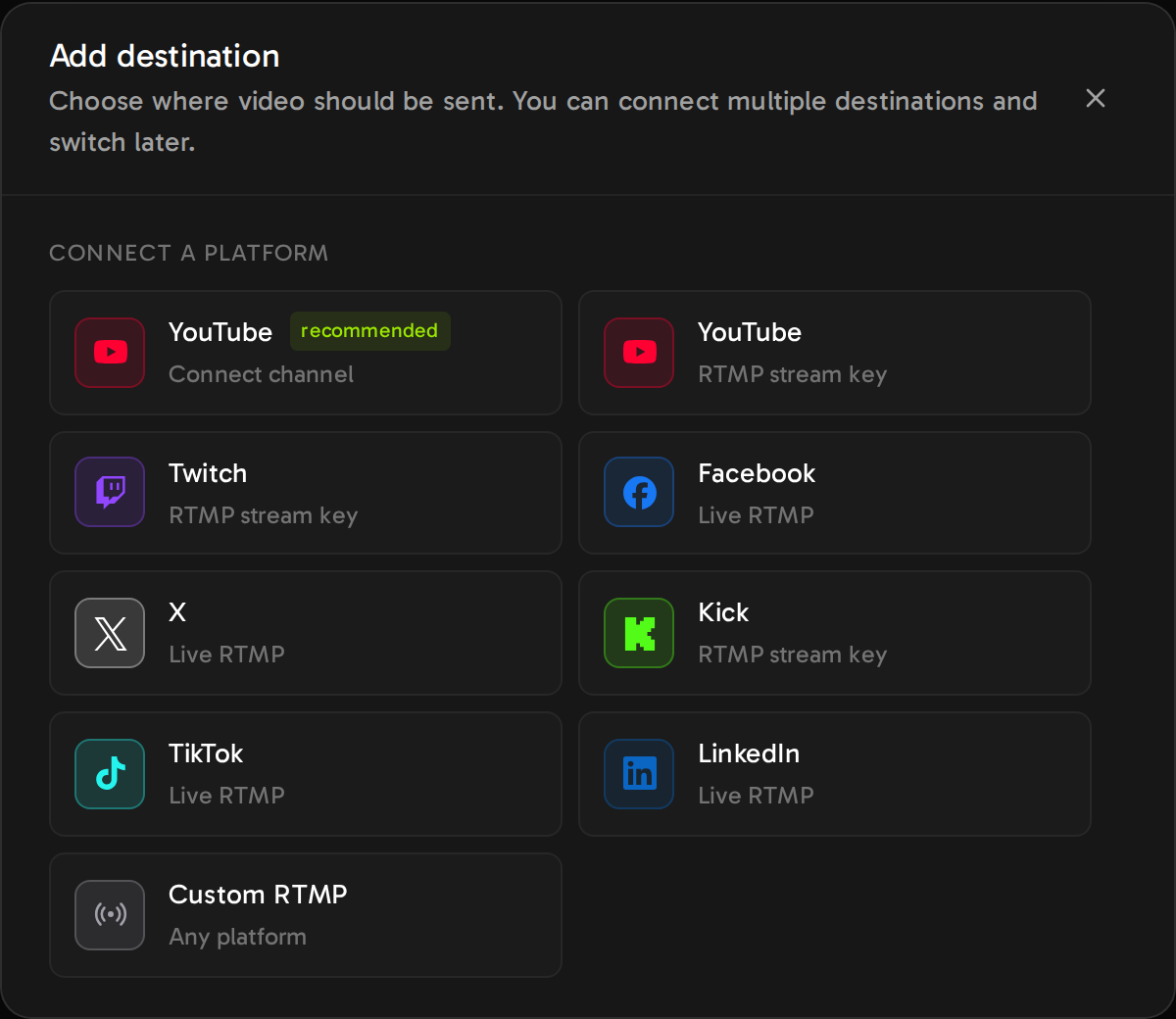
In Streamloop, only YouTube can connect by sign-in. Every other platform uses a server URL and a stream key.
Full setup: the 24/7 live stream guide, or the Twitch and Facebook versions.
Start a 24/7 loop with a stream key or a YouTube sign-in
Streaming is billed by the minute, only while live: one 24/7 stream at 1080p is about $10 per 30 days. Start with a $1 trial week, which becomes a monthly plan unless you cancel, or top up and pay as you go. See all prices
To cancel, open Billing, select Cancel, then Cancel plan. Cancel during the trial and you pay nothing more.
Each extra destination adds $6 per 30 days at 1080p, only while live. The trial does not cover extra destinations. A card top-up can add a fee of up to 5%, at least $0.50, depending on the payment method. The top-up window shows the fee before you pay.
How do you replace a reset key in Streamloop?
Streamloop cannot edit a saved key.
After a reset on the platform, stop the loop. Remove the old destination from the loop, and add it again with the new key. Then start the loop.
Frequently asked questions
Is it safe to share my stream key?
No. Anyone with your key can stream to your channel. Facebook Help says: "Anyone with these details can stream to your post." If your key leaked, reset it at once.
Can two people use the same stream key at once?
Twitch does not recommend that you share your key. Instead, add each extra streamer under Permissions, and Twitch sends them a guest key. When you reset your own key, their guest keys still work.
Does Twitch allow pre-recorded video?
Yes. Twitch Help says that you can stream past videos as a Rerun "from your streaming encoder of choice". Select Rerun, and add "[Rerun]" to the title and the Go Live notification, as the 24/7 Twitch guide shows.
Where do I find my stream key on my phone?
What is the Instagram stream key, and why does it keep changing?
Instagram shows a URL and a stream key when you start a live video on Instagram.com. Instagram Help says that the key "is not static, and will refresh each time you use Live Producer." Only public accounts with 1,000 or more followers can go live.
Sources
Checked on October 15, 2026, against YouTube Help, Twitch Help, Kick Help, Facebook Help, Instagram Help, the OBS Studio wiki and the Streamloop dashboard.
Platform help
YouTube Help: Manage live stream settings
YouTube Help: Create a YouTube live stream with an encoder
Twitch Help: Twitch Stream Key FAQ
Twitch Help: On-Demand Content on Twitch
Kick Help: OBS or Streamlabs not connecting to KICK
Facebook Help: Go live on Facebook using streaming software
Instagram Help: Start a live video on Instagram