
What Is HLS, and How Do M3U8 Playlists Work?
HLS, short for HTTP Live Streaming, is one of the most widely used ways video reaches viewers on the internet. The server cuts the video into short segments and lists them in a text playlist, an M3U8 file. The player downloads the playlist, then the segments, over ordinary HTTPS.
Apple released HLS in 2009, and the IETF documents it as RFC 8216. This guide is for creators and small teams who run a live stream or a 24/7 channel and meet HLS along the way. That may be a player address, an encoder setting or a platform help page.

An HLS path. The encoder sends one stream, the packager cuts segments and writes the playlist, and the player reads the playlist from a CDN.
On this page
How does HLS work?
HLS turns one video stream into a chain of small files plus a playlist that names them. The player follows the playlist, so the stream needs nothing more than a web server.
- Your encoder makes one stream. For a live stream it pushes RTMP, RTMPS or SRT to the platform.
- A packager cuts the stream into segments a few seconds long and writes a playlist that lists them in order.
- A web server, the origin, holds the playlist and the segments as ordinary files.
- A CDN, a network of delivery servers, caches those files close to your viewers.
- The player downloads the playlist, then each segment in order. For a live stream it reloads the playlist to find new segments.
Most streams come in several qualities. A master playlist lists each one, and RFC 8216 tells players to switch between them as network conditions change. That is adaptive bitrate streaming: on a weak connection the picture drops to a lower quality instead of stopping.
Because every file travels over plain HTTP, HLS works with ordinary web servers and content delivery networks, as Apple puts it. It usually runs over TCP, like most web pages, so lost packets are sent again. The price is delay, which a later section covers.
Segment length is the packager's choice. The example in RFC 8216 uses a 10 second target, and YouTube asks for 1 to 4 second segments when you send HLS to it. HLS carries on-demand video as well as live video; the difference is whether the playlist keeps growing.
What is an M3U8 file, and what is inside it?
An M3U8 file is the HLS playlist: a plain text file, in UTF-8, that holds tags and addresses. It contains no video. A player opens it, reads the addresses and fetches the video files from there.
RFC 8216 names two kinds. A master playlist lists the qualities: one EXT-X-STREAM-INF line per quality, with its bandwidth, resolution and codecs, then the address of that quality's own playlist. A media playlist lists the segments: a target duration, then an EXTINF line with the length in seconds before the address of each segment.
Here are real lines from the two public test streams in the next section. These are two rows from Apple's sample master playlist, for two of its six resolutions; the real file has more rows.
| Line in the master playlist | What it means |
|---|---|
| #EXTM3U | Every playlist starts with this tag. |
| #EXT-X-STREAM-INF:AVERAGE-BANDWIDTH=7968416,BANDWIDTH=8001098,CODECS="avc1.64002a,mp4a.40.2",RESOLUTION=1920x1080,FRAME-RATE=60.000,CLOSED-CAPTIONS="cc1",AUDIO="aud1",SUBTITLES="sub1" | The top quality: about 8 Mbps, H.264 video and AAC audio, 1920x1080 at 60 fps, plus the caption, audio and subtitle groups it uses. |
| v9/prog_index.m3u8 | The media playlist for that quality, as an address relative to the master playlist. |
| #EXT-X-STREAM-INF:AVERAGE-BANDWIDTH=895755,BANDWIDTH=902298,CODECS="avc1.64001e,mp4a.40.2",RESOLUTION=640x360,FRAME-RATE=30.000,CLOSED-CAPTIONS="cc1",AUDIO="aud1",SUBTITLES="sub1" | A low quality for weak connections: about 0.9 Mbps, 640x360 at 30 fps. |
| v3/prog_index.m3u8 | Its media playlist. |
A media playlist then lists the segments. This is the top of the 720p media playlist of the Mux test stream. That stream stores each segment as its own MPEG-2 transport stream file, .ts, and the real file lists 64 segments.
| Line in the media playlist | What it means |
|---|---|
| #EXTM3U | The same first tag. |
| #EXT-X-VERSION:3 | The protocol version the player must support. |
| #EXT-X-PLAYLIST-TYPE:VOD | On demand: the list is complete and will not change. |
| #EXT-X-TARGETDURATION:11 | No segment is longer than 11 seconds. |
| #EXTINF:10.000, | The next segment lasts 10 seconds. |
| url_462/193039199_mp4_h264_aac_hd_7.ts | The first segment file, as an address relative to this playlist. |
| #EXTINF:10.000, | And so on, one pair of lines per segment, 64 in this file, until the last line, #EXT-X-ENDLIST. |
Apple's sample does it differently. It keeps every segment of a quality inside one fragmented MP4 file, a form that Apple added to HLS in 2016. A byte range then follows each EXTINF line.
A live playlist has no end tag. The packager adds a line for each new segment and drops old ones, and the player reloads the file to keep up.
A player knows a playlist by its address, which usually ends in .m3u8 (.m3u is also allowed), or by its content type, application/vnd.apple.mpegurl or audio/mpegurl.
What does an HLS stream URL look like, and where can you test one?
An HLS stream URL is an https address that ends in .m3u8, such as master.m3u8, index.m3u8 or playlist.m3u8. It points at the playlist, and the player finds everything else from there.
Two public sample streams work today. Both are on demand, and both are third-party files that can move.
| Sample stream | Address | What you get |
|---|---|---|
| Apple sample | https://devstreaming-cdn.apple.com/videos/streaming/examples/img_bipbop_adv_example_fmp4/master.m3u8 | A test pattern in six resolutions, from 480x270 to 1920x1080, in fragmented MP4 segments. The master playlist above. |
| Mux test stream | https://test-streams.mux.dev/x36xhzz/x36xhzz.m3u8 | A video in five resolutions, from 320x184 to 1920x1080, in transport stream segments. The media playlist above. |
To test an address, paste it into Safari or Chrome (version 142 or newer), which play HLS on their own. Firefox and Edge need a player such as hls.js, an open-source project on GitHub with a demo page. A live stream has the same kind of address; the playlist just keeps changing while you watch.
Why do you send RTMP, but your viewers get HLS?
A live stream has two legs. On the ingest leg, your encoder or a cloud service pushes one stream to the platform over RTMP, RTMPS or SRT. On the delivery leg, the platform sends HLS to every viewer.
The platform receives your stream, transcodes it into several qualities, packages HLS or DASH and gives the files to a CDN. Your viewer's player never sees RTMP; it reads a playlist. That is why browsers cannot play an RTMP stream, and why viewers get HLS and not RTMP.
YouTube is the exception on the ingest leg. It also accepts HLS as an ingest protocol, for HDR and for codecs that RTMP cannot carry, such as HEVC. YouTube Help says the ingest address starts with https instead of rtmp, and it needs transport stream segments of 1 to 4 seconds. Our platform table shows what each service accepts.
As a creator you rarely make HLS yourself. You make it only when you host video on your own website or app, with a media server or a video host that packages it.
Why does an HLS stream lag behind, and what is Low-Latency HLS?
HLS lags because a segment must be complete before the playlist can list it. The player also stays a few segments behind the newest one.
RFC 8216 tells a player that joins a live stream not to start less than three target durations from the end of the playlist. With 6 second segments, a common setting, that is about 18 seconds behind live, before encoding and network delay. YouTube Help says the same in plain words: HLS has higher latency because it sends segments of video instead of a continuous stream like RTMP. For that reason YouTube turns its ultra low latency option off for HLS ingest.
Apple documents Low-Latency HLS, an extension of the protocol for live streams; vendors report a few seconds of delay. For real-time use, such as a conversation with guests, look at WebRTC instead.
Where does HLS fit in a 24/7 channel?
Streamloop turns pre-recorded videos into a 24/7 live stream from the cloud, so your computer can be off and you need no OBS. It suits lofi and ambient channels, music sets, sermon replays, nature and study streams. A 24/7 live stream stays live, so new viewers can find it at any hour. In such a channel, HLS appears at the end of the delivery leg, and as one possible input.
- Your loop sends RTMP or RTMPS. A loop is your 24/7 stream of pre-recorded videos. Streamloop sends it to YouTube, Twitch, Kick, Facebook or any custom RTMP address. The platform makes the HLS for your viewers, and you never touch a playlist.
- A loop plays files, not streams. A loop plays videos that you upload or import from a link, such as Google Drive, YouTube or a direct .mp4 link. An HLS URL is a live stream, not a file, so it is not a loop source.
- Live Scenes can pull a live HLS stream. Live Scenes is the Streamloop studio for live sources, such as a camera or another stream, with graphics on top. In the studio, add HLS stream under Live inputs and paste the m3u8 URL. Use it for a partner feed, a public camera stream or another channel's output. Set a slate, a fallback screen, for when the stream drops. A scene sends RTMP or RTMPS to up to 5 destinations, at up to 1080p60, with no guest cameras. Choose Scene when you create a stream and describe your use case; access is granted within 24 hours.
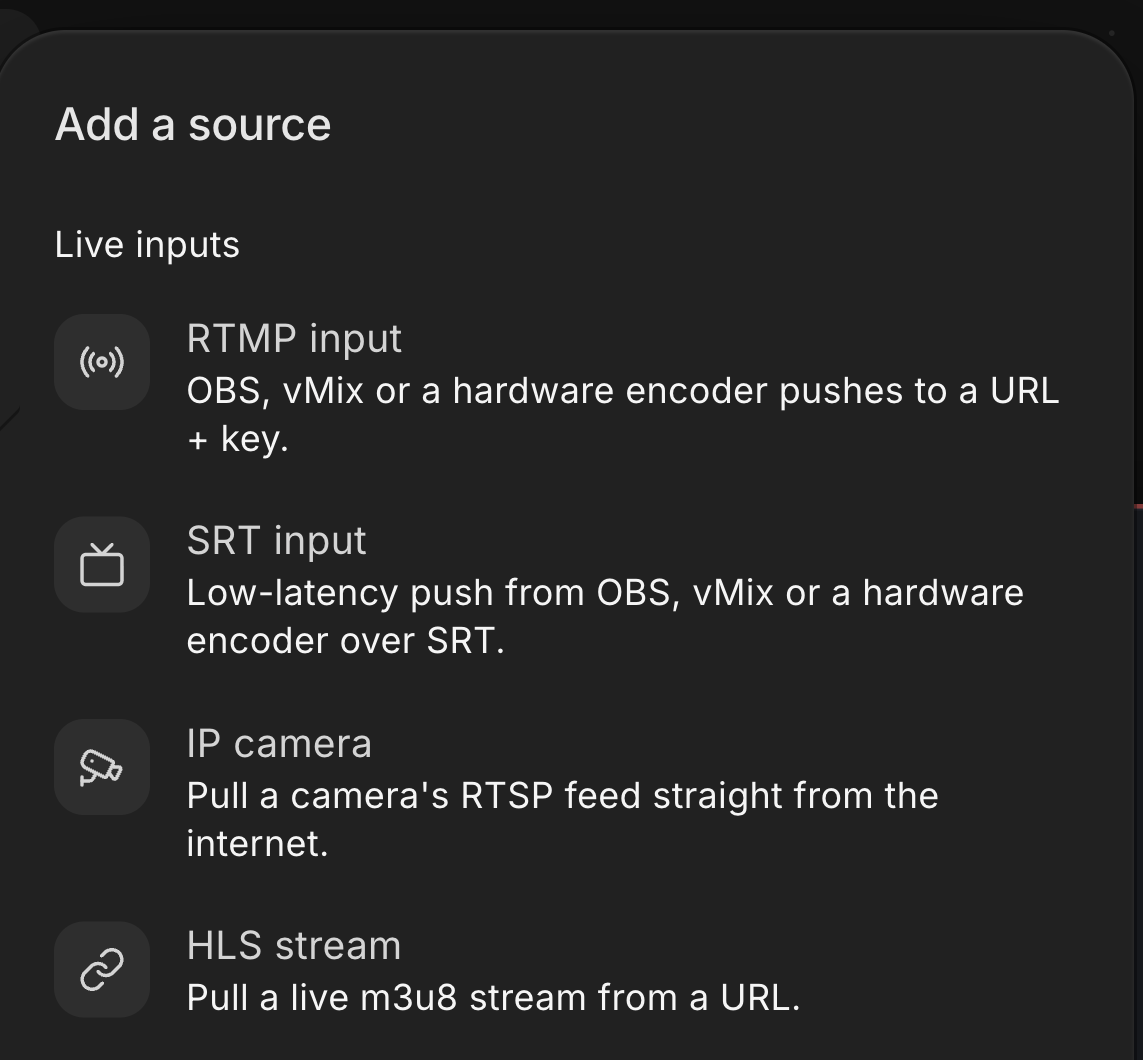
In the Streamloop studio, the Add a source menu lists HLS stream under Live inputs. It pulls a live m3u8 stream from a URL.
Streamloop does not give you an HLS address to embed on your own website. Use the platform's embed player instead. Or send the loop to a custom RTMP destination on a media server or video host that makes HLS.
Run your channel from the cloud
Streaming is billed by the minute, only while live: one 24/7 stream at 1080p is about $10 per 30 days. Start with a $1 trial week, which becomes a monthly plan unless you cancel, or top up and pay as you go. See all prices
Frequently asked questions
Is HLS the same as M3U8?
No, but they go together. HLS is the protocol: the segments, the playlists and the rules a player follows. M3U8 is the file extension of the playlist that HLS uses. When people say an m3u8 stream or an m3u8 link, they mean an HLS stream and the address of its playlist.
Can a browser play an HLS URL without a plugin?
Safari and Chrome (version 142 or newer) play an HLS URL on their own, so you can open an .m3u8 address in them. Firefox and Edge have no built-in HLS player, so a web page needs a JavaScript player such as hls.js, which has a demo page.
Can you send an HLS stream to YouTube?
Yes. YouTube accepts HLS as an ingest protocol next to RTMP and RTMPS. It suggests HLS for HDR and for codecs that RTMP cannot carry, such as HEVC. The ingest address starts with https, and the segments must be transport stream files of 1 to 4 seconds. The ultra low latency option is off for HLS.
What is the difference between HLS and DASH?
Both cut video into segments, offer several qualities and deliver the files over HTTP. HLS is the design from Apple, with an M3U8 playlist, and Apple devices play it without extra software. DASH is the MPEG standard with its own manifest file. Our protocol comparison explains where DASH and WebRTC fit.
Can you download an HLS stream as an MP4 file?
For a video you hold the rights to, yes. A tool such as FFmpeg reads the playlist, fetches the segments and joins them into one MP4 file. A live playlist has no end, so you record it for as long as you need instead. Check the rights before you save anyone else's stream.
Sources
Checked on October 16, 2026 against RFC 8216 (IETF), Apple's HTTP Live Streaming developer page, Wikipedia, YouTube Help and the Streamloop dashboard.
The sample playlists and test addresses were fetched the same day from the Apple and Mux sample streams.