
What Is RTSP, and How Do You Find a Camera's RTSP URL?
RTSP, the Real Time Streaming Protocol, is how a player, a recorder or a server asks an IP camera for its live video. The camera waits, and the other side connects and pulls the stream.
This guide is for anyone who wants to show an IP camera in a live stream, from a venue, church, building site or wildlife spot. Its standards, RFC 2326 from 1998 and RTSP 2.0 in RFC 7826 from 2016, call RTSP a "network remote control" for multimedia servers.

An RTSP camera path. A relay or cloud studio pulls the camera over RTSP and pushes RTMP (the protocol platforms receive) to the platform. The platform delivers HLS (the format players fetch) to viewers.
On this page
How does RTSP work?
RTSP works like a remote control for a camera. The client sends short text requests, and the camera answers each one, much as a web server answers a browser.
A typical session uses four requests:
- DESCRIBE asks which streams the camera offers, such as video and audio, and in which formats.
- SETUP tells the camera how to send each stream to the client.
- PLAY starts the stream.
- TEARDOWN ends the session when the client is done.
RTSP itself carries only these commands. The video and audio usually travel over RTP, a separate protocol for media. That split matters when the stream must cross the internet.
RTP can run over UDP, which has little overhead. It can also travel inside the RTSP connection over TCP, which the standard calls interleaved data. TCP gets through routers and firewalls, while they often block RTP over UDP. Cameras such as Dahua's support both, so choose TCP when the camera and the client sit on different networks.
In short, RTSP pulls video from a camera, while RTMP pushes a stream to a platform. The protocol comparison explains that difference in more detail.
What does an RTSP URL look like?
An RTSP URL names the camera, the port and the stream you want. Most follow one pattern: rtsp://username:password@address:554/path.
Here is each part, with an example address from the range set aside for documentation:
| Part | Example | What it is |
|---|---|---|
| Scheme | rtsp:// | The protocol. An address that starts with rtsps:// uses RTSP with TLS encryption. |
| Login | viewer:password@ | A camera account. It is optional, and some apps take it in separate fields. |
| Address | 203.0.113.7 | The IP address or host name of the camera. |
| Port | :554 | The RTSP port. When you leave it out, the client uses 554. |
| Path | /stream1 | The stream on the camera. Each brand uses its own paths. |
Many cameras offer more than one stream. The main stream has the full picture, and a sub stream gives a lower resolution for previews and slow connections.
Keep special characters out of the camera password. Dahua says the password cannot contain #, and Reolink says not to use special characters at all. Characters such as # and @ have their own meaning in a URL, so they can break the address.
How do you find your camera's RTSP URL?
The fastest way is the camera maker's own documentation. Check these places in order, then test the URL before you use it anywhere else.
- Open the camera's manual, web page or app. Look for RTSP in the network or stream settings.
- Search the maker's support site for "RTSP URL" and your camera model.
- If the camera supports ONVIF, use an ONVIF tool. It asks the camera for its stream address.
- Test the URL in VLC media player. Choose Media, then Open Network Stream, paste the URL and click Play.
These are the paths that four camera makers publish for the main stream. The full URL is rtsp://, the login, the address and the port, then the path.
| Brand | Path after the address | Other streams |
|---|---|---|
| Hikvision | /Streaming/channels/101 | 102 is the sub stream of channel 1. The first digit is the channel, the last two the stream (01 main, 02 sub). |
| Dahua | /cam/realmonitor?channel=1&subtype=0 | subtype=1 is extra stream 1. Channel numbers start at 1. |
| Axis | /axis-media/media.amp?camera=1 | The vendor examples use camera=1. |
| Reolink | /Preview_01_main | /Preview_01_sub is the sub stream. Most models need the RTSP port turned on first. |
Paths can change between models and firmware versions. When a path fails, the maker's current support page wins over any list, this one included.
Which port does RTSP use?
RTSP uses port 554 by default. RTSPS, the encrypted form, uses port 322, and port 8554 is registered as an alternative.
Many cameras let you change the port, and some makers use another one. Hikvision's support article, for example, gives 10554 as the default for streams with a login. If :554 fails with a Hikvision camera, try :10554. Check the network settings of the camera, and put the port in the URL whenever it is not 554.
The port matters most when the client is outside the camera's network. A camera at home or in an office usually has a private address that the internet cannot reach. In that case, the router must forward the RTSP port to the camera, or the camera needs a public address.
A forwarded port makes the camera visible to the whole internet. So give it a strong password, and use a separate account that can only view the video. The router setting is usually called port forwarding.
How do you add a username and password to an RTSP stream?
Most cameras ask for a login before they send video. Put it in the URL, as in rtsp://viewer:password@203.0.113.7:554/stream1, or type it into the username and password fields of your app.
RTSP uses the login methods of the web, mainly Basic and Digest. Basic sends the password only encoded, so anyone who can read the traffic can decode it. Digest sends a hash of the password instead, so the password itself never crosses the network.
Neither method encrypts the video. RTSPS adds TLS encryption to the whole connection, if the camera supports it.
The error "401 Unauthorized" means that the camera refused the login. Check the username, the password and any special characters in it.
Is ONVIF the same as RTSP?
No. ONVIF is an industry standard that lets cameras and video software find and control each other. RTSP controls the live stream itself.
The two work together. ONVIF Profile S is the profile "for basic video streaming". A Profile S client, such as video management software, can request and control video from the camera. When it asks for the stream address, the camera answers with a URL that uses RTSP to start the live stream.
So an ONVIF tool is a good way to find a camera's RTSP URL when the manual does not give it. Check that ONVIF is enabled in the camera settings.
How do you get an RTSP camera onto YouTube or another platform?
You need something in between, because the big platforms do not accept RTSP. YouTube's ingestion guide lists RTMP, RTMPS, HLS and DASH, and Twitch, Kick and Facebook do not list RTSP either.
The middle step pulls the camera over RTSP and pushes RTMP to the platform. You have four common choices:
- The camera itself. Some cameras have an RTMP setting and push straight to the platform. Then you need no RTSP at all.
- FFmpeg on a computer at the site can pull the camera and push RTMP, as long as the computer stays on.
- A media server. MediaMTX, an open-source server, can pull many cameras and pass them on.
- A cloud studio. A service on the internet pulls the camera and sends it on, often with graphics. It can reach only a camera with a public address or a forwarded port.
Set the camera's video to H.264 if you can. YouTube takes only H.264 over RTMP, and Dahua's VLC guide also asks for H.264, not H.265.
The platform then turns your RTMP stream into HLS for every viewer. That is why your viewers get HLS, and never see RTSP or RTMP.
Can a cloud studio pull your camera into a live stream?
Streamloop turns pre-recorded videos into a 24/7 live stream from the cloud, so your computer can be off and you need no OBS. Its studio for live sources, Live Scenes, takes a camera or encoder feed and adds graphics on top. It suits nature, city and venue cameras, and church services. A 24/7 live stream stays live, so new viewers can find your camera at any hour.
The studio pulls the camera from the internet, so the camera needs a public address or a forwarded port. Private addresses do not work.
- In the studio, open Add a source and choose IP camera under Live inputs.
- Paste the RTSP URL. Fill in the username and password if the camera asks for them.
- Leave Transport on TCP. Choose UDP only if the camera insists on it.
- Click Test connection. The test shows the video codec, the picture size and the frame rate.
- Choose what viewers see if the camera drops, such as a "Camera reconnecting" slate.
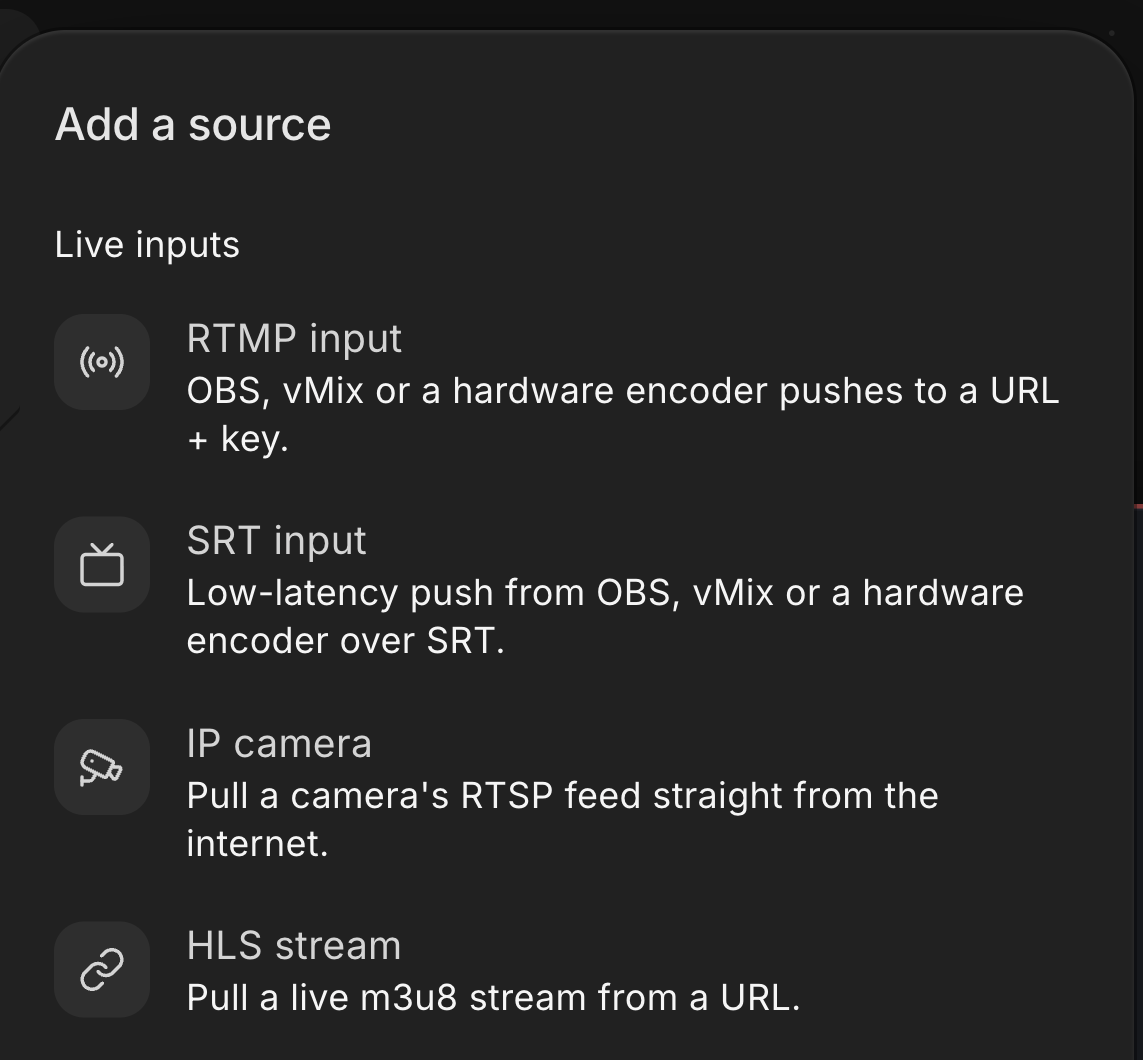
In the Streamloop studio, choose IP camera under Live inputs to open the camera form.
Use the camera's rtsp:// address, because rtsps:// is not supported, and keep its video on H.264.
A scene sends RTMP or RTMPS to up to 5 platforms at once, at up to 1080p60, with no guest cameras. A loop of pre-recorded videos plays files only, so a camera feed needs Live Scenes.
Put your camera in a live show
Live Scenes is billed by the minute, only while live: one 1080p channel at 30 fps, live 24/7, is about $20 per 30 days. Choose Scene when you create a stream and describe your use case. Access is granted within 24 hours.
Frequently asked questions
Can a web browser play an RTSP stream?
No, not directly. Browsers have no built-in RTSP player. A media server must pull the camera and convert the stream to HLS or WebRTC before a web page can show it. To check a camera URL on your computer, open it in VLC media player instead, with Media, then Open Network Stream.
What is the difference between RTSP and RTMP?
RTSP pulls and RTMP pushes. With RTSP, a player or a server asks the camera for its stream. With RTMP, an encoder sends its stream to a server, such as the ingest server of YouTube. A camera often reaches a platform through both, because a relay pulls RTSP and pushes RTMP. Read what RTMP is for the push side.
Should you use TCP or UDP for RTSP?
Use TCP in most cases. Over TCP, the video travels inside the RTSP connection, so it gets through routers and firewalls. UDP has less overhead, but routers and firewalls often block it between networks. Choose UDP on a local network, or when the camera offers nothing else. The client and the camera agree on the transport when the stream starts.
What is RTSPS?
RTSPS is RTSP over TLS, the same kind of encryption that protects HTTPS web pages. Its addresses start with rtsps://, and its default port is 322. It protects the login and the video from anyone on the network path. Both the camera and the client must support it, so check both before you switch.
Can you stream a camera that has no public address?
Yes, two ways work. Run a relay at the site that pulls the camera and pushes RTMP, such as FFmpeg or the camera's own RTMP setting. Or forward the RTSP port on the router to the camera, so a cloud service can reach it. A forwarded port makes the camera visible to the whole internet, so use a strong password.
Sources
Checked on October 16, 2026 against RFC 2326 and RFC 7826 (IETF) and the ONVIF Profile S page. Also checked against the Hikvision, Dahua, Axis and Reolink support pages, YouTube's ingestion protocol guide and the Streamloop dashboard.
- RFC 2326, Real Time Streaming Protocol (RTSP): www.rfc-editor.org/rfc/rfc2326.html
- RFC 7826, Real-Time Streaming Protocol Version 2.0: www.rfc-editor.org/rfc/rfc7826.html
- ONVIF Profile S: www.onvif.org/profiles/profile-s/ and the ONVIF media service definition: www.onvif.org/ver10/media/wsdl/media.wsdl
- Hikvision, How do I get my RTSP stream?: supportusa.hikvision.com/support/solutions/articles/17000129064-how-do-i-get-my-rtsp-stream-
- Dahua Wiki, Remote Access/RTSP via VLC: dahuawiki.com/Remote_Access/RTSP_via_VLC
- Axis developer documentation, Stream with RTSP: developer.axis.com/video-streaming-and-recording/video-streaming/how-to-guides/rtsp/
- Reolink Support, How to Live View Reolink Cameras via VLC Media Player: support.reolink.com/articles/360007010473-How-to-Live-View-Reolink-Cameras-via-VLC-Media-Player/
- Google for Developers, YouTube Live Streaming Ingestion Protocol Comparison: developers.google.com/youtube/data/live/guides/ingestion-protocol-comparison